
Xenonize
(Note: THIS IS A BETA VERSION OF NEXUS! NOT OFFICIAL RELEASE YET!) Xenonize (Formerly known as Nexus) is a sleek, high-performance modpack with minimalist visuals and immersive shaders built for smooth, cinematic gameplay with quality-of-life mods.
Screenshots
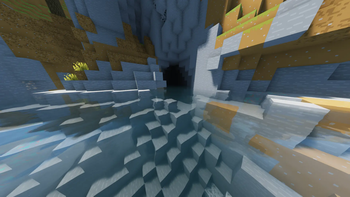
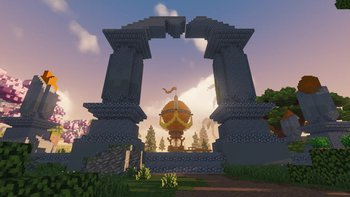
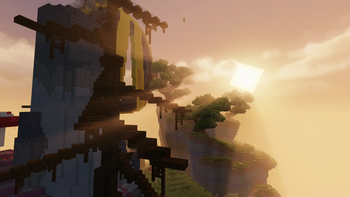
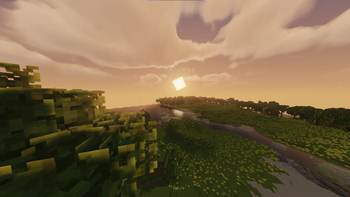
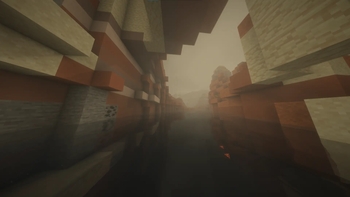
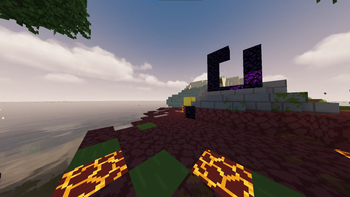
About this Modpack
(Note: THIS IS A BETA VERSION OF NEXUS! NOT OFFICIAL RELEASE YET!) Xenonize (Formerly known as Nexus) is a modpack built for players who want their game to look amazing without sacrificing smooth, consistent performance. Many packs go all-in on visuals and end up feeling heavy and sluggish, while others focus only on FPS and leave the world looking flat. Nexus finds the balance between both.
With Xenonize, the game becomes sharp, vibrant, and alive thanks to carefully selected visual enhancements. The pack includes the Bare Bones texture pack, giving the world a clean, modern aesthetic that pairs perfectly with upgraded lighting and effects. World generation is powered by Terralith, transforming terrain with cliffs, caves, biomes, and landscapes that look handcrafted—while still performing efficiently.
Performance is a core focus: optimizations and system tweaks ensure that your FPS stays high, even during long play sessions or big builds.
Alongside visuals and performance, Nexus adds quality-of-life improvements that make the game smoother. These mods don’t change the core gameplay; they simply remove unnecessary friction so you can focus on playing.
The goal isn’t to overload your system with heavy shaders or massive assets, it’s to create a polished, responsive experience. Whether you're exploring Terralith’s terrain, building megabases, or fighting, Xenonize enhances the game visually, mechanically, and ergonomically without slowing you down.
If you want great graphics, high FPS, better worlds, and smart quality-of-life upgrades, Xenonize is the perfect balance.
Available Versions
How to Set Up a Xenonize Server
Order Server
Choose at least 4 GB RAM (6 GB recommended for Xenonize). Based on player count: per 8 players.
Install Modpack in Dashboard
Open the modpack browser in the dashboard, search for "Xenonize" and click "Install". The fabric loader and Minecraft 1.21.8 are configured automatically.
Start Server & Play
Start the server – all mods are loaded automatically. Share the server IP with friends and play together!
Frequently Asked Questions
Xenonize server crashes or won't start – what to do?
Most common causes: insufficient RAM or wrong fabric loader. Check latest.log for "OutOfMemoryError" → increase RAM to at least 6 GB. For "Mixin" or "ClassNotFoundException" errors: modpack version and loader don't match. With Mado Hosting, loader and Minecraft version are auto-configured on modpack install – preventing most startup issues.
How much RAM does a Xenonize server really need?
Minimum 4 GB, recommended 6 GB for stable performance. per 8 players. Important: Minecraft modpacks need more RAM than vanilla – plan extra per additional player. With Mado Hosting, you can scale RAM up live at any time without data loss (from €8/month).
Can I add custom mods to Xenonize without conflicts?
Yes, but check compatibility: only use mods for the same loader (fabric) and same Minecraft version (1.21.8). Common issues: ID conflicts with recipe mods and incompatible coremod versions. The Mado dashboard mod browser only shows compatible mods and warns about known conflicts.
Xenonize server lagging – performance tips
1) Increase RAM to 6 GB+. 2) Reduce server view-distance to 8 (server.properties). 3) Pre-generate chunks with the "Chunky" plugin. 4) Use /spark profiler to check which mods consume the most tick time. With Mado Hosting, all servers run on NVMe SSDs with dedicated CPU cores – eliminating hardware as a bottleneck.
Similar Modpacks

![Cobblemon Official Modpack [Fabric]](https://cdn.modrinth.com/data/5FFgwNNP/e7f9ee2e9d361623847853fe2ddce42f519ee64f.png)
![COBBLEVERSE - Pokemon Adventure [Cobblemon]](https://cdn.modrinth.com/data/Jkb29YJU/581ecf54530972afb18a04660afd820f2f24f6c7.png)
![Better MC [FABRIC] - BMC2](https://cdn.modrinth.com/data/shFhR8Vx/a19c2bcb51d38f32f138d3607e91cb2b7b8e387f_96.webp)


Rent Xenonize Server
Start your own server with automatic modpack installation.
Details
- License
- GNU General Public License v3.0 or later
- Server-side
- Optional
- Client-side
- Required
Supported Versions
Start your Xenonize Server now
From €8.00/month with 6 GB RAM for the best performance.
Configure Server →