
Yesser Pack
A bunch of QOL and visual mods I like to use
Screenshots
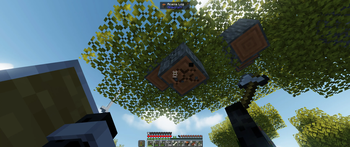


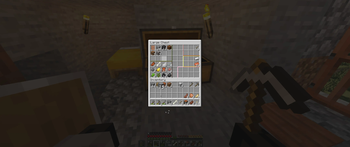
About this Modpack
Yesser Pack
Yesser Pack is a pack of QOL and visual mods I like to use.
It is a collection of mods that fix the parts of vanilla that have always felt a bit unpolished — inventory management, sound effects and visuals, LODs so you can see the world without your computer crying for air, some shaders and a bunch of visual and audio polish. The game still plays like vanilla, it just feels much better.
Important mods:
- Distant Horizons - see very far
- Dynamic Crosshair - morphs crosshair according to what you're looking at and what you're holding
- Chest Separators - Draw separators in a chest's grid
- Mouse Tweaks - better inventory controls
- Immersive UI, Immersive Hotbar, Inventory Particles, Obscure Tooltips - UI visual effects
- Perception, Presence Footsteps, Cool Rain, Punchy, Cursors Extended - sound effects, animations, VFX
- Jade, Death Sorter - QOL mods
- MakeUp - Ultra Fast - shader
FAQ
- Q: Will this work client-side?
A: Yes (except death sorter). - Q: Why does it lag just after joining/creating a world?
A: Distant Horizons is loading LOD chunks. The first few seconds are the worst but DH will continue more slowly after a small radius has been generated. - Q: ...but my PC is a potato!
A: I used a bunch of optimisation mods and the game runs very fast even with the shader (on my GTX 1070 I'm getting a stable 80 FPS; tested on Linux, Windows might eat up more of your FPS).
If you're still getting low frames, try disabling the shader (with K). - Q: You used my mod but I don't want it to be included!
A: Please contact me at the e-mail shown on my YT channel (Clickmore...on the channel description and clickShow e-mail address). - Q: What in the world are those keybinds???
A: Those are the keybinds I like to play with (needs a mouse with side buttons). Feel free to change them if you don't like mine!
Mod list
The full mod list is available in your version's page under Dependencies.
Available Versions
How to Set Up a Yesser Pack Server
Order Server
Choose at least 6 GB RAM (8 GB recommended for Yesser Pack). Based on player count: per 5 players.
Install Modpack in Dashboard
Open the modpack browser in the dashboard, search for "Yesser Pack" and click "Install". The fabric loader and Minecraft 1.21.11 are configured automatically.
Start Server & Play
Start the server – all mods are loaded automatically. Share the server IP with friends and play together!
Frequently Asked Questions
Yesser Pack server crashes or won't start – what to do?
Most common causes: insufficient RAM or wrong fabric loader. Check latest.log for "OutOfMemoryError" → increase RAM to at least 8 GB. For "Mixin" or "ClassNotFoundException" errors: modpack version and loader don't match. With Mado Hosting, loader and Minecraft version are auto-configured on modpack install – preventing most startup issues.
How much RAM does a Yesser Pack server really need?
Minimum 6 GB, recommended 8 GB for stable performance. per 5 players. Important: Minecraft modpacks need more RAM than vanilla – plan extra per additional player. With Mado Hosting, you can scale RAM up live at any time without data loss (from €12/month).
Can I add custom mods to Yesser Pack without conflicts?
Yes, but check compatibility: only use mods for the same loader (fabric) and same Minecraft version (1.21.11). Common issues: ID conflicts with recipe mods and incompatible coremod versions. The Mado dashboard mod browser only shows compatible mods and warns about known conflicts.
Yesser Pack server lagging – performance tips
1) Increase RAM to 8 GB+. 2) Reduce server view-distance to 8 (server.properties). 3) Pre-generate chunks with the "Chunky" plugin. 4) Use /spark profiler to check which mods consume the most tick time. With Mado Hosting, all servers run on NVMe SSDs with dedicated CPU cores – eliminating hardware as a bottleneck.
Similar Modpacks

![Cobblemon Official Modpack [Fabric]](https://cdn.modrinth.com/data/5FFgwNNP/e7f9ee2e9d361623847853fe2ddce42f519ee64f.png)
![COBBLEVERSE - Pokemon Adventure [Cobblemon]](https://cdn.modrinth.com/data/Jkb29YJU/581ecf54530972afb18a04660afd820f2f24f6c7.png)
![Better MC [FABRIC] - BMC2](https://cdn.modrinth.com/data/shFhR8Vx/a19c2bcb51d38f32f138d3607e91cb2b7b8e387f_96.webp)


Rent Yesser Pack Server
Start your own server with automatic modpack installation.
Supported Versions
Start your Yesser Pack Server now
From €12.00/month with 8 GB RAM for the best performance.
Configure Server →