
Zecoar Modpack
A Minecraft Modpack, you can have a good time in this new Minecraft, it is a vanilla modpack, the gameplay has not been modified.
Screenshots
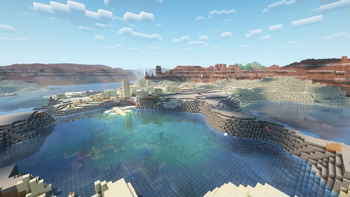

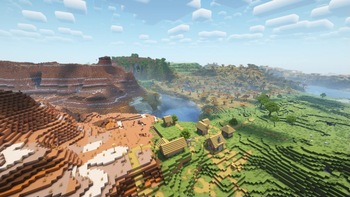

About this Modpack

Zecoar Modpack
Minecraft vanilla Fabric modpack
| Minecraft Ver. | Latest Ver. | Java Ver.(Recommend) | Update? |
|---|---|---|---|
| 1.20.1 | 1.0.0 | Java 17 | No |
| 1.20.6 | 1.0.1 | Java 21 | No |
| 1.21 | 1.1.3 | Java 21 | No |
| 1.21.1 | 1.0.1 | Java 21 | No |
| 1.21.3 | 1.0.3 | Java 21 | No |
| 1.21.4 | 1.0.3 | Java 21 | No |
| 1.21.5 | 1.0.2 | Java 24 | No |
| 1.21.6 | 1.0.3 | Java 24 | No |
| 1.21.7 | 1.0.2 | Java 24 | No |
| 1.21.8 | 1.0.4 | Java 24 | No |
| 1.21.9 | 1.0.0 | Java 24 | No |
| 1.21.10 | 1.0.1 | Java 24 | No |
| 1.21.11 | 1.0.2 | Java 24 | Yes |
| 26.1.2 | 0.1.0 | Java 25 | Yes |


Dedicated to players who enjoy playing the vanilla Minecraft
Switch Resourcepacks
Don't like Rainbowpixel? Don't worry. We have in-built another three resoucepacks —— CozyUI+, OreUI Reaction and Unique Dark Refined.
If you want to switch resourcepacks, you need disable current resoucepacks, than you can enable the resourcepack which you want to use.
Configuration Requirements
*Attention: Distant Horizon defaults to off, the enabled shaderpacks is Complementary Reimgained.
Lowest | Disable Shader, Distant Horizons Off
GPU: Intel Iris Xe Graphics
Memory: 16 GB
Storge: 500 MB
Lowest | Enable Shader, Distant Horizons Off
GPU: NVIDIA GeForce GTX 1660 Super
Memory: 16 GB
Storge: 500 MB
Recommend | Disable Shader (Distant Horizons: 32 Chunks, CPU Usage Rate Minimal, Quality: Normal)
GPU: NVIDIA GeForce RTX 2060
Memory: 16 GB
Storge: 1 GB
Recommend | Enable Shader (Distant Horizons: 64 Chunks, CPU Usage Rate Lowest, Quality: Normal)
GPU: NVIDIA GeForce RTX 2070 Super
Memory: 16 GB
Storge: 1 GB
(Configuration may not be accurate, subject to actual situation; I don't know configuration requirements of AMD, because I don't use AMD)
Inside version name explain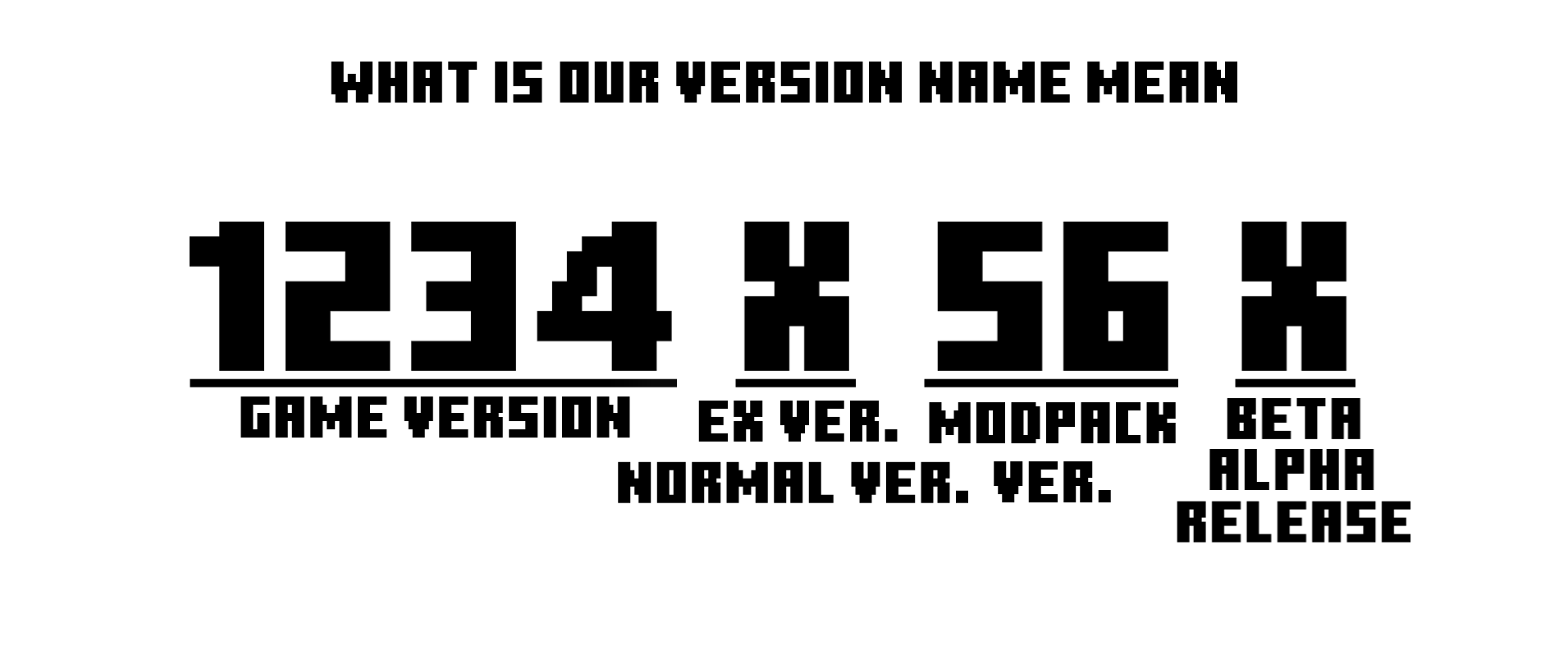
Lastest letter:
R-Release
B-Beta
A-Alpha
Middle letter:
B-Normal
Notes
- If you add a mod yourself, it may cause the game to crash, so before adding it, make sure it does not conflict with the mods in the modpack.
- The shaderpack "Complementary Reimgained" is belong to EminGT.Any problem about this shaderpack is entirely under the responsibility of the author of Zecoar Modpack.
- The shaderpack "Complementary Reimgained" require high graphics card, low configuration users please use the shaderpacks which import by users.
- If you are a MC server owner,welcome to use my modpack as a server client, you can also ask me to customize the client(base on Zecoar Modpack).
More interesting things
Vanilla modpack too boring? We have another modpack, Click to know more
Feedback
If you encounter problems when playing this modpack, please feedback the problem to Issue on Github.
——————————————————————————————————————————————————
Zecoar 整合包
《我的世界》原版 Fabric 整合包
| 我的世界版本 | 最新版本 | Java 版本(推荐) | 还更新吗 |
|---|---|---|---|
| 1.20.1 | 1.0.0 | Java 17 | 否 |
| 1.20.6 | 1.0.1 | Java 21 | 否 |
| 1.21 | 1.1.3 | Java 21 | 否 |
| 1.21.1 | 1.0.1 | Java 21 | 否 |
| 1.21.3 | 1.0.3 | Java 21 | 否 |
| 1.21.4 | 1.0.3 | Java 21 | 否 |
| 1.21.5 | 1.0.2 | Java 24 | 否 |
| 1.21.6 | 1.0.3 | Java 24 | 否 |
| 1.21.7 | 1.0.2 | Java 24 | 否 |
| 1.21.8 | 1.0.4 | Java 24 | 否 |
| 1.21.9 | 1.0.0 | Java 24 | 否 |
| 1.21.10 | 1.0.1 | Java 24 | 否 |
| 1.21.11 | 1.0.2 | Java 24 | 是 |
| 26.1.2 | 0.1.0 | Java 25 | 是 |


献给喜欢游玩原版《我的世界》的玩家
切换材质包
我们内置了四款材质包 —— CozyUI+、 OreUI Reaction、Unique Dark Refined和彩虹像素
若你想要切换材质包,先禁用当前材质包,然后再启用你想用的材质包。
配置要求
*注意: 遥远的地平线默认关闭,启用的光影是互补重新构想。
最低 | 关闭光影、遥远的地平线
GPU: Intel Iris Xe Graphics
内存: 16 GB
存储空间: 500 MB
最低 | 开启光影,关闭遥远的地平线
GPU: NVIDIA GeForce GTX 1660 Super
内存: 16 GB
存储空间: 500 MB
推荐 | 关闭光影 (遥远的地平线: 32 区块, CPU使用率最小化, 质量: 普通)
GPU: NVIDIA GeForce RTX 1660 Super
内存: 16 GB
存储空间: 1 GB
推荐 | 开启光影 (遥远的地平线: 64 区块, 低CPU使用率, 质量: 普通)
GPU: NVIDIA GeForce RTX 2070 Super
内存: 16 GB
存储空间: 1 GB
(配置可能不准,以实际情况为准;我不知道AMD的配置要求,因为我不用AMD)
内部版本名称解释
最后一位字母:
R-正式版
B-测试版
A-早期测试版
中间一位字母:
B-普通版
备注
- 如果您自行添加模组,可能会导致游戏崩溃,所以在添加之前,确保它不会与整合包内的模组冲突。
- 光影“互补重新构想”属于EminGT。关于此光影的任何问题都完全由Zecoar Modpack的作者负责。
- 光影“互补重新构想”要求高配置显卡,低配置用户请自行导入低配光影。
- 如果你是一个服务器拥有者,欢迎使用我的整合包作为服务器客户端,你也可以找我定制服务器客户端(基于Zecoar Modpack)。
- 如果你下载了该整合包,可以通过PCL2导入。
更多有趣的东西
原版整合包太枯燥?我们有另一个整合包。点击以了解详情
反馈
如在游玩本整合包时遇到问题 请将问题反馈至Github的Issue栏目
Available Versions
How to Set Up a Zecoar Modpack Server
Order Server
Choose at least 4 GB RAM (6 GB recommended for Zecoar Modpack). Based on player count: per 8 players.
Install Modpack in Dashboard
Open the modpack browser in the dashboard, search for "Zecoar Modpack" and click "Install". The fabric loader and Minecraft 26.1.2 are configured automatically.
Start Server & Play
Start the server – all mods are loaded automatically. Share the server IP with friends and play together!
Frequently Asked Questions
Zecoar Modpack server crashes or won't start – what to do?
Most common causes: insufficient RAM or wrong fabric loader. Check latest.log for "OutOfMemoryError" → increase RAM to at least 6 GB. For "Mixin" or "ClassNotFoundException" errors: modpack version and loader don't match. With Mado Hosting, loader and Minecraft version are auto-configured on modpack install – preventing most startup issues.
How much RAM does a Zecoar Modpack server really need?
Minimum 4 GB, recommended 6 GB for stable performance. per 8 players. Important: Minecraft modpacks need more RAM than vanilla – plan extra per additional player. With Mado Hosting, you can scale RAM up live at any time without data loss (from €8/month).
Can I add custom mods to Zecoar Modpack without conflicts?
Yes, but check compatibility: only use mods for the same loader (fabric) and same Minecraft version (26.1.2). Common issues: ID conflicts with recipe mods and incompatible coremod versions. The Mado dashboard mod browser only shows compatible mods and warns about known conflicts.
Zecoar Modpack server lagging – performance tips
1) Increase RAM to 6 GB+. 2) Reduce server view-distance to 8 (server.properties). 3) Pre-generate chunks with the "Chunky" plugin. 4) Use /spark profiler to check which mods consume the most tick time. With Mado Hosting, all servers run on NVMe SSDs with dedicated CPU cores – eliminating hardware as a bottleneck.
Similar Modpacks

![Cobblemon Official Modpack [Fabric]](https://cdn.modrinth.com/data/5FFgwNNP/e7f9ee2e9d361623847853fe2ddce42f519ee64f.png)
![COBBLEVERSE - Pokemon Adventure [Cobblemon]](https://cdn.modrinth.com/data/Jkb29YJU/581ecf54530972afb18a04660afd820f2f24f6c7.png)
![Better MC [FABRIC] - BMC2](https://cdn.modrinth.com/data/shFhR8Vx/a19c2bcb51d38f32f138d3607e91cb2b7b8e387f_96.webp)


Rent Zecoar Modpack Server
Start your own server with automatic modpack installation.
Supported Versions
Start your Zecoar Modpack Server now
From €8.00/month with 6 GB RAM for the best performance.
Configure Server →