
Zen Legions
The Ultimate Optimization and PvP modpack
Screenshots




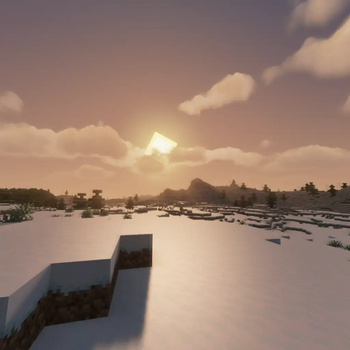
About this Modpack

The Best Modpack for Minecraft Optimization and PvP with many functions Such as:
- 100+ fps on low-end devices
- best for PvP in servers
- has many quality of life mods
- Performance mods like sodium,lithium and much more are added to make your gaming experence better
- includes features that allow you to experience Minecraft just as you remember it, no matter what version you've used before
And We also have a Discord Server that you can join for support. This modpack will also get updated to the newest version fast as possible
FAQ
Q: How do I install, update, add mods, or do something else?
A: Yes you can update the mod after downloading the modpack.
Q: If something broken what sould I do?
A: Go to our disocrd and send a screenshot of your problem.
Q: I like the modpack. How can I contribute?
A: You can join our discord server and promote the modpack.
MODS
- oωo (owo-lib)
- BadOptimizations
- Client Tweaks
- Controlling
- Highlight
- LambDynamicLights
- More Chat History
- Fabric API
- Title Fixer
- e4mc
- ReplayMod
- Zoomify
- Konkrete
- Better Command Block UI
- CraterLib
- Motion Blur
- Cull Leaves
- Dynamic FPS
- Concurrent Chunk Management Engine (Fabric)
- Better Beds
- Better Clouds
- Chat Animation [Smooth Chat]
- Resourcify
- Video Tape
- Durability Tooltip
- Camera Utils
- Simple Voice Chat
- ToolTipFix
- [ESF] Entity Sound Features
- WorldEdit
- No Chat Reports
- Iris Shaders
- Item Highlighter
- Too Many Players
- FabricSkyboxes
- Gamma Utils (Fullbright)
- Cloth Config API
- Eating Animation
- bad packets
- CIT Resewn
- SmartBrainLib
- MidnightLib
- ItemPhysic Lite
- Motschen's Better Leaves
- Mouse Tweaks
- Reese's Sodium Options
- Enhanced Block Entities
- Shulker Box Tooltip
- Awesome 3D Mace
- Explosive Enhancement
- Xaero's Minimap
- Litematica
- Item Borders
- Fzzy Config
- Fast IP Ping
- AmbientSounds
- Better Statistics Screen
- inventoryhud.fabric.1.21-3.4.26.jar
- FerriteCore
- Animatica
- M.R.U
- Particle Core
- Dynamic Crosshair
- Packet Fixer
- Enchant Icons
- Enhanced Attack Indicator
- TCDCommons API
- Your Options Shall Be Respected (YOSBR)
- Not Enough Crashes
- Entity Culling
- Architectury API
- Low Durability Switcher
- Satin API
- Indium
- Particular ✨
- spark
- Detail Armor Bar
- Blur+
- Bare Bones x Fresh Animations
- Iceberg
- Simple Armor Hud
- ImmediatelyFast
- Freecam (Modrinth Edition)
- Bridging Mod
- CustomSkinLoader
- Player Health Indicators
- Better Mount HUD
- FabricSkyBoxes Interop
- ViaFabricPlus
- Fresh Animations - Extensions
- Sodium Extra
- Not Enough Animations
- InvMove
- Cherished Worlds
- Bookshelf
- Chat Heads
- Falling Leaves
- Remove Reloading Screen
- CalcMod
- Bare Bones
- Craftify
- No Resource Pack Warnings
- Bobby
- BSL Shaders - Original
- Model Gap Fix
- Sound Physics Remastered
- Clumps
- Fullbright UB
- Debugify
- CreativeCore
- Sodium Shadowy Path Blocks
- 3D Skin Layers
- Better Ping Display [Fabric]
- Translations for Sodium
- Presence Footsteps
- Visuality
- ModernFix
- MoreCosmetics
- Roughly Enough Items (REI)
- ukulib
- Wavey Capes
- AppleSkin
- Language Reload
- libIPN
- Default Dark Mode
- Ksyxis
- Puzzle
- Sounds
- SuperMartijn642's Config Lib
- [ETF] Entity Texture Features
- Sodium Extra Information
- BetterF3
- Low On Fire
- Mod Menu
- Prism
- Exordium
- Very Many Players (Fabric)
- Searchables
- VTDownloader
- MaLiLib
- Bare Bones x Eating Animation
- MixinTrace
- In-Game Account Switcher
- Moonlight Lib
- FastQuit
- Carpet
- BetterHurtCam
- CICADA
- FakeFPS
- Text Placeholder API
- Dynamic Lights
- Legendary Tooltips
- Noisium
- OptiGUI
- Wakes
- YetAnotherConfigLib
- Show Me Your Skin!
- Fresh Animations
- Krypton
- [EMF] Entity Model Features
- Lithium
- Fabric Language Kotlin
- Fresh Moves
- Sodium
- More Culling
- Balm
- Simple Discord RPC
- Screenshot to Clipboard
- Continuity
- Better Third Person
- Fast Better Grass
- Noxesium
Available Versions
How to Set Up a Zen Legions Server
Order Server
Choose at least 4 GB RAM (6 GB recommended for Zen Legions). Based on player count: per 8 players.
Install Modpack in Dashboard
Open the modpack browser in the dashboard, search for "Zen Legions" and click "Install". The fabric loader and Minecraft 1.21.1 are configured automatically.
Start Server & Play
Start the server – all mods are loaded automatically. Share the server IP with friends and play together!
Frequently Asked Questions
Zen Legions server crashes or won't start – what to do?
Most common causes: insufficient RAM or wrong fabric loader. Check latest.log for "OutOfMemoryError" → increase RAM to at least 6 GB. For "Mixin" or "ClassNotFoundException" errors: modpack version and loader don't match. With Mado Hosting, loader and Minecraft version are auto-configured on modpack install – preventing most startup issues.
How much RAM does a Zen Legions server really need?
Minimum 4 GB, recommended 6 GB for stable performance. per 8 players. Important: Minecraft modpacks need more RAM than vanilla – plan extra per additional player. With Mado Hosting, you can scale RAM up live at any time without data loss (from €8/month).
Can I add custom mods to Zen Legions without conflicts?
Yes, but check compatibility: only use mods for the same loader (fabric) and same Minecraft version (1.21.1). Common issues: ID conflicts with recipe mods and incompatible coremod versions. The Mado dashboard mod browser only shows compatible mods and warns about known conflicts.
Zen Legions server lagging – performance tips
1) Increase RAM to 6 GB+. 2) Reduce server view-distance to 8 (server.properties). 3) Pre-generate chunks with the "Chunky" plugin. 4) Use /spark profiler to check which mods consume the most tick time. With Mado Hosting, all servers run on NVMe SSDs with dedicated CPU cores – eliminating hardware as a bottleneck.
Rent Zen Legions Server
Start your own server with automatic modpack installation.
Supported Versions
Start your Zen Legions Server now
From €8.00/month with 6 GB RAM for the best performance.
Configure Server →