
Zombifiedcraft
“A tense survival-focused Minecraft modpack where a growing zombie apocalypse reshapes every night into a fight to stay alive.”
Screenshots
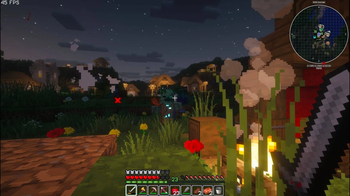
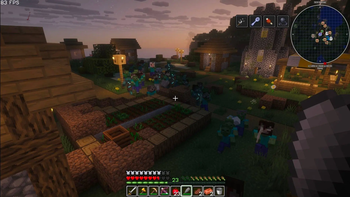
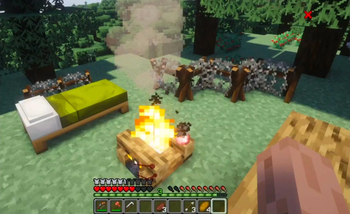
About this Modpack

Zombified Minecraft transforms the classic Minecraft world into a relentless, undead-infested survival challenge. The infection has taken over, and every corner of the world is crawling with new types of zombies, harsher survival mechanics, and an atmosphere built to keep you constantly on edge.
In this modpack, days feel shorter, nights feel longer, and nowhere is ever truly safe. Zombies evolve, adapt, and overwhelm in numbers. Some burn in sunlight—many do not. Structures are ruined, resources are scarce, and survival requires strategy, caution, and courage. Whether you’re fortifying a base, scavenging abandoned buildings, or pushing into the darkness in search of rare loot, danger is always one step behind you.
Features include:
Enhanced, smarter, and more varied zombies that can break blocks, detect players from farther away, or swarm in large groups.
Post-apocalyptic world generation, with ruined cities, abandoned shelters, and scattered remnants of civilization.
Improved survival mechanics such as hunger tweaks, scarce resources, and tougher nights.
Dark, immersive atmosphere, including foggy landscapes, eerie ambient sounds, and reduced visibility to amplify tension.
Expanded combat and gear progression to help you hold back the undead onslaught.
Balanced progression encouraging exploration, base-defense builds, and long-term survival planning.
If you’re looking for a Minecraft experience that’s darker, harder, and packed with undead chaosZombified Minecraft is your next nightmare.
Available Versions
How to Set Up a Zombifiedcraft Server
Order Server
Choose at least 6 GB RAM (8 GB recommended for Zombifiedcraft). Based on player count: per 5 players.
Install Modpack in Dashboard
Open the modpack browser in the dashboard, search for "Zombifiedcraft" and click "Install". The fabric loader and Minecraft 1.21.4 are configured automatically.
Start Server & Play
Start the server – all mods are loaded automatically. Share the server IP with friends and play together!
Frequently Asked Questions
Zombifiedcraft server crashes or won't start – what to do?
Most common causes: insufficient RAM or wrong fabric loader. Check latest.log for "OutOfMemoryError" → increase RAM to at least 8 GB. For "Mixin" or "ClassNotFoundException" errors: modpack version and loader don't match. With Mado Hosting, loader and Minecraft version are auto-configured on modpack install – preventing most startup issues.
How much RAM does a Zombifiedcraft server really need?
Minimum 6 GB, recommended 8 GB for stable performance. per 5 players. Important: Minecraft modpacks need more RAM than vanilla – plan extra per additional player. With Mado Hosting, you can scale RAM up live at any time without data loss (from €12/month).
Can I add custom mods to Zombifiedcraft without conflicts?
Yes, but check compatibility: only use mods for the same loader (fabric) and same Minecraft version (1.21.4). Common issues: ID conflicts with recipe mods and incompatible coremod versions. The Mado dashboard mod browser only shows compatible mods and warns about known conflicts.
Zombifiedcraft server lagging – performance tips
1) Increase RAM to 8 GB+. 2) Reduce server view-distance to 8 (server.properties). 3) Pre-generate chunks with the "Chunky" plugin. 4) Use /spark profiler to check which mods consume the most tick time. With Mado Hosting, all servers run on NVMe SSDs with dedicated CPU cores – eliminating hardware as a bottleneck.
Similar Modpacks
![Cobblemon Official Modpack [Fabric]](https://cdn.modrinth.com/data/5FFgwNNP/e7f9ee2e9d361623847853fe2ddce42f519ee64f.png)
![COBBLEVERSE - Pokemon Adventure [Cobblemon]](https://cdn.modrinth.com/data/Jkb29YJU/581ecf54530972afb18a04660afd820f2f24f6c7.png)
![Better MC [FABRIC] - BMC2](https://cdn.modrinth.com/data/shFhR8Vx/a19c2bcb51d38f32f138d3607e91cb2b7b8e387f_96.webp)


![Better MC [FORGE] - BMC4](https://cdn.modrinth.com/data/4BV47HRn/7f5ef7cc61b2593609aabef3ed07a866a4f11b73_96.webp)
Rent Zombifiedcraft Server
Start your own server with automatic modpack installation.
Supported Versions
Start your Zombifiedcraft Server now
From €12.00/month with 8 GB RAM for the best performance.
Configure Server →