
20w14∞ Improvements
Welcome to The Ultimate Content Update! However this datapack changes it a bit. Makes it a challenge!
Screenshots
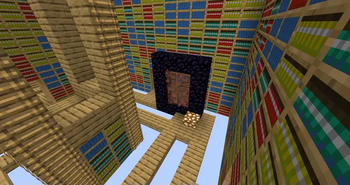





About this Mod
Welcome to The Ultimate Content Update! However this datapack changes it a bit. With default settings the datapack spawns you in the libary dim. If you die you respawn here. It also prevents you from entering the overworld & nether, but the end works fine. Turns out the funky portals can go to the overworld, nether, and end. I tell you the phrases when you join. So that means you can beat the ender dragon with this datapack, but you haft to go thru random dimentions you have no control over to find the materals to get a book & quil, as well as gear. Making the datapack quite fun, and it also works for servers if you edit the settings in the op menu. You also get some new advancements to bring new challanges. Anyway, i play tested it, it gives a good description of other things it does in game. Enjoy!
/trigger intro
- gives a introduction into the datpack, you also get the introduction when you first join. Has lots of useful hints, and a list of features & changes.
/trigger op_menu
- See and edit the settings for this datapack, there is lots of useful ones. Only works for op's in creative mode. Has settings like enable/disable overworld, end, and nether. Being stuck in the libary dim is turned off. Among other things. You need to edit the settings to make the datapack playable in multiplayer, but its setup perfect for singleplayer.
Available Versions
How to Install 20w14∞ Improvements on Your Server
Order Server
Order a Minecraft Java server with at least 3 GB RAM (4 GB recommended).
Set datapack Loader
In the panel under "Egg", select the datapack loader and matching Minecraft version (20w14infinite).
Install Mod
Open the mod browser in the dashboard and search for "20w14∞ Improvements". Click "Install" – done! Alternatively, upload the .jar via SFTP to the /mods folder.
Compatibility
Mod Loaders
Minecraft Versions
20w14infinite
Server-side
✓ RequiredRecommended RAM
4 GB(min. 3 GB)Frequently Asked Questions
20w14∞ Improvements server crashes on startup – what to do?
Most common cause: wrong datapack version or insufficient RAM. Check the server log (latest.log) for "OutOfMemoryError" or "Mixin" errors. With Mado Hosting: ensure at least 3 GB RAM is allocated and the loader matches the mod version (20w14infinite). You can switch loaders with one click in the panel.
Is 20w14∞ Improvements compatible with datapack and fabric and forge and neoforge and quilt?
20w14∞ Improvements officially supports datapack, fabric, forge, neoforge, quilt for Minecraft 20w14infinite. Note: Forge and Fabric mods are NOT cross-compatible – pick one loader and stick with it. The Mado dashboard automatically detects incompatible loader combinations.
Server lagging with 20w14∞ Improvements – how to optimize performance?
Recommended RAM: 4 GB (per 8 players). Use /spark profiler to check if 20w14∞ Improvements consumes the most tick time. Common fixes: reduce server view-distance to 8-10, install "performant" or "starlight" as supplementary mods on Forge. With Mado Hosting, your server runs on NVMe SSDs with dedicated CPU cores for minimal latency.
Similar Mods




Rent Modded Server
Install 20w14∞ Improvements with just one click on your server.