
Third Person Camera
A dynamic 3rd Person Camera mod where u can change the position of the camera using a menu which can be accessed using a keybind, which also can be changed from the control settings
Screenshots
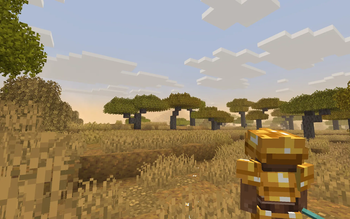
About this Mod
📷 3rd Person Camera
Completely client-sided!
3rd Person Camera mod, Minecraft’s third-person camera with smooth, intelligent behavior and full in-game customization. Designed to feel natural and responsive, it automatically adapts to your surroundings while giving you precise control over camera positioning and zoom.
✨ Features
Fully adjustable camera offset:
Customize X / Y / Z offsets relative to the player
Includes X-axis rotation for camera tilt
Smooth camera distance:
Natural transitions instead of sudden camera jumpsAdaptive zoom in tight spaces:
Camera smoothly moves closer when space is limitedAutomatic first-person switching:
Seamlessly switches when third-person is not viableContextual zoom while aiming:
Camera zooms in when using specific items (configurable)In-game settings screen:
Changes apply instantly with live visual feedbackKeybind support:
Press O to open the settings screen
Fully rebindable under the “Camera Fix” controls category
🎮 Why use Camera Fix?
Eliminates camera clipping and awkward angles
Ideal for combat, exploration, and cinematic gameplay
Highly customizable without restarting the game
Available Versions
How to Install Third Person Camera on Your Server
Order Server
Order a Minecraft Java server with at least 3 GB RAM (4 GB recommended).
Set fabric Loader
In the panel under "Egg", select the fabric loader and matching Minecraft version (1.21.11).
Install Mod
Open the mod browser in the dashboard and search for "Third Person Camera". Click "Install" – done! Alternatively, upload the .jar via SFTP to the /mods folder.
Compatibility
Mod Loaders
Minecraft Versions
1.21.11, 1.21.1
Server-side
✗ UnsupportedRecommended RAM
4 GB(min. 3 GB)Frequently Asked Questions
Third Person Camera server crashes on startup – what to do?
Most common cause: wrong fabric version or insufficient RAM. Check the server log (latest.log) for "OutOfMemoryError" or "Mixin" errors. With Mado Hosting: ensure at least 3 GB RAM is allocated and the loader matches the mod version (1.21.11). You can switch loaders with one click in the panel.
Is Third Person Camera compatible with fabric?
Third Person Camera officially supports fabric for Minecraft 1.21.11, 1.21.1. The Mado dashboard automatically detects incompatible loader combinations.
Server lagging with Third Person Camera – how to optimize performance?
Recommended RAM: 4 GB (per 8 players). Use /spark profiler to check if Third Person Camera consumes the most tick time. Common fixes: reduce server view-distance to 8-10, install "performant" or "starlight" as supplementary mods on Forge. With Mado Hosting, your server runs on NVMe SSDs with dedicated CPU cores for minimal latency.
Similar Mods




Rent Modded Server
Install Third Person Camera with just one click on your server.