
Access Pad
A simple mod that adds a pad to let you open your benches (chests, furnaces, and blocks from any mod) anywhere in any dimension!
Screenshots
About this Mod
Access Pad
Have you ever put your items in a chest at your base, walked far away, and then realized you forgot something? This mod fixes that! It adds a cool Access Pad item that lets you link to your storage or machines and open them from anywhere.
What it does:
- Open blocks from anywhere just by clicking the pad in your main hand or offhand.
- 3 Tiers of pads that you can craft and upgrade.
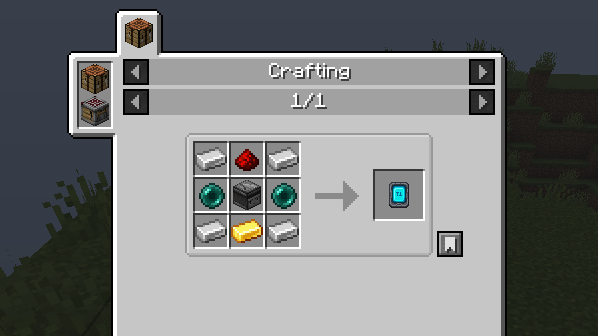
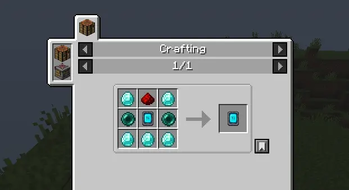
Access Pad tier 1 recepie (within 16 blocks)
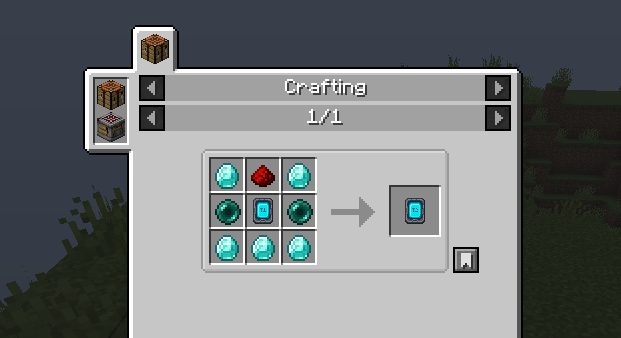
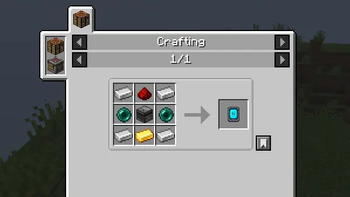
Access Pad tier 2 recepie (within 64 blocks)
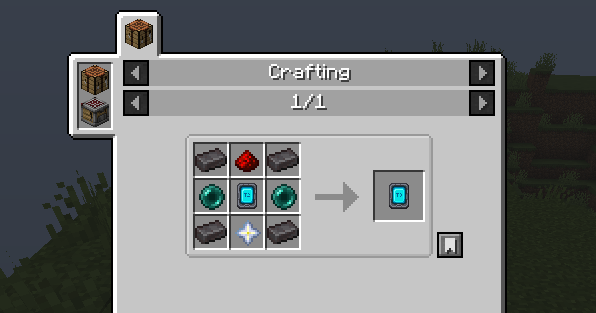
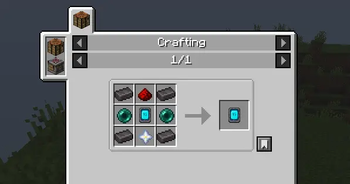
Access Pad tier 3 recepie (any where in any dimension)
Uses:
- Chests and Trapped Chests (works perfectly on double chests too!)
- Barrels
- Furnaces, Blast Furnaces, and Smokers
- Brewing Stands
- Crafters
- It basically works on almost every bench in Minecraft, and even machines from other mods!
- Works in other dimensions
How to use:
- Craft the Access Pad.
- Sneak + Right-Click on the chest or machine you want to link it to.
- Walk away, and Right-Click the pad to open the menu from anywhere!
Attention:
You will need to load the chunks for the benches so you will need a chunk loader, we recommend FTB chunk loader.
Available Versions
How to Install Access Pad on Your Server
Order Server
Order a Minecraft Java server with at least 3 GB RAM (4 GB recommended).
Set neoforge Loader
In the panel under "Egg", select the neoforge loader and matching Minecraft version (1.21.1).
Install Mod
Open the mod browser in the dashboard and search for "Access Pad". Click "Install" – done! Alternatively, upload the .jar via SFTP to the /mods folder.
Compatibility
Mod Loaders
Minecraft Versions
1.21.1
Server-side
✓ RequiredRecommended RAM
4 GB(min. 3 GB)Frequently Asked Questions
Access Pad server crashes on startup – what to do?
Most common cause: wrong neoforge version or insufficient RAM. Check the server log (latest.log) for "OutOfMemoryError" or "Mixin" errors. With Mado Hosting: ensure at least 3 GB RAM is allocated and the loader matches the mod version (1.21.1). You can switch loaders with one click in the panel.
Is Access Pad compatible with neoforge?
Access Pad officially supports neoforge for Minecraft 1.21.1. The Mado dashboard automatically detects incompatible loader combinations.
Server lagging with Access Pad – how to optimize performance?
Recommended RAM: 4 GB (per 8 players). Use /spark profiler to check if Access Pad consumes the most tick time. Common fixes: reduce server view-distance to 8-10, install "performant" or "starlight" as supplementary mods on Forge. With Mado Hosting, your server runs on NVMe SSDs with dedicated CPU cores for minimal latency.
Similar Mods


Rent Modded Server
Install Access Pad with just one click on your server.