Alternate Create Of Fiery Items (ACOFI)
ACOFI is a mod that changes the craft of fiery equipment from the Twilight Forest
About this Mod
Alternate Create Of Fiery Items
[EN] About the mod
About the mod
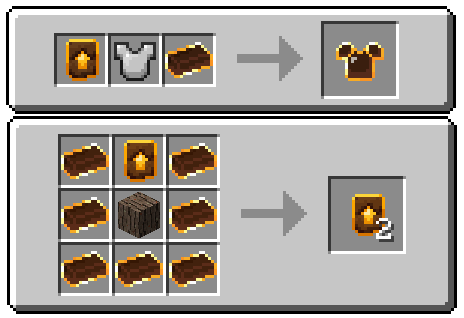
Alternate Create Of Fiery Items (ACOFI) is an addon for Twilight Forest that changes the crafting of fiery equipment to be similar to Netherite after the 1.20 update.
Fiery Upgrade Template
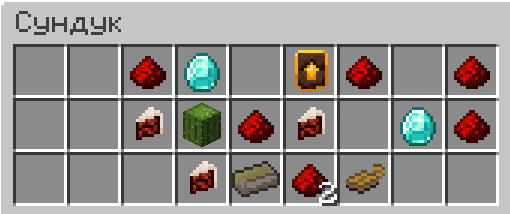
The template is used to upgrade iron items to fiery items. It spawns in chests within the Ur-Ghast's Dark Tower.
Configuration
(For mod version 1.2.0 and above)
Configuration file - /config/acofi-common.toml
In the config, you can adjust the template spawn chance and which loot tables it will generate in. That is, you can make the template drop from a mob, boss, or any other structure besides the Dark Tower.
Example config:
["ACOFI Config"]
  #Upgrade template spawn chance. (0.2 = 20%)
  #Default: 0.2
  #Range: 0.0 ~ 1.0
  upgrade_template_spawn_chance = 0.65
  #List of loot table IDs where the upgrade template will spawn.
  #Default: ["twilightforest:chests/darktower_cache", "twilightforest:chests/darktower_key"]
  target_tables = ["minecraft:chests/end_city_treasure", "minecraft:entities/warden"]
[RU] Описание мода
О моде
Alternate Create Of Fiery Items (ACOFI) - это аддон для Twilight forest меняющий способ создания огненного снаряжения, на подобный незеритовому после обновления 1.20.
Шаблон огненного улучшения
Шаблон используется для улучшения железных вещей в огненные. Спавнится в сундуках тёмной башни Ур-Гаста.
Конфигурация
(Для версии мода начиная с 1.2.0 и выше)
Файл конфигурации - /config/acofi-common.toml
В конфиге можно настроить шанс спавна шаблона и в каких таблицах лута он будет генерироваться. То есть, можно сделать чтобы шаблон дропался с какого-то моба, босса или в любой другой структуре помимо тёмной башни.
Пример конфига:
["ACOFI Config"]
  #Upgrade template spawn chance. (0.2 = 20%)
  #Default: 0.2
  #Range: 0.0 ~ 1.0
  upgrade_template_spawn_chance = 0.65
  #List of loot table IDs where the upgrade template will spawn.
  #Default: ["twilightforest:chests/darktower_cache", "twilightforest:chests/darktower_key"]
  target_tables = ["minecraft:chests/end_city_treasure", "minecraft:entities/warden"]
Available Versions
How to Install Alternate Create Of Fiery Items (ACOFI) on Your Server
Order Server
Order a Minecraft Java server with at least 4 GB RAM (6 GB recommended).
Set forge Loader
In the panel under "Egg", select the forge loader and matching Minecraft version (1.21.1).
Install Mod
Open the mod browser in the dashboard and search for "Alternate Create Of Fiery Items (ACOFI)". Click "Install" – done! Alternatively, upload the .jar via SFTP to the /mods folder.
Compatibility
Mod Loaders
Minecraft Versions
1.21.1, 1.20.4, 1.20.1
Server-side
✓ RequiredRecommended RAM
6 GB(min. 4 GB)Frequently Asked Questions
Alternate Create Of Fiery Items (ACOFI) server crashes on startup – what to do?
Most common cause: wrong forge version or insufficient RAM. Check the server log (latest.log) for "OutOfMemoryError" or "Mixin" errors. With Mado Hosting: ensure at least 4 GB RAM is allocated and the loader matches the mod version (1.21.1). You can switch loaders with one click in the panel.
Is Alternate Create Of Fiery Items (ACOFI) compatible with forge and neoforge?
Alternate Create Of Fiery Items (ACOFI) officially supports forge, neoforge for Minecraft 1.21.1, 1.20.4, 1.20.1. The Mado dashboard automatically detects incompatible loader combinations.
Server lagging with Alternate Create Of Fiery Items (ACOFI) – how to optimize performance?
Recommended RAM: 6 GB (per 5 players). Use /spark profiler to check if Alternate Create Of Fiery Items (ACOFI) consumes the most tick time. Common fixes: reduce server view-distance to 8-10, install "performant" or "starlight" as supplementary mods on Forge. With Mado Hosting, your server runs on NVMe SSDs with dedicated CPU cores for minimal latency.
Similar Mods




Rent Modded Server
Install Alternate Create Of Fiery Items (ACOFI) with just one click on your server.