ActionHUD
a client-side HUD mod with four manual modes for mining, exploring, combat, and building.
Screenshots
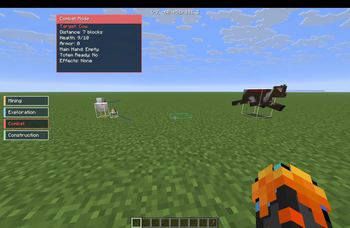
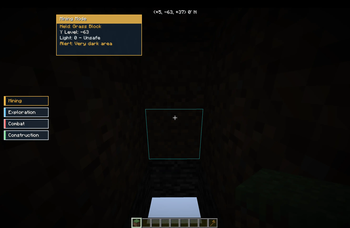
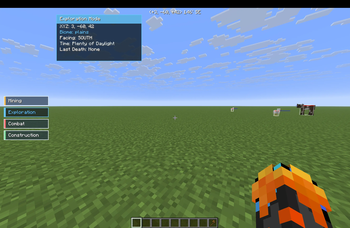
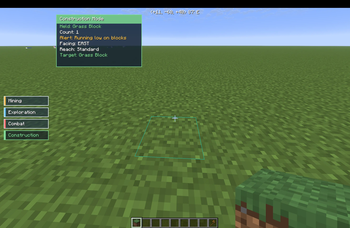
About this Mod
ActionHUD is a client-side Fabric HUD mod that lets you manually switch between focused HUD layouts for different parts of Minecraft gameplay. Instead of keeping the same information on screen at all times, ActionHUD gives you dedicated modes so the HUD matches what you are doing.
What ActionHUD adds:
- Four manual HUD modes: Mining, Exploration, Combat, and Construction
- A visible side selector for quick status awareness
- A dedicated selector screen for reliable in-game mode switching
- Mode-specific accent colors so each mode is easy to recognize at a glance
- Practical alerts and readable status text instead of raw technical clutter
- Mod Menu integration for layout and visibility settings
Mining Mode
- Shows held tool information and durability
- Shows Y level for mining and cave navigation
- Shows light level with readable danger context
- Warns when your tool is getting low
- Warns when the area is too dark
Exploration Mode
- Shows coordinates, biome, and facing direction
- Shows readable time-of-day status instead of raw world tick numbers
- Tracks your last death location
- Gives more practical travel awareness with status text like day safety and - approaching danger
Combat Mode
- Focuses on the last entity you hit, not just your own player stats
- Shows target health and armor
- Shows the target’s main hand item
- Indicates whether the target appears to have a totem ready
- Shows target effects when applicable
- Helps keep important opponent information visible during fights
Construction Mode
Shows held block or item context
Shows how many matching blocks you still have in inventory
Shows target block feedback
Includes alignment guidance for building
Warns when you are running low on materials
Why download ActionHUD
Keeps your screen cleaner by only showing the information that matters for the task you are doing
Makes survival information easier to read at a glance
Gives mining, exploring, fighting, and building their own focused HUD style
Stays fully client-side and quality-of-life focused
Configuration
ActionHUD includes Mod Menu support so you can adjust:
- Selector visibility
- HUD position
- Opacity
- Enabled modes
- Layout preferences
- Visible widgets
- Client-side only
- ActionHUD is a quality-of-life HUD mod.
It does not:
- automate gameplay
- reveal hidden blocks or hidden world information
- modify movement
- add combat automation
Credits:
Made by Kai with implementation help from OpenAI Codex.
Available Versions
How to Install ActionHUD on Your Server
Order Server
Order a Minecraft Java server with at least 3 GB RAM (4 GB recommended).
Set fabric Loader
In the panel under "Egg", select the fabric loader and matching Minecraft version (26.1.2).
Install Mod
Open the mod browser in the dashboard and search for "ActionHUD". Click "Install" – done! Alternatively, upload the .jar via SFTP to the /mods folder.
Compatibility
Mod Loaders
Minecraft Versions
26.1.2
Server-side
✗ UnsupportedRecommended RAM
4 GB(min. 3 GB)Frequently Asked Questions
ActionHUD server crashes on startup – what to do?
Most common cause: wrong fabric version or insufficient RAM. Check the server log (latest.log) for "OutOfMemoryError" or "Mixin" errors. With Mado Hosting: ensure at least 3 GB RAM is allocated and the loader matches the mod version (26.1.2). You can switch loaders with one click in the panel.
Is ActionHUD compatible with fabric?
ActionHUD officially supports fabric for Minecraft 26.1.2. The Mado dashboard automatically detects incompatible loader combinations.
Server lagging with ActionHUD – how to optimize performance?
Recommended RAM: 4 GB (per 8 players). Use /spark profiler to check if ActionHUD consumes the most tick time. Common fixes: reduce server view-distance to 8-10, install "performant" or "starlight" as supplementary mods on Forge. With Mado Hosting, your server runs on NVMe SSDs with dedicated CPU cores for minimal latency.
Similar Mods




Rent Modded Server
Install ActionHUD with just one click on your server.