
Advanced Arsenal
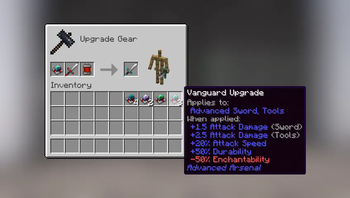
Redstone-powered equipment that can be upgraded to suit your playstyle.
Screenshots

About this Mod

About
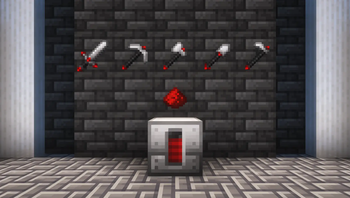
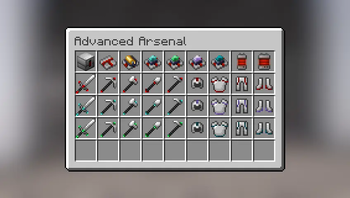
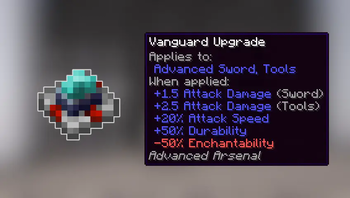
This mod adds redstone-powered equipment meant as viable alternatives to vanilla tools and armors.
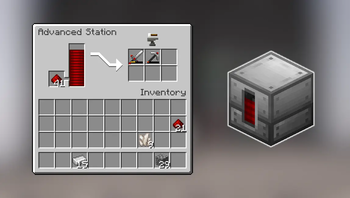
It also adds the Advanced Station, a machine that consumes redstone to repair your tools without having to spend xp. It can be automated using hoppers and emits a redstone signal based on how full the redstone gauge is.
Content

Configuration
Some aspects of the mod can be changed in the configuration file.

Tools for modpacks
You can add new redstone fuels for the Advanced Repair Station, using item tags:
• Set as Tier 1 fuel (same as redstone dust): redstone_fuels/tier_1
• Set as Tier 2 fuel (same as redstone block): redstone_fuels/tier_2
Structure is as follows: advanced_arsenal:{tag}
Credits
All custom textures used (if any) are either created by me or have a license that allows modification and distribution.
I make every effort to comply with project license obligations and to always credit the original owners. If you believe your name is missing from the credits or if you decide to change your project's license, please contact me.
Credits:
- Futureazoo's Repository (CC License) as base template for the machine block.
- Malcolmriley's Repository (CC License) as base template some of the items.
Dependencies
This mod has no dependencies.
JEI is recommended for recipes but not required.
Installation
Add the .jar mod file into your mods folder.
Alternatively, you can browse the CurseForge launcher for the mod (if it doesn't show up, try typing the autor's name). Once found, click "Install" to add it to your modpack.
Permissions
You are free to include this mod in any modpack, public or private.
Support my work
 Download my projects on CurseForge
 Download my projects on Modrinth
 Donate on Paypal
Available Versions
How to Install Advanced Arsenal on Your Server
Order Server
Order a Minecraft Java server with at least 3 GB RAM (4 GB recommended).
Set forge Loader
In the panel under "Egg", select the forge loader and matching Minecraft version (1.21.1).
Install Mod
Open the mod browser in the dashboard and search for "Advanced Arsenal". Click "Install" – done! Alternatively, upload the .jar via SFTP to the /mods folder.
Compatibility
Mod Loaders
Minecraft Versions
1.21.1, 1.21, 1.20.1 (+1 more)
Server-side
✓ RequiredRecommended RAM
4 GB(min. 3 GB)Frequently Asked Questions
Advanced Arsenal server crashes on startup – what to do?
Most common cause: wrong forge version or insufficient RAM. Check the server log (latest.log) for "OutOfMemoryError" or "Mixin" errors. With Mado Hosting: ensure at least 3 GB RAM is allocated and the loader matches the mod version (1.21.1). You can switch loaders with one click in the panel.
Is Advanced Arsenal compatible with forge and neoforge?
Advanced Arsenal officially supports forge, neoforge for Minecraft 1.21.1, 1.21, 1.20.1. The Mado dashboard automatically detects incompatible loader combinations.
Server lagging with Advanced Arsenal – how to optimize performance?
Recommended RAM: 4 GB (per 8 players). Use /spark profiler to check if Advanced Arsenal consumes the most tick time. Common fixes: reduce server view-distance to 8-10, install "performant" or "starlight" as supplementary mods on Forge. With Mado Hosting, your server runs on NVMe SSDs with dedicated CPU cores for minimal latency.
Similar Mods




![[TaCZ] Timeless and Classics Zero](https://cdn.modrinth.com/data/SzzJttH8/fd27766d2bb8390d284696b1dbd358f87e081439_96.webp)

Rent Modded Server
Install Advanced Arsenal with just one click on your server.