
Advanced Economics
Adds a survival and server economy with money, shops, selling, item unlocks, quests, professions, banking, loans, investments, gambling, duels, paid services, insurance, pet economy, and an in-game menu. Includes server-side player data, configurable price
Screenshots
About this Mod
Advanced Economics
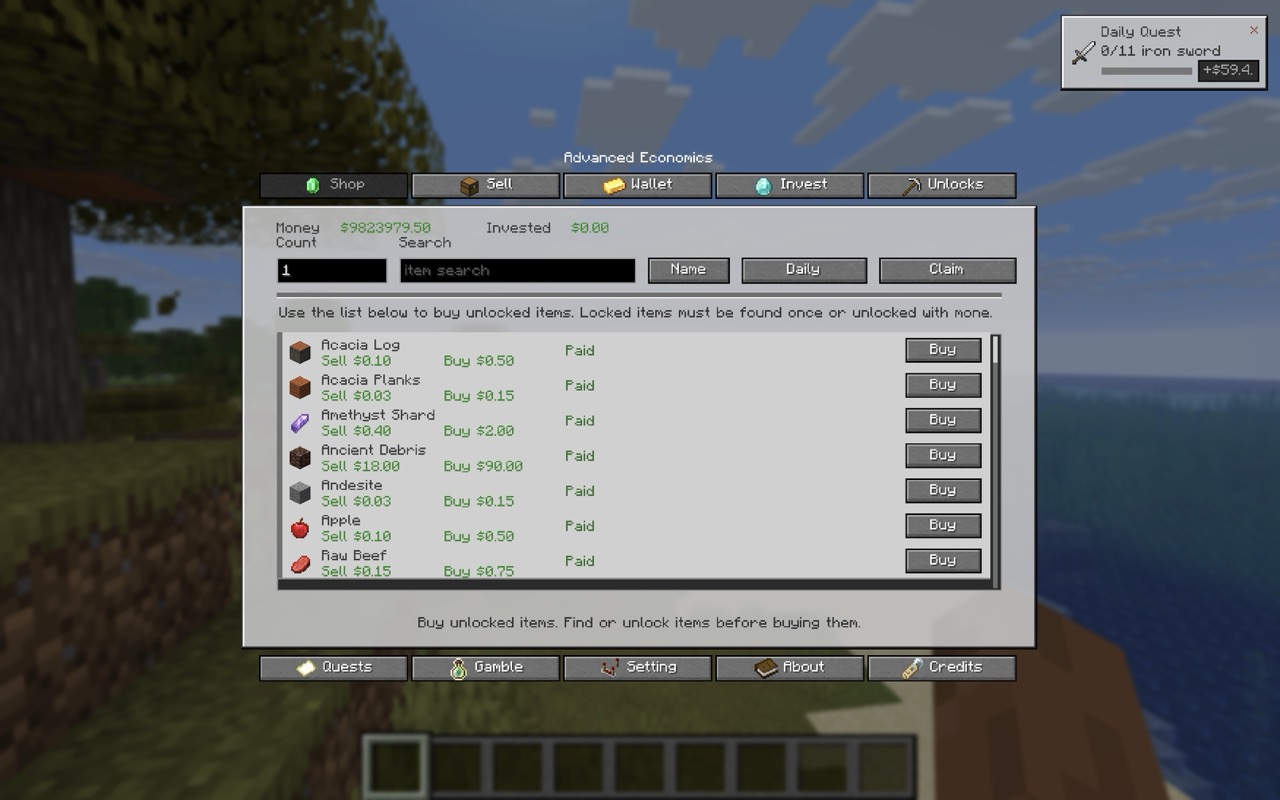
Advanced Economics is a Minecraft economy mod made by xlvr.
It adds a full survival-friendly money system with shops, selling, item unlocks, quests, professions, banking, gambling, services, insurance, and an in-game economy menu.
Press N in game to open the Advanced Economics menu.
What The Mod Adds
Advanced Economics gives every player their own money balance and turns survival gameplay into a server-friendly economy system.
Players can earn money by selling items, completing daily quests, choosing professions, gambling, trading XP, using bank systems, and interacting with other players through money transfers and duels.
The mod is useful for:
- Survival servers
- SMP servers
- Economy-based modpacks
- Roleplay servers
- Progression-focused worlds
- Players who want money, shops, and rewards without needing many separate economy mods
Main Features
- Player wallet balance
- Buy and sell shop system
- Sell items from hand or inventory
- Item unlock system before buying locked items
- Daily sell deal with bonus value
- Daily quests with money rewards
- Professions with sell bonuses
- Profession quests
- Investments with daily growth
- Fixed-term deposits
- Emergency loans
- Player money transfers
- Money duels
- Item gambling
- Money gambling
- Paid teleporting
- Buy potion effects with money
- Buy and sell XP levels
- Repair items with money
- Disenchant items with money
- Rename items with money
- Death insurance
- Pet selling
- Pet insurance
- Server-side player money storage
- Configurable item prices
- Support for custom/modded item config
- In-game economy GUI
- GUI scale setting
- Server feature toggles
In-Game Menu
Open the economy menu with: "N"
The keybind can be changed in Minecraft controls.
The menu includes:
- Shop
- Sell
- Wallet
- Invest
- Unlocks
- Quests
- Gamble
- Settings
- About
- Credits
The GUI shows your money, invested money, shop items, prices, item unlock status, inventory counts, quests, and command help.
Shop And Selling
Players can sell supported items for money and buy unlocked items from the shop.
Buying uses a higher price than selling, so players cannot infinitely buy and sell the same item for profit.
Items can be unlocked by finding them, paying to unlock them, or using unlock commands.
Server owners can configure item prices and add modded items.
Professions
Players can choose a profession to get extra progression and rewards.
Available professions:
- Miner
- Lumberjack
- Farmer
- Fisherman
- Hunter
Professions can give sell bonuses and profession quests.
Banking
The banking system lets players use money in different ways:
- Invest money
- Withdraw investments
- Start fixed-term deposits
- Claim matured deposits
- Take emergency loans
- Repay loans
- Gambling And Duels
Players can gamble money or items for a chance to win more.
Players can also start money duels with another player. Both players stake money, and the winner takes the reward.
Services
Players can spend money on useful services:
- Teleport to another player
- Buy potion effects
- Buy XP levels
- Sell XP levels
- Repair held item
- Disenchant held item
- Rename held item
- Insurance And Pets
The mod includes extra survival systems:
- Death insurance to reduce death penalties
- Pet insurance
- Selling nearby owned tamed pets
- Commands
Main command: /ae
Help: /ae help
Money Commands
/ae money
/ae money send <player> <amount|all>
/ae money give <amount>
/ae money give <player> <amount>
Shop Commands
/ae buy <item> [count|all]
/ae sell [count|all]
/ae sell <item> [count|all]
/ae price
/ae unlock <item|all>
/ae unlocks
/ae shop buy <item> [count|all]
/ae shop sell [count|all]
/ae shop sell <item> [count|all]
/ae shop sell-inventory
/ae shop price
/ae shop unlock <item|all>
/ae shop unlocks
Bank Commands
/ae bank invest <amount|all>
/ae bank investment
/ae bank withdraw
/ae bank deposit start <7|14|30> <amount>
/ae bank deposit claim
/ae bank loan take <amount>
/ae bank loan repay <amount|all>
Quest Commands
/ae quest daily
/ae quest daily claim
/ae quest daily hide
/ae quest daily show
Profession Commands
/ae profession
/ae profession choose <miner|lumberjack|farmer|fisherman|hunter>
/ae profession quest
/ae profession quest claim
Gambling Commands
/ae gamble item
/ae gamble money <amount>
Duel Commands
/ae duel start <player> <amount>
/ae duel accept
/ae duel deny
Service Commands
/ae service effect <speed|haste>
/ae service xp buy [levels]
/ae service xp sell [levels|all]
/ae service item repair
/ae service item disenchant
/ae service item rename <name>
/ae service teleport <player>
Insurance And Pet Commands
/ae insurance buy
/ae pet sell
/ae pet insure
Admin Commands
/ae admin settings
/ae admin settings toggle <feature>
/ae admin money give <amount>
/ae admin money give <player> <amount>
Admin money commands are intended for creative/admin use.
Server Owner Info
Advanced Economics stores player economy data server-side per world.
This means balances, unlocks, investments, loans, quests, professions, insurance, and history belong to the world/server economy.
Server owners can configure prices and add modded items through config.
Useful for server owners who want:
Custom shop prices
Modded item economy support
Server-controlled progression
Economy features without requiring players to manage files
Images
Credits
Made by xlvr
Available Versions
How to Install Advanced Economics on Your Server
Order Server
Order a Minecraft Java server with at least 3 GB RAM (4 GB recommended).
Set fabric Loader
In the panel under "Egg", select the fabric loader and matching Minecraft version (26.2).
Install Mod
Open the mod browser in the dashboard and search for "Advanced Economics". Click "Install" – done! Alternatively, upload the .jar via SFTP to the /mods folder.
Compatibility
Mod Loaders
Minecraft Versions
26.2, 26.1.2
Server-side
✓ RequiredRecommended RAM
4 GB(min. 3 GB)Frequently Asked Questions
Advanced Economics server crashes on startup – what to do?
Most common cause: wrong fabric version or insufficient RAM. Check the server log (latest.log) for "OutOfMemoryError" or "Mixin" errors. With Mado Hosting: ensure at least 3 GB RAM is allocated and the loader matches the mod version (26.2). You can switch loaders with one click in the panel.
Is Advanced Economics compatible with fabric?
Advanced Economics officially supports fabric for Minecraft 26.2, 26.1.2. The Mado dashboard automatically detects incompatible loader combinations.
Server lagging with Advanced Economics – how to optimize performance?
Recommended RAM: 4 GB (per 8 players). Use /spark profiler to check if Advanced Economics consumes the most tick time. Common fixes: reduce server view-distance to 8-10, install "performant" or "starlight" as supplementary mods on Forge. With Mado Hosting, your server runs on NVMe SSDs with dedicated CPU cores for minimal latency.
Similar Mods



![CobbleDollars [Cobblemon Addon]](https://cdn.modrinth.com/data/s7N7AsqL/684040a264fc1d7f9b856ec5d2da39767398c7ad.png)

Rent Modded Server
Install Advanced Economics with just one click on your server.