
Advanced Finders
Discover ores faster with new finders that revolutionize the mining experience
Screenshots


About this Mod
"Advanced Finders" is a mod that transforms your mining experience by adding specialized ore detection tools that make locating valuable resources faster, easier, and far more rewarding. Whether you're exploring deep caverns or tunneling through solid stone, these finders eliminate the frustration of missing ore deposits hidden just out of sight - ensuring you never overlook a valuable vein again.
The mod is designed for players who want to reclaim time spent on tedious ore hunting while maintaining the thrill of discovery. Instead of mindlessly strip-mining or hoping to stumble across deposits, you'll have intelligent tools that guide you directly to nearby ores and deep underground veins. This transforms mining from a monotonous grind into a focused, purposeful activity where every expedition yields results.
Advanced Finders works seamlessly in multiplayer environments, allowing you to see ore detection data from other players' finders in real time - turning solo mining into a collaborative effort. The mod is fully customizable, supporting most popular resource-based mods out of the box while offering the flexibility to add custom ores for any mod you play with.
Key Features
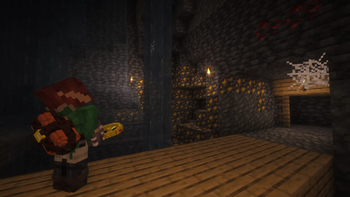
- Displays the direction to nearby ores around the player (hands shown as rectangles indicate ores found in the horizontal plane)
- Detects deep underground ore veins (arrows shown as triangles indicate the direction - up or down - to the nearest vein)
- Signals large ore deposits with red lights when found
- Synchronized between players so you can see what another player's finder is displaying
- Server-safe with all settings synchronized between server and clients
- Built-in support for popular resource-based mods
- Fully customizable via config files, including the ability to add custom ores for your favorite mods
- Specialized finders for different ore types
REQUIRES ForgeEndertech library
Want to turn routine mining into an epic treasure hunt? Pair Advanced Finders with Large Ore Deposits for an unforgettable mining experience.
Available Versions
How to Install Advanced Finders on Your Server
Order Server
Order a Minecraft Java server with at least 3 GB RAM (4 GB recommended).
Set fabric Loader
In the panel under "Egg", select the fabric loader and matching Minecraft version (26.2).
Install Mod
Open the mod browser in the dashboard and search for "Advanced Finders". Click "Install" – done! Alternatively, upload the .jar via SFTP to the /mods folder.
Compatibility
Mod Loaders
Minecraft Versions
26.2
Server-side
✓ RequiredRecommended RAM
4 GB(min. 3 GB)Frequently Asked Questions
Advanced Finders server crashes on startup – what to do?
Most common cause: wrong fabric version or insufficient RAM. Check the server log (latest.log) for "OutOfMemoryError" or "Mixin" errors. With Mado Hosting: ensure at least 3 GB RAM is allocated and the loader matches the mod version (26.2). You can switch loaders with one click in the panel.
Is Advanced Finders compatible with fabric and forge and neoforge?
Advanced Finders officially supports fabric, forge, neoforge for Minecraft 26.2. Note: Forge and Fabric mods are NOT cross-compatible – pick one loader and stick with it. The Mado dashboard automatically detects incompatible loader combinations.
Server lagging with Advanced Finders – how to optimize performance?
Recommended RAM: 4 GB (per 8 players). Use /spark profiler to check if Advanced Finders consumes the most tick time. Common fixes: reduce server view-distance to 8-10, install "performant" or "starlight" as supplementary mods on Forge. With Mado Hosting, your server runs on NVMe SSDs with dedicated CPU cores for minimal latency.
Similar Mods




Rent Modded Server
Install Advanced Finders with just one click on your server.
Details
- License
- Creative Commons Attribution No Derivatives 4.0 International
- Server-side
- Required