
Advanced Networking
Adds systems for programmable transfer of resources
Screenshots
About this Mod
Advanced Networking




A mod that adds systems for transfer of resources and data using a node based programming system. While inspired by Integrated Dynamics and XNet,
this mod makes sure to stay distinct and get its own place in modpacks (even though neither of the aforementioned mods are on fabric). Originally made for Modfest Singularity.
Getting Started
To get started craft some crystalline compound, with an amethyst shard, a clay ball and a piece of coal.
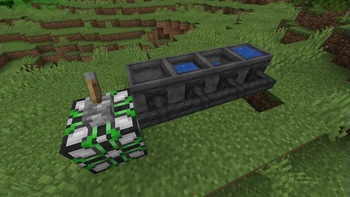
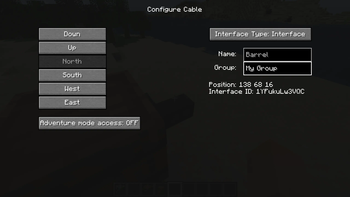
Using that you can craft cables and controllers. Sneak-click on a cable with an empty hand to open its configuration.
There you can set the mode of each side of the cable. Make one side an interface and give it a name.
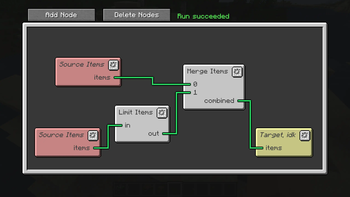
Open up the controller, add some nodes and connect them.
Select your interface in the configuration of a node and you should have a working network.

Features
Cables
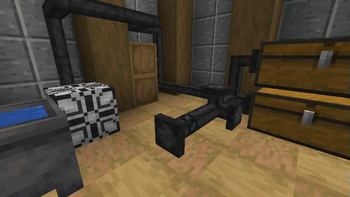
Cables are a core part of the mod, they are used to connect controllers to everything they need.
Click on them with a stick or any wrench from other mods to quickly change the mode of a side.
More advanced configuration can be accessed by sneak-clicking on the cable.
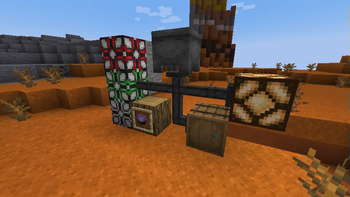
Cables automatically connect to each other and controllers, but not other blocks. For those you will need to set the cable to interface mode.

Controllers
Controllers house your programs. They have a node based UI where you can perform routing of resources and all kinds of logic.
You can add nodes from the Add Nodes menu and it's submenus.
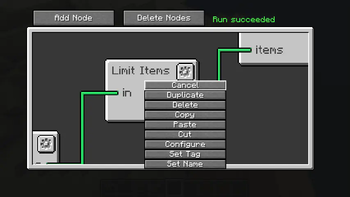
Deleting nodes can be done by right-clicking and selecting Delete or using the Delete Nodes mode.
Nodes can also be duplicated from the right-clicking menu. You can freely move around by dragging and zoom by scrolling in the editor.

Resource Transfer and Streams
Some of the most important nodes are for transfer of energy, items and fluids.
They work on with a stream system where the nodes control set the flow of resources and the actual transfer happens after all nodes have evaluated.
There are also nodes for getting the capacity and fill level of storages. These are evaluated before any transfer happens.
The filter and limit nodes allows you to control what items are transferred.
The limit node sets a maximum number of items to transfer and the filter blocks certain items from passing through.

Other Info
Modpack permission
You can use this mod in any modpack as long as you don't reupload the mod. You can get a direct download link from modrinth or github.
Downloading
This mod is only officially available on curseforge, modrinth and github.
Any other sites are third-party reuploads and should not be trusted.
Incompatibilities
I intend to try and stay compatible with as many mods as possible, but might abandon support for some if it becomes too hard.
- Sodium compatibility is only guaranteed if indium is installed.
- Optifine will never be officially supported. Might work, might not.
Porting and Forking
You can read my policy on forking and porting mods.
Licencing
The mod is licensed under the Apache License, Version 2.0.
You are free to use the mods code in any way you want as long as you follow the license and credit me for the original (link is enough).
Available Versions
How to Install Advanced Networking on Your Server
Order Server
Order a Minecraft Java server with at least 3 GB RAM (4 GB recommended).
Set fabric Loader
In the panel under "Egg", select the fabric loader and matching Minecraft version (1.21.6).
Install Mod
Open the mod browser in the dashboard and search for "Advanced Networking". Click "Install" – done! Alternatively, upload the .jar via SFTP to the /mods folder.
Compatibility
Mod Loaders
Minecraft Versions
1.21.6, 1.21.1, 1.21 (+7 more)
Server-side
✓ RequiredRecommended RAM
4 GB(min. 3 GB)Frequently Asked Questions
Advanced Networking server crashes on startup – what to do?
Most common cause: wrong fabric version or insufficient RAM. Check the server log (latest.log) for "OutOfMemoryError" or "Mixin" errors. With Mado Hosting: ensure at least 3 GB RAM is allocated and the loader matches the mod version (1.21.6). You can switch loaders with one click in the panel.
Is Advanced Networking compatible with fabric and quilt?
Advanced Networking officially supports fabric, quilt for Minecraft 1.21.6, 1.21.1, 1.21. The Mado dashboard automatically detects incompatible loader combinations.
Server lagging with Advanced Networking – how to optimize performance?
Recommended RAM: 4 GB (per 8 players). Use /spark profiler to check if Advanced Networking consumes the most tick time. Common fixes: reduce server view-distance to 8-10, install "performant" or "starlight" as supplementary mods on Forge. With Mado Hosting, your server runs on NVMe SSDs with dedicated CPU cores for minimal latency.
Similar Mods





Rent Modded Server
Install Advanced Networking with just one click on your server.