Advanced Timer
Adds a timer with many features like placing it anywhere on the screen, changing its color, auto-pausing and more.
Screenshots


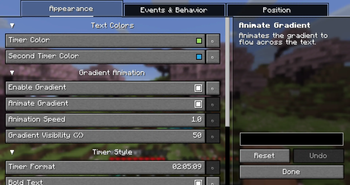
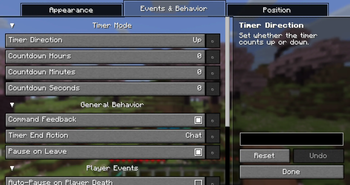
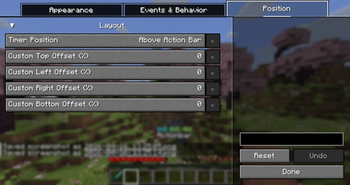
About this Mod

A highly customizable Minecraft timer mod with extensive color customization, gradient effects, auto-pause features, and per-world/server timer storage. Works with both Fabric and NeoForge. Does NOT use the Action Bar!


Features
Color & Visual Customization
- Primary & Secondary Timer Colors - Set custom colors for single or gradient modes
- Gradient Mode - Enable smooth color gradients between two colors
- Animated Gradients - Dynamic gradient animation with adjustable speed
- Gradient Visibility - Control gradient intensity (0-100%)
- Bold Text - Toggle bold timer display
- Paused State Indicators:
- Optional "(paused)" suffix
- Change color when paused
Timer Display
- Multiple Time Formats:
DD:HH:MM,DD:HH:MM:SS,Dd Hh Mm Ssand more! - Flexible Positioning:
- Above action bar
- Top left/center/right
- Bottom left/center/right
- Custom coordinates
- HUD Toggle - Show/hide timer via command
Auto-Pause System
Automatically pauses the timer on configurable events:
- Dragon Kill
- Wither Kill
- Elder Guardian Kill
- Warden Kill
- Player Death
- Leaving the game/world
Multiloader Support
- Works seamlessly with both Fabric and NeoForge mod loaders
Per-World/Server Timer Storage
- Automatically saves timer state per world/server
- Switch between worlds or servers without losing your timer data
- Supports multiple concurrent timers (one per world/server)
Timer Modes
- Count Up - Track elapsed time from zero
- Count Down - Configurable countdown timer with custom hours, minutes, and seconds
- Timer end actions:
Off,Title, orChatmessage
Commands
| Command | Description |
|---|---|
/timer start |
Start or continue the timer |
/timer pause |
Pause the timer |
/timer continue |
Continue the timer (alias for start) |
/timer restart |
Reset and start the timer |
/timer hide |
Hide the timer HUD |
/timer show |
Show the timer HUD |
/timer config |
Open the config menu |
/timer help |
Display help message |
/timer time add <time> |
Add time to the timer in seconds, minutes, hours, days (e.g., 0 30, 0 0 2) |
/timer time set <time> |
Set the timer to a specific time |
Configuration Menu
Full GUI configuration via Yet Another Config Library (YACL):
- Timer color picker with hex input
- Gradient enable/disable toggle
- Animation speed slider
- All timer settings accessible in one place
- ModMenu Integration (Fabric) - Access config from mod menu
Configuration Options
| Option | Default | Description |
|---|---|---|
timerColor |
#8FE163 |
Primary timer color |
secondTimerColor |
#00ECD0 |
Secondary color for gradient |
enableGradient |
false |
Enable gradient mode |
animateGradient |
true |
Animate gradient colors |
animationSpeed |
1.0 |
Gradient animation speed |
gradientVisibility |
50 |
Gradient intensity (0-100) |
timerBold |
true |
Bold timer text |
timerFormat |
HH:MM:SS |
Time display format |
pauseOnLeave |
true |
Auto-pause when leaving world |
showPausedState |
false |
Show "(paused)" suffix |
pausedSuffix |
(paused) |
Paused indicator text |
changePausedColor |
false |
Use different color when paused |
pausedColor |
#AAAAAA |
Color when timer is paused |
timerDirection |
UP |
Count up or countdown mode |
countdownHours/Minutes/Seconds |
1:00:00 |
Countdown start time |
timerPosition |
ABOVE_ACTION_BAR |
HUD position |
autoPauseOnDragonKill |
false |
Pause on Ender Dragon kill |
autoPauseOnWitherKill |
false |
Pause on Wither kill |
autoPauseOnElderGuardianKill |
false |
Pause on Elder Guardian kill |
autoPauseOnWardenKill |
false |
Pause on Warden kill |
autoPauseOnDeath |
false |
Pause on player death |
showCommandFeedback |
true |
Show command feedback in chat |
timerEndAction |
CHAT |
Action when countdown ends |
Available Versions
How to Install Advanced Timer on Your Server
Order Server
Order a Minecraft Java server with at least 3 GB RAM (4 GB recommended).
Set fabric Loader
In the panel under "Egg", select the fabric loader and matching Minecraft version (26.1.2).
Install Mod
Open the mod browser in the dashboard and search for "Advanced Timer". Click "Install" – done! Alternatively, upload the .jar via SFTP to the /mods folder.
Compatibility
Mod Loaders
Minecraft Versions
26.1.2, 1.21.11
Server-side
✗ UnsupportedRecommended RAM
4 GB(min. 3 GB)Frequently Asked Questions
Advanced Timer server crashes on startup – what to do?
Most common cause: wrong fabric version or insufficient RAM. Check the server log (latest.log) for "OutOfMemoryError" or "Mixin" errors. With Mado Hosting: ensure at least 3 GB RAM is allocated and the loader matches the mod version (26.1.2). You can switch loaders with one click in the panel.
Is Advanced Timer compatible with fabric and neoforge?
Advanced Timer officially supports fabric, neoforge for Minecraft 26.1.2, 1.21.11. The Mado dashboard automatically detects incompatible loader combinations.
Server lagging with Advanced Timer – how to optimize performance?
Recommended RAM: 4 GB (per 8 players). Use /spark profiler to check if Advanced Timer consumes the most tick time. Common fixes: reduce server view-distance to 8-10, install "performant" or "starlight" as supplementary mods on Forge. With Mado Hosting, your server runs on NVMe SSDs with dedicated CPU cores for minimal latency.
Similar Mods





Rent Modded Server
Install Advanced Timer with just one click on your server.