
Advanced Water Bottle
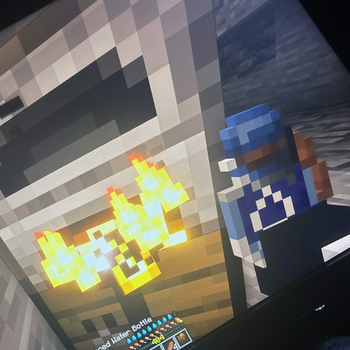
Stop carrying stacks of water | This craftable, reusable bottle fully restores thirst (0–20) and can be refilled anytime. Requires the Thirst Bar mod.
Screenshots
About this Mod
💧 Advanced Water Bottle
A reusable, craftable water bottle that actually keeps you hydrated underground.
The vanilla glass bottle restores 3 thirst out of 20. That's it.
When you're deep in a cave or mid-dungeon with the Thirst Bar mod
installed, it's practically useless. The Advanced Water Bottle fixes
that — one drink fully maxes your thirst bar, and you can refill it
at any water source.
✨ Features
| Feature | Details |
|---|---|
| Drink Charges | 3 per fill cycle |
| Thirst Restored | 20 (max) per drink |
| Durability | 250 max — costs 5 per fill |
| Texture States | 4 dynamic pixel art stages |
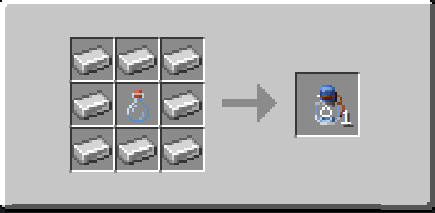
| Crafting | Glass bottle + 8 iron ingots |
🎨 Texture States
The bottle automatically swaps textures based on current charges so
you always know how much water you have at a glance.
- Full — 3 charges remaining
- Half — 2 charges remaining
- Quarter — 1 charge remaining
- Empty — 0 charges remaining
🔨 Crafting Recipe
8 Iron Ingots Surrounding 1 Glass Bottle
The bottle is crafted empty — find a water source and right click
to fill it up. Takes 3 fills to reach full capacity.
🚰 How To Use
- Craft the Advanced Water Bottle at a crafting table
- Fill it by right clicking any water source block — 1 charge per
click, 3 clicks to fill fully - Drink by holding right click — plays vanilla potion animation
and sound - Refill when empty and repeat — bottle breaks permanently at 0
durability
⚠️ Requirements
- Fabric Loader
- Fabric API
- Thirst Bar — the
thirstbarscoreboard objective must exist in your world
🖥️ Server Compatible
Yes — all players must have the mod installed client side. The server
must be running Fabric with Fabric API and have the Thirst Bar mod loaded.
Textures Designed By: Calvin
Mod Coded By: player.games AI
Available Versions
How to Install Advanced Water Bottle on Your Server
Order Server
Order a Minecraft Java server with at least 3 GB RAM (4 GB recommended).
Set fabric Loader
In the panel under "Egg", select the fabric loader and matching Minecraft version (26.1.2).
Install Mod
Open the mod browser in the dashboard and search for "Advanced Water Bottle". Click "Install" – done! Alternatively, upload the .jar via SFTP to the /mods folder.
Compatibility
Mod Loaders
Minecraft Versions
26.1.2, 26.1.1, 26.1
Server-side
✓ RequiredRecommended RAM
4 GB(min. 3 GB)Frequently Asked Questions
Advanced Water Bottle server crashes on startup – what to do?
Most common cause: wrong fabric version or insufficient RAM. Check the server log (latest.log) for "OutOfMemoryError" or "Mixin" errors. With Mado Hosting: ensure at least 3 GB RAM is allocated and the loader matches the mod version (26.1.2). You can switch loaders with one click in the panel.
Is Advanced Water Bottle compatible with fabric?
Advanced Water Bottle officially supports fabric for Minecraft 26.1.2, 26.1.1, 26.1. The Mado dashboard automatically detects incompatible loader combinations.
Server lagging with Advanced Water Bottle – how to optimize performance?
Recommended RAM: 4 GB (per 8 players). Use /spark profiler to check if Advanced Water Bottle consumes the most tick time. Common fixes: reduce server view-distance to 8-10, install "performant" or "starlight" as supplementary mods on Forge. With Mado Hosting, your server runs on NVMe SSDs with dedicated CPU cores for minimal latency.
Similar Mods




Rent Modded Server
Install Advanced Water Bottle with just one click on your server.