
AdvanceKeyStrokes
AdvanceKeystrokes is a Minecraft client-side overlay mod that displays your keyboard and mouse inputs in real time on screen. It is mainly used for: PvP gameplay movement visualization content creation practice & training 🎮 Main Features ✔ Live W A
Screenshots
About this Mod
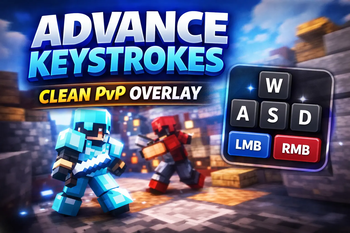
AdvanceKeystrokes is a lightweight client-side Fabric mod that adds a clean and modern keystrokes overlay to Minecraft, allowing players to see their live keyboard and mouse inputs directly on screen. The mod is designed for PvP players, practice sessions, and content creators who want a professional-looking way to visualize movement and clicks during gameplay.
The overlay shows real-time inputs such as movement keys ⌨️ W • A • S • D, mouse buttons 🖱️ LMB / RMB, and optional click information, helping players analyze movement consistency, improve gameplay mechanics, and showcase clean gameplay in videos or streams. The display updates instantly as keys are pressed, making it perfect for competitive play and training.
AdvanceKeystrokes focuses on simplicity, performance, and customization. Players can personalize the overlay to match their HUD style by adjusting colors, backgrounds, scaling, and positioning. Visual options include rounded backgrounds, key shadows, rainbow effects, and rendering settings that control when the overlay appears (GUI screens, debug HUD, player list, etc.). This allows the overlay to look natural and unobtrusive while still being informative.
⚙️ Main Features
⌨️ Live WASD movement display
🖱️ Mouse clicks (LMB / RMB)
📏 Adjustable size & scaling
🧩 Lightweight and performance-friendly
🎥 Great for PvP, practice, and content creation
Available Versions
How to Install AdvanceKeyStrokes on Your Server
Order Server
Order a Minecraft Java server with at least 3 GB RAM (4 GB recommended).
Set fabric Loader
In the panel under "Egg", select the fabric loader and matching Minecraft version (1.21.11).
Install Mod
Open the mod browser in the dashboard and search for "AdvanceKeyStrokes". Click "Install" – done! Alternatively, upload the .jar via SFTP to the /mods folder.
Compatibility
Mod Loaders
Minecraft Versions
1.21.11, 1.21.10, 1.21.9 (+9 more)
Server-side
✓ RequiredRecommended RAM
4 GB(min. 3 GB)Frequently Asked Questions
AdvanceKeyStrokes server crashes on startup – what to do?
Most common cause: wrong fabric version or insufficient RAM. Check the server log (latest.log) for "OutOfMemoryError" or "Mixin" errors. With Mado Hosting: ensure at least 3 GB RAM is allocated and the loader matches the mod version (1.21.11). You can switch loaders with one click in the panel.
Is AdvanceKeyStrokes compatible with fabric?
AdvanceKeyStrokes officially supports fabric for Minecraft 1.21.11, 1.21.10, 1.21.9. The Mado dashboard automatically detects incompatible loader combinations.
Server lagging with AdvanceKeyStrokes – how to optimize performance?
Recommended RAM: 4 GB (per 8 players). Use /spark profiler to check if AdvanceKeyStrokes consumes the most tick time. Common fixes: reduce server view-distance to 8-10, install "performant" or "starlight" as supplementary mods on Forge. With Mado Hosting, your server runs on NVMe SSDs with dedicated CPU cores for minimal latency.
Similar Mods



![[TaCZ] Timeless and Classics Zero](https://cdn.modrinth.com/data/SzzJttH8/fd27766d2bb8390d284696b1dbd358f87e081439_96.webp)


Rent Modded Server
Install AdvanceKeyStrokes with just one click on your server.