
AE2 Auto Pattern Upload
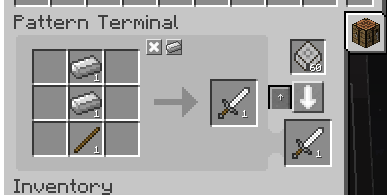
add an upload button to the Pattern Terminal, allowing you to send encoded patterns directly to connected pattern providers with a single click.
Screenshots

About this Mod
AE2 Auto Pattern Upload is a lightweight add-on for Applied Energistics 2 that adds a small upload button to the Pattern Terminal and lets you send encoded patterns directly to connected pattern providers with a single click. It is designed to remove the most repetitive step in late‑game AE2 automation: moving encoded patterns by hand between the Pattern Terminal and your pattern storage.
Once installed, the mod integrates a new button into the existing Pattern Terminal GUI next to the encode button. After you create and encode a pattern, simply press the upload button and the mod will automatically send the pattern to suitable pattern providers or other supported pattern storage on the same AE2 network. This greatly reduces GUI juggling and shift‑clicking every time you update or expand your automation setup.
AE2 Auto Pattern Upload is intentionally lightweight and non‑intrusive. It does not change the core progression or mechanics of Applied Energistics 2; it only adds a single extra control to the familiar Pattern Terminal workflow. The goal is to make pattern management more comfortable without introducing new complexity or extra grind.
This mod is essentially a standalone extraction of the pattern auto‑upload feature from my other mod, ExtendedAE‑Plus (EAEP). If you already use ExtendedAE‑Plus and enjoy its quality‑of‑life improvements for AE2, AE2 Auto Pattern Upload provides the same pattern‑upload convenience in a smaller, focused package for setups where you only want this one feature.
Available Versions
How to Install AE2 Auto Pattern Upload on Your Server
Order Server
Order a Minecraft Java server with at least 3 GB RAM (4 GB recommended).
Set forge Loader
In the panel under "Egg", select the forge loader and matching Minecraft version (1.20.1).
Install Mod
Open the mod browser in the dashboard and search for "AE2 Auto Pattern Upload". Click "Install" – done! Alternatively, upload the .jar via SFTP to the /mods folder.
Compatibility
Mod Loaders
Minecraft Versions
1.20.1, 1.12.2, 1.7.10
Server-side
✓ RequiredRecommended RAM
4 GB(min. 3 GB)Frequently Asked Questions
AE2 Auto Pattern Upload server crashes on startup – what to do?
Most common cause: wrong forge version or insufficient RAM. Check the server log (latest.log) for "OutOfMemoryError" or "Mixin" errors. With Mado Hosting: ensure at least 3 GB RAM is allocated and the loader matches the mod version (1.20.1). You can switch loaders with one click in the panel.
Is AE2 Auto Pattern Upload compatible with forge?
AE2 Auto Pattern Upload officially supports forge for Minecraft 1.20.1, 1.12.2, 1.7.10. The Mado dashboard automatically detects incompatible loader combinations.
Server lagging with AE2 Auto Pattern Upload – how to optimize performance?
Recommended RAM: 4 GB (per 8 players). Use /spark profiler to check if AE2 Auto Pattern Upload consumes the most tick time. Common fixes: reduce server view-distance to 8-10, install "performant" or "starlight" as supplementary mods on Forge. With Mado Hosting, your server runs on NVMe SSDs with dedicated CPU cores for minimal latency.
Similar Mods


Rent Modded Server
Install AE2 Auto Pattern Upload with just one click on your server.