
AE2 Fluid Crafting Rework
A port and reworked of AE2FC. Implement the fluid autocrafting mechanic in AE2.
About this Mod
AE2 Fluid Crafting Rework
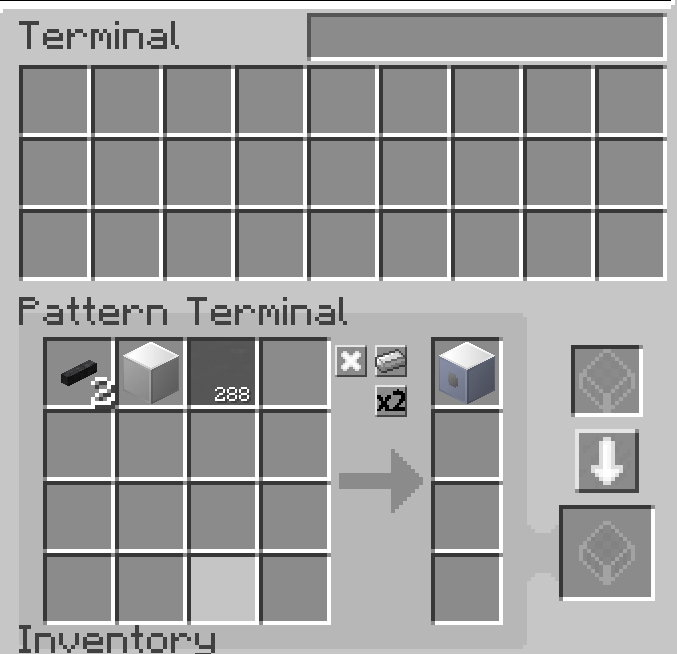
Put fluids in the pattern!
Intro
AE2 autocrafting is amazing and everyone loves it, but it is always becoming painful when dealing with fluids.
You have to put fluids in a container or use a dummy item to write patterns with fluids.
That's because AE2 doesn't support fluid as valid crafting ingredients before 1.16, so it can't handle fluids directly.
However, it is changed now! With AE2 Fluid Crafting you can write patterns with fluids freely.
Your AE system can output and accept fluids like items without worrying about how to handle these fluid cells.
Installation
1.7.10: Any version of AE2(Both Official AE2 and GTNH edition AE2 works). Extra Cells isn't necessary.
1.12.2: Only support PAE2. You can use origin AE2FC if you are playing with official AE2. You can directly upgrade origin AE2FC in your old save.
More Info: Github Readme Page
QoL
- You can directly code the fluid in fluid pattern terminal with fluid container.
- Right clicking with fluid container in fluid pattern terminal can add the fluid amount in pattern.
- An extend fluid terminal with 16 inputs and 4 outputs.
- 'Multi amount' buttons also works on fluid amount.
- Fix most crash or bugs with PAE2 in 1.12.2
Available Versions
How to Install AE2 Fluid Crafting Rework on Your Server
Order Server
Order a Minecraft Java server with at least 3 GB RAM (4 GB recommended).
Set forge Loader
In the panel under "Egg", select the forge loader and matching Minecraft version (1.12.2).
Install Mod
Open the mod browser in the dashboard and search for "AE2 Fluid Crafting Rework". Click "Install" – done! Alternatively, upload the .jar via SFTP to the /mods folder.
Compatibility
Mod Loaders
Minecraft Versions
1.12.2, 1.7.10
Server-side
✓ RequiredRecommended RAM
4 GB(min. 3 GB)Frequently Asked Questions
AE2 Fluid Crafting Rework server crashes on startup – what to do?
Most common cause: wrong forge version or insufficient RAM. Check the server log (latest.log) for "OutOfMemoryError" or "Mixin" errors. With Mado Hosting: ensure at least 3 GB RAM is allocated and the loader matches the mod version (1.12.2). You can switch loaders with one click in the panel.
Is AE2 Fluid Crafting Rework compatible with forge?
AE2 Fluid Crafting Rework officially supports forge for Minecraft 1.12.2, 1.7.10. The Mado dashboard automatically detects incompatible loader combinations.
Server lagging with AE2 Fluid Crafting Rework – how to optimize performance?
Recommended RAM: 4 GB (per 8 players). Use /spark profiler to check if AE2 Fluid Crafting Rework consumes the most tick time. Common fixes: reduce server view-distance to 8-10, install "performant" or "starlight" as supplementary mods on Forge. With Mado Hosting, your server runs on NVMe SSDs with dedicated CPU cores for minimal latency.
Similar Mods






Rent Modded Server
Install AE2 Fluid Crafting Rework with just one click on your server.