
AE2UEL Extra
1.12.2 Applied Energistics 2 Unofficial Extended Life Fork
Screenshots
About this Mod
AE2UEL Extra
AE2-UEL Fork with optimizations, QoL improvements and backported modern features
✨ Key Features
Gameplay Improvements
- Stackable Inscriber - Now supports stacks of 64.
- Guaranteed Drops - Sky Stone Chests certainly now contain all 4 types Inscriber Press.
- QNB Optimizations (1.19 Backported) - Don't require power to connect QNBs (but they still drain power).
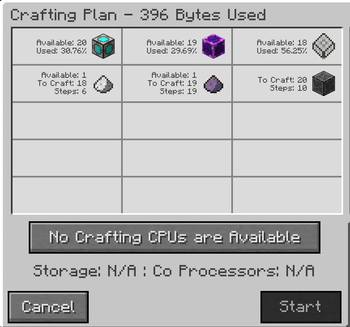
- Enhanced Crafting - Crafting Plan displays material utilization rate and template dispatch rounds.
Optimizations
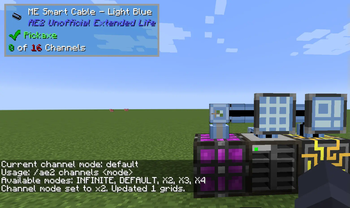
- Modern Channel Mode (1.18 Backported) - Backport Channel Mode, Use
/ae2 channelsto check the current channel mode, and/ae2 channels <mode>to set the channel mode. - Network Storage System Refactoring (1.15 Backported) - Migrated the network storage from a custom configuration to Minecraft WorldSavedData , adopting NBT serialization and simplifying related data structures.
- TickHandler Optimizations (1.15 Backported) - Split TickHandler#onTick into more specific event handlers.
- Energy Optimizations (1.15 Backported) - Optimized the sorting and allocation logic of energy nodes.
- Grid Optimize (1.17+ Backported)
- Optimize channel computation
- Hierarchical bottleneck detection
- Layered BFS + Iterative DFS pathfinding
⚠️ Compatibility Notice
Due to code refactoring, most AE2 addons are no longer compatible. Notable changes:
EnumSet<GridFlags> getFlags();→boolean hasFlag(GridFlags flag);TickHandler.INSTANCE→TickHandler.instance()- Network API modifications (IGridBlock, IGridNode , etc.)
Compatible Addons:
- AE2 Fluid Crafting Rework (2.6.6-r)
- AE Wireless Channel (1.0.1-release)
- YM-Additions (0.1.6)
- Lazy AE2 (1.1.26)
- Not Enough Energistics (2.0.9)
- Neeve's AE2: Extended Life Additions(Unofficial build) https://github.com/ChromaPIE/NAE2/tree/ae2-extra-compat
Available Versions
How to Install AE2UEL Extra on Your Server
Order Server
Order a Minecraft Java server with at least 3 GB RAM (4 GB recommended).
Set forge Loader
In the panel under "Egg", select the forge loader and matching Minecraft version (1.12.2).
Install Mod
Open the mod browser in the dashboard and search for "AE2UEL Extra". Click "Install" – done! Alternatively, upload the .jar via SFTP to the /mods folder.
Compatibility
Mod Loaders
Minecraft Versions
1.12.2
Server-side
✓ RequiredRecommended RAM
4 GB(min. 3 GB)Frequently Asked Questions
AE2UEL Extra server crashes on startup – what to do?
Most common cause: wrong forge version or insufficient RAM. Check the server log (latest.log) for "OutOfMemoryError" or "Mixin" errors. With Mado Hosting: ensure at least 3 GB RAM is allocated and the loader matches the mod version (1.12.2). You can switch loaders with one click in the panel.
Is AE2UEL Extra compatible with forge?
AE2UEL Extra officially supports forge for Minecraft 1.12.2. The Mado dashboard automatically detects incompatible loader combinations.
Server lagging with AE2UEL Extra – how to optimize performance?
Recommended RAM: 4 GB (per 8 players). Use /spark profiler to check if AE2UEL Extra consumes the most tick time. Common fixes: reduce server view-distance to 8-10, install "performant" or "starlight" as supplementary mods on Forge. With Mado Hosting, your server runs on NVMe SSDs with dedicated CPU cores for minimal latency.
Similar Mods


Rent Modded Server
Install AE2UEL Extra with just one click on your server.