
Create Aeronautics: Claims
Claim system for create aeronautics, compatible with OPAC.
Screenshots
About this Mod
Sub-levels claim system for Create: Aeronautics
Works and compatible with Open Parties and Claims mod (OPAC).
This is custom claim system, separate from OPAC, but integrates with its parties and allies system and claims amount. Players wouldn’t feel big difference between OPAC and our claim system.
How does it work?
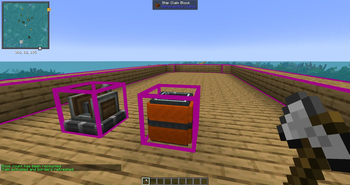
You can claim Sub-level (ship, aircraft, whatever you want) with the Claim block using its GUI.
You also will have to use Aero claims depending on your Sub-level size.
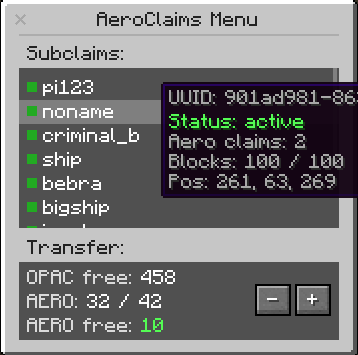
You can acquire Aero-claims by converting regular OPAC claims to the Aero-claims
Each Aero-claim provides protection to certain amount of blocks (can be changed in config).
You can increase the claim size by adding more Aero-claims to Claim block.
Example:
- 1 Aero-claim = 50 blocks
- 20 Aero-claims = 1000 blocks
Feature
- You can place the Claim block only on Sub-level, it scans all the structure. Doesn’t work outside the Sub-level.
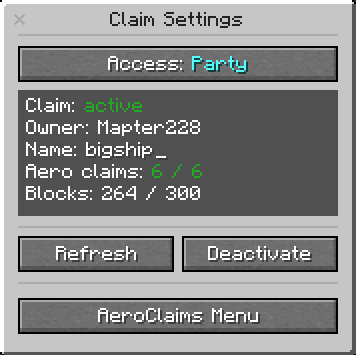
- You can set up permissions: party, ally, all or nobody.
- Simple GUI: claim-activation button, sub-level info, reload borders button. Press "refresh" button after you increased your Sub-level.
- Regular destruction and player-interaction protection.
- Improved create-block-interaction (drills, saws, deployers etc) protection. Protection from the honey glue (from Aeronautics). List will be improved, more items/blocks will be added.
- You can save the Sub-level list with all info as .json-files in the server folder. You can save claimed and unclamed “sub-levels” separately. Mod records sub-level’s - UUID & size, owner’s nickname. The list will be increased.
- Useful commands for admins and regular players. Admin commands provide the control over the amount of sub-levels, which can help with server optimization. The list will be increased.
- Set up with the config. The list will be increased.
Commands
For players:
/aeroclaims info - shows all your “sub-levels”, used and left “aero-claims” info.

/aeroclaims transfer to opac <amount> - transfers your “aero-claims” to “opac-claims”

/aeroclaims transfer to aero <amount> - transfers your “opac-claims” to “aero-claims”
For admins:
/aeroclaims sublevels unclaimed clear - deletes all the unclaimed “sub-levels”

/aeroclaims sublevels all/claimed/unclaimed dump - saves all/claimed/unclaimed “sub-levels” as .json-file to the server folder.
Available Versions
How to Install Create Aeronautics: Claims on Your Server
Order Server
Order a Minecraft Java server with at least 4 GB RAM (6 GB recommended).
Set forge Loader
In the panel under "Egg", select the forge loader and matching Minecraft version (1.21.1).
Install Mod
Open the mod browser in the dashboard and search for "Create Aeronautics: Claims". Click "Install" – done! Alternatively, upload the .jar via SFTP to the /mods folder.
Compatibility
Mod Loaders
Minecraft Versions
1.21.1, 1.20.1
Server-side
✓ RequiredRecommended RAM
6 GB(min. 4 GB)Frequently Asked Questions
Create Aeronautics: Claims server crashes on startup – what to do?
Most common cause: wrong forge version or insufficient RAM. Check the server log (latest.log) for "OutOfMemoryError" or "Mixin" errors. With Mado Hosting: ensure at least 4 GB RAM is allocated and the loader matches the mod version (1.21.1). You can switch loaders with one click in the panel.
Is Create Aeronautics: Claims compatible with forge and neoforge?
Create Aeronautics: Claims officially supports forge, neoforge for Minecraft 1.21.1, 1.20.1. The Mado dashboard automatically detects incompatible loader combinations.
Server lagging with Create Aeronautics: Claims – how to optimize performance?
Recommended RAM: 6 GB (per 5 players). Use /spark profiler to check if Create Aeronautics: Claims consumes the most tick time. Common fixes: reduce server view-distance to 8-10, install "performant" or "starlight" as supplementary mods on Forge. With Mado Hosting, your server runs on NVMe SSDs with dedicated CPU cores for minimal latency.
Rent Modded Server
Install Create Aeronautics: Claims with just one click on your server.