
Aeroworld
Rethinking world generation for a better travel experience in Create aeronautic
Screenshots

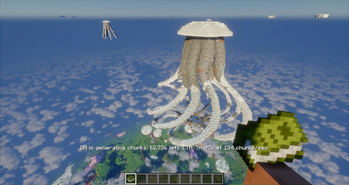

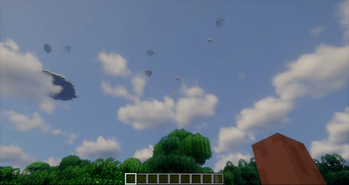
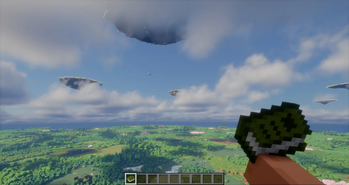

About this Mod
Hello, everyone. First of all, I strongly recommend that you download projects through the official curseforge and modrinth launchers—this will increase the reward for the creators. Thank you all very much for your support!!!

Since the release of the Aeronautics mod, I've seen numerous videos of people traveling through various world structures and even flying into space, but their journeys were particularly lacking in vertical lift. The overworld is limited to 300+ blocks, and there's little point in building power for flight at much higher altitudes.
I've decided to rethink Skywalker; the world now consists of four main layers:
The first is very similar to the overworld, except it contains less ore than the overworld, inside a huge, endless cavern providing easy access to most underground dungeons.
The second layer is located at an altitude of 300-400 blocks within a layer that forms floating islands, abundant with ore and vegetation.
The top layer is made up of huge, packed ellipsoidal boulders, spawning at an altitude of 1000-1100 blocks.
The fourth and final layer is located at an altitude of 1900-2000+. Only diamonds, emeralds, and lapis lazuli spawn on it. All islands will resemble creatures, but currently, only jellyfish-shaped ones.
Also, robot-like structures appear in various layers using a separate library mod. The remaining moving structures are not fully implemented at the time of the first version. Structures that form only in the second layer will be added to the islands as the update progresses. If you want to offer your insight, join the discord.



Available Versions
How to Install Aeroworld on Your Server
Order Server
Order a Minecraft Java server with at least 4 GB RAM (6 GB recommended).
Set neoforge Loader
In the panel under "Egg", select the neoforge loader and matching Minecraft version (1.21.1).
Install Mod
Open the mod browser in the dashboard and search for "Aeroworld". Click "Install" – done! Alternatively, upload the .jar via SFTP to the /mods folder.
Compatibility
Mod Loaders
Minecraft Versions
1.21.1
Server-side
✓ RequiredRecommended RAM
6 GB(min. 4 GB)Frequently Asked Questions
Aeroworld server crashes on startup – what to do?
Most common cause: wrong neoforge version or insufficient RAM. Check the server log (latest.log) for "OutOfMemoryError" or "Mixin" errors. With Mado Hosting: ensure at least 4 GB RAM is allocated and the loader matches the mod version (1.21.1). You can switch loaders with one click in the panel.
Is Aeroworld compatible with neoforge?
Aeroworld officially supports neoforge for Minecraft 1.21.1. The Mado dashboard automatically detects incompatible loader combinations.
Server lagging with Aeroworld – how to optimize performance?
Recommended RAM: 6 GB (per 5 players). Use /spark profiler to check if Aeroworld consumes the most tick time. Common fixes: reduce server view-distance to 8-10, install "performant" or "starlight" as supplementary mods on Forge. With Mado Hosting, your server runs on NVMe SSDs with dedicated CPU cores for minimal latency.
Similar Mods




Rent Modded Server
Install Aeroworld with just one click on your server.