
AetheriumCraft: New Tools & New Armor
Add new Tools & Armor out of Wolfram & Iridium
Screenshots
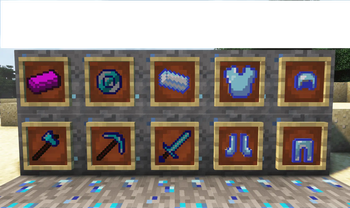
About this Mod
Welcome to AetheriumCraft – Forge the Future!
AetheriumCraft is an immersive and lore-friendly Minecraft modification that expands the vanilla experience with powerful new materials, tools, and armor sets. Dive into a world of high-tier progression and discover what it means to become truly unstoppable.
🛠️ What Does AetheriumCraft Add?
🔩 New Materials:
Wolfram (Tungsten) – A dense and durable metal, ideal for crafting high-durability equipment.
Iridium – A rare, radiant resource used in crafting ultra-strong gear and future high-tech items.
🛡️ New Armor Sets:
Wolfram Armor – High defense, increased durability, and impressive knockback resistance.
⛏️ New Tools & Weapons:
Wolfram Pickaxe – Mines faster and lasts longer than diamond, ideal for endgame resource collection.
More tools and custom weaponry coming soon!
💎 Progression-Based Crafting:
Requires you to explore, mine, and unlock stronger equipment as you master the world of Aetherium.
✨ Future Additions (Planned):
Custom dimensions
Unique mobs and bosses
Iridium-based technology
In-game advancements and progression quests
🌍 Client-Server Compatibility
AetheriumCraft is a client and server-side mod. That means it must be installed on both sides to function correctly, as it adds new items, blocks, and game mechanics.
👥 Community & Extras
Join our Discord community to stay updated, give feedback, and download our exclusive Fabric Client, optimized for AetheriumCraft and other mods.
🔗 Join the Discord and download the client here!
Available Versions
How to Install AetheriumCraft: New Tools & New Armor on Your Server
Order Server
Order a Minecraft Java server with at least 3 GB RAM (4 GB recommended).
Set forge Loader
In the panel under "Egg", select the forge loader and matching Minecraft version (1.20.1).
Install Mod
Open the mod browser in the dashboard and search for "AetheriumCraft: New Tools & New Armor". Click "Install" – done! Alternatively, upload the .jar via SFTP to the /mods folder.
Compatibility
Mod Loaders
Minecraft Versions
1.20.1
Server-side
✓ RequiredRecommended RAM
4 GB(min. 3 GB)Frequently Asked Questions
AetheriumCraft: New Tools & New Armor server crashes on startup – what to do?
Most common cause: wrong forge version or insufficient RAM. Check the server log (latest.log) for "OutOfMemoryError" or "Mixin" errors. With Mado Hosting: ensure at least 3 GB RAM is allocated and the loader matches the mod version (1.20.1). You can switch loaders with one click in the panel.
Is AetheriumCraft: New Tools & New Armor compatible with forge?
AetheriumCraft: New Tools & New Armor officially supports forge for Minecraft 1.20.1. The Mado dashboard automatically detects incompatible loader combinations.
Server lagging with AetheriumCraft: New Tools & New Armor – how to optimize performance?
Recommended RAM: 4 GB (per 8 players). Use /spark profiler to check if AetheriumCraft: New Tools & New Armor consumes the most tick time. Common fixes: reduce server view-distance to 8-10, install "performant" or "starlight" as supplementary mods on Forge. With Mado Hosting, your server runs on NVMe SSDs with dedicated CPU cores for minimal latency.
Similar Mods




Rent Modded Server
Install AetheriumCraft: New Tools & New Armor with just one click on your server.