
Afar
A faster, lighter minecraft chunk caching solution
Screenshots
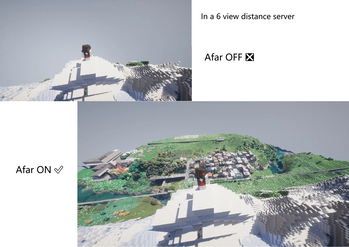
About this Mod
Afar

Afar is a faster, lighter chunk caching solution for minecraft, allowing you to see far beyond the server's view distance.
How It Works
Instead of modifying the complex rendering engine, Afar operates at lower level. It works directly on the client's network connection.
- Cache (Save): It silently listens to and saves all the chunk data packets the server sends to your client into a local database.
- Load (Read): When you move around and need chunks that are within your client's view distance but beyond the server's, Afar seamlessly loads that previously saved data from your cache instead of waiting for the server to send it.
Key Features
🚀 Performance
- Utilizes SQLite as the storage backend, offering significantly faster read/write speeds and smaller file sizes compared to serializing NBT data to files.
🔧 Compatibility
- Works purely at the network connection level, intercepting and forging packets. It makes zero changes to the game's rendering code.
- This makes it theoretically 100% compatible with any rendering optimization mods like Optifine, Sodium, Iris, and any mod that affects chunk rendering or visual aesthetics.
Dependence
- Minecraft SQLite JDBC (modrinth)
- World ID Provider such as VoxelMap and JourneyMap ( Xaero's Map compatibility is still in production.)
Usage
- You can find Afar config button in the settings menu or the mod list menu. All configuration items have corresponding explanations.
- Here are some client-side command you can use
/afar dataInfo    //Show database infomation
/afar runVacuum   //Run database vacuum, which will optimize the size and read/write speed of the database
/afar doDrop      //Delete all chunk data
/afar deleteOld <float:hours>  // Delete all records before the specified database running time. You can check the running time using /afar dataInfo
Disclaimer
- This mod simply re-uses data the server has already sent you. It does not hack the server to get more data. Your client's performance when rendering a larger view distance is dependent on your own PC's capabilities.
Available Versions
How to Install Afar on Your Server
Order Server
Order a Minecraft Java server with at least 3 GB RAM (4 GB recommended).
Set forge Loader
In the panel under "Egg", select the forge loader and matching Minecraft version (1.20.6).
Install Mod
Open the mod browser in the dashboard and search for "Afar". Click "Install" – done! Alternatively, upload the .jar via SFTP to the /mods folder.
Compatibility
Mod Loaders
Minecraft Versions
1.20.6, 1.20.5, 1.20.4 (+3 more)
Server-side
✗ UnsupportedRecommended RAM
4 GB(min. 3 GB)Frequently Asked Questions
Afar server crashes on startup – what to do?
Most common cause: wrong forge version or insufficient RAM. Check the server log (latest.log) for "OutOfMemoryError" or "Mixin" errors. With Mado Hosting: ensure at least 3 GB RAM is allocated and the loader matches the mod version (1.20.6). You can switch loaders with one click in the panel.
Is Afar compatible with forge?
Afar officially supports forge for Minecraft 1.20.6, 1.20.5, 1.20.4. The Mado dashboard automatically detects incompatible loader combinations.
Server lagging with Afar – how to optimize performance?
Recommended RAM: 4 GB (per 8 players). Use /spark profiler to check if Afar consumes the most tick time. Common fixes: reduce server view-distance to 8-10, install "performant" or "starlight" as supplementary mods on Forge. With Mado Hosting, your server runs on NVMe SSDs with dedicated CPU cores for minimal latency.
Rent Modded Server
Install Afar with just one click on your server.