
AFK Utilitys
Advanced AFK management mod for Minecraft Fabric with anti-kick protection, auto-reconnect, safety disconnect, and hunger management
Screenshots



About this Mod
AFK Utilitys

An advanced utility mod for Minecraft Fabric that manages AFK (Away From Keyboard) states with intelligent automation and safety features.
Settings Keybind:
K
Use Cases
- Server AFK Protection: Prevent kicks from AFK timeout systems
- Safety Management: Auto-disconnect when health drops or taking damage
- Automatic Reconnection: Never lose your spot during server restarts
- Hunger Management: Keep your hunger bar full while away
- Farm Automation: Maintain activity for passive mob farms and auto-clickers

Features
Anti-AFK System
Simulates natural player activity to prevent server kicks:
- Auto-Jump: Randomized jumping intervals for natural appearance
- Auto-Swing: Periodic hand swinging with Use (right-click) interaction. Perfect for flipping levers or interacting with buttons automatically.
- Auto-Sneak: Configurable crouch timing and intervals
- Strafe Mode: Automatic left-right movement to avoid coordinate-based detection
- Spin Mode:
- Client Mode: Rotates your camera view visually
- Server Mode: Sends rotation packets while keeping your screen static
- Chat Messages: Send periodic messages with custom text
- Interval range: 0.1 to 30 minutes
- Custom message support
Auto Reconnect
Smart reconnection system for uninterrupted gameplay:
- Server Retention: Automatically remembers last connected server
- Countdown Timer: Visual countdown on disconnect screen
- Quick Toggle: Enable/disable directly from disconnect screen
- Configurable Delay: Set custom wait time before reconnection attempt
Auto Log (Safety Disconnect)
Protect your character while away:
- HP Threshold: Disconnect when health drops below configured value
- Instant Damage Mode: Disconnect immediately upon taking any damage
- Safety Lock: Optional Auto Reconnect disable after Auto Log trigger
- Death Prevention: Keeps you safe in dangerous situations
Auto Eat
Intelligent hunger management:
- Smart Timing: Only eats when hunger restoration won't be wasted
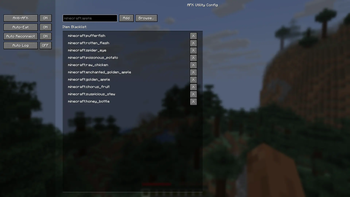
- Blacklist Support: Exclude specific items (e.g., Rotten Flesh, Spider Eyes)
- Efficient Consumption: Calculates optimal eating times based on food value
Installation
Requirements
- Minecraft 1.21+
- Fabric Loader 0.16.0+
- FabricAPI
Download
Download the mod from Modrinth and place the .jar file into your .minecraft/mods folder.
Configuration
The mod features a sidebar-based configuration UI with four main categories:
- Anti-AFK: Configure all anti-kick features and intervals
- Auto-Eat: Set hunger thresholds and manage food blacklist
- Reconnect: Adjust reconnection delay and toggle auto-reconnect
- Auto-Log: Configure health thresholds and safety settings
Configuration File
Settings are saved to:
.minecraft/config/afkutility.json
Example configuration:
{
  "antiAfk": {
    "autoJump": true,
    "autoSwing": true,
    "autoSneak": false,
    "sneakTime": 2.0,
    "strafeMode": false,
    "spinMode": "OFF",
    "chatMessages": false,
    "messageInterval": 5.0,
    "customMessage": "I am not AFK"
  },
  "autoReconnect": {
    "enabled": true,
    "delay": 5
  },
  "autoLog": {
    "enabled": true,
    "healthThreshold": 4.0,
    "onDamage": false,
    "disableReconnect": true
  },
  "autoEat": {
    "enabled": true,
    "blacklist": ["minecraft:rotten_flesh", "minecraft:spider_eye"]
  }
}
For Developers
Building
./gradlew build
Output: build/libs/afk-utility-1.0.0.jar
Project Structure
src/client/java/dev/afk/utility/
├── AFKUtilityClient.java          # Client entrypoint
├── config/
│   └── ModConfig.java             # Configuration management
├── features/
│   ├── AntiAFK.java               # Anti-AFK implementations
│   ├── AutoReconnect.java         # Reconnection handler
│   ├── AutoLog.java               # Safety disconnect
│   └── AutoEat.java               # Hunger management
├── mixin/client/
│   ├── DisconnectScreenMixin.java # UI integration
│   └── ClientPlayerMixin.java     # Player event hooks
└── screen/
    └── ConfigScreen.java          # Sidebar configuration UI
License
MIT
Credits
- Fabric API Team
- Minecraft Modding Community
Available Versions
How to Install AFK Utilitys on Your Server
Order Server
Order a Minecraft Java server with at least 3 GB RAM (4 GB recommended).
Set fabric Loader
In the panel under "Egg", select the fabric loader and matching Minecraft version (1.21.11).
Install Mod
Open the mod browser in the dashboard and search for "AFK Utilitys". Click "Install" – done! Alternatively, upload the .jar via SFTP to the /mods folder.
Compatibility
Mod Loaders
Minecraft Versions
1.21.11, 1.21.10, 1.21.9 (+9 more)
Server-side
✗ UnsupportedRecommended RAM
4 GB(min. 3 GB)Frequently Asked Questions
AFK Utilitys server crashes on startup – what to do?
Most common cause: wrong fabric version or insufficient RAM. Check the server log (latest.log) for "OutOfMemoryError" or "Mixin" errors. With Mado Hosting: ensure at least 3 GB RAM is allocated and the loader matches the mod version (1.21.11). You can switch loaders with one click in the panel.
Is AFK Utilitys compatible with fabric?
AFK Utilitys officially supports fabric for Minecraft 1.21.11, 1.21.10, 1.21.9. The Mado dashboard automatically detects incompatible loader combinations.
Server lagging with AFK Utilitys – how to optimize performance?
Recommended RAM: 4 GB (per 8 players). Use /spark profiler to check if AFK Utilitys consumes the most tick time. Common fixes: reduce server view-distance to 8-10, install "performant" or "starlight" as supplementary mods on Forge. With Mado Hosting, your server runs on NVMe SSDs with dedicated CPU cores for minimal latency.
Similar Mods






Rent Modded Server
Install AFK Utilitys with just one click on your server.