
Afrikalify Music
A modern in-game music player with themes, queues, and Simple Voice Chat support.
Screenshots
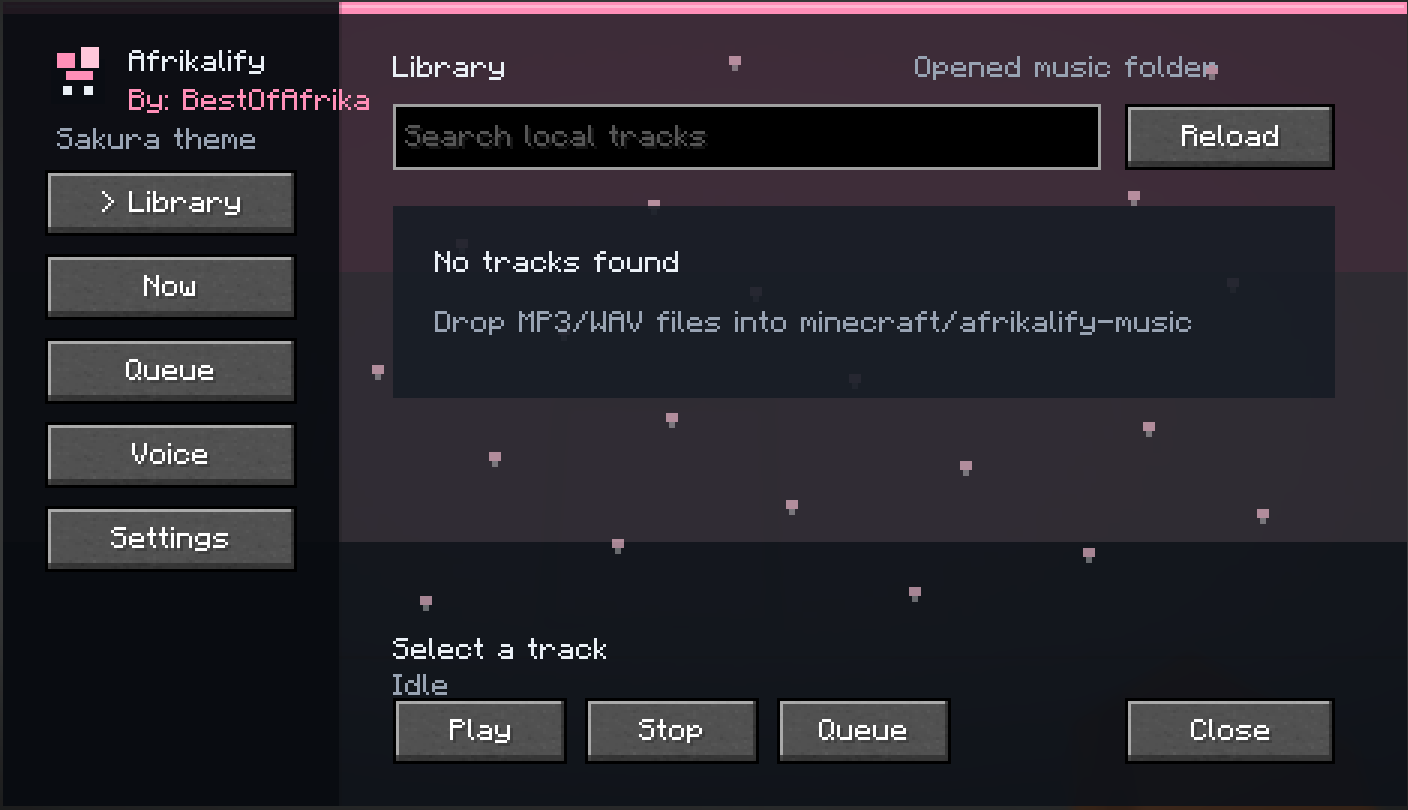
About this Mod
Afrikalify
Afrikalify is a modern in-game music player for Minecraft, made for players who want a Spotify-like music menu directly inside the game.
Open the Afrikalify menu, search your local songs, play music, queue tracks, change the look of the GUI, and optionally mix your music into Simple Voice Chat so friends can hear it too.
What It Offers
- Modern transparent music GUI
- Open with the keybind or through Mod Menu
- Search and play local music files
- Queue system for tracks
- Music folder button so you can quickly open where songs go
- Volume controls
- Softer sound option for smoother playback
- Simple Voice Chat support
- Configurable settings through Mod Menu
- Custom Afrikalify logo
- GUI credit:
By: BestOfAfrika
How It Works
Afrikalify reads music from a local folder on your computer. Put your supported music files into the Afrikalify music folder, open the menu in-game, press reload, then search and play your tracks.
The mod does not stream from Spotify or YouTube. It plays your own local music files.
For Simple Voice Chat broadcasting, enable the broadcast option inside Afrikalify. You may need to use open mic or hold your push-to-talk key so Simple Voice Chat sends audio.
Themes
Afrikalify includes a bunch of built-in themes so you can style the menu your way:
- Emerald
- Ocean
- Rose
- Cat Pink
- Cat Mint
- Cat Lavender
- Cat Blue
- Cat Fire
- Dog
- Dog Blue
- Elephant
- Elephant Rose
- Afrika Red
- Afrika Sunset
- Sakura
- Petal Dream
- Forest
- Ice
- Lava
- Candy
- Midnight
- Gold
- Neon Gradient
- Sunset Gradient
- Afrika Gradient
Some themes include extra animated details, like cat ears, dog ears, elephant ears, gradients, and falling petals.
Requirements
- Fabric Loader
- Fabric API
- Minecraft 1.21.11
- Mod Menu is recommended
- Simple Voice Chat is optional, only needed for voice broadcast features
Notes
Afrikalify is client-side focused. Other players do not need Afrikalify installed to hear music through Simple Voice Chat, but they do need to be connected to a server using Simple Voice Chat.
Available Versions
How to Install Afrikalify Music on Your Server
Order Server
Order a Minecraft Java server with at least 3 GB RAM (4 GB recommended).
Set fabric Loader
In the panel under "Egg", select the fabric loader and matching Minecraft version (1.21.11).
Install Mod
Open the mod browser in the dashboard and search for "Afrikalify Music". Click "Install" – done! Alternatively, upload the .jar via SFTP to the /mods folder.
Compatibility
Mod Loaders
Minecraft Versions
1.21.11
Server-side
✗ UnsupportedRecommended RAM
4 GB(min. 3 GB)Frequently Asked Questions
Afrikalify Music server crashes on startup – what to do?
Most common cause: wrong fabric version or insufficient RAM. Check the server log (latest.log) for "OutOfMemoryError" or "Mixin" errors. With Mado Hosting: ensure at least 3 GB RAM is allocated and the loader matches the mod version (1.21.11). You can switch loaders with one click in the panel.
Is Afrikalify Music compatible with fabric?
Afrikalify Music officially supports fabric for Minecraft 1.21.11. The Mado dashboard automatically detects incompatible loader combinations.
Server lagging with Afrikalify Music – how to optimize performance?
Recommended RAM: 4 GB (per 8 players). Use /spark profiler to check if Afrikalify Music consumes the most tick time. Common fixes: reduce server view-distance to 8-10, install "performant" or "starlight" as supplementary mods on Forge. With Mado Hosting, your server runs on NVMe SSDs with dedicated CPU cores for minimal latency.
Similar Mods



Rent Modded Server
Install Afrikalify Music with just one click on your server.