
AgalarRPG
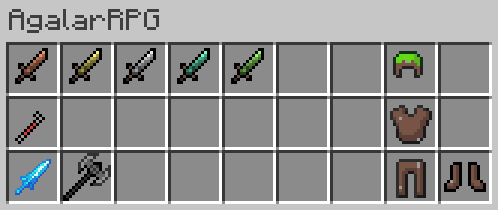
AgalarRPG is a Minecraft mod that enhances gameplay with new weapons, armor, and items. It introduces RPG elements, encouraging exploration and combat while offering diverse playstyles and strategic depth.
Screenshots
About this Mod
Agalar Team has granted permission to Modiverse mod team for development on Minecraft Bedrock Edition.
Project Summary
Transform your Minecraft experience with AgalarRPG, a mod that introduces new weapons, armor, and unique features to enhance gameplay.
Project Description
AgalarRPG is an immersive RPG mod for Minecraft designed to enrich your gameplay with a variety of new features and content. Here's what you can expect:
Features:
Weapons: Discover an array of new weapons, including daggers and swords, each with unique attributes and abilities.
Armor: Equip yourself with new armor sets that provide enhanced protection and special bonuses.
Items: Explore a diverse collection of other cool items that add depth and excitement to your adventures.
Impact on User Experience: AgalarRPG significantly enhances the traditional Minecraft experience by introducing RPG elements that encourage exploration and combat. The new weapons and armor allow for varied playstyles, while the additional items create opportunities for discovery and strategic gameplay. Whether you're battling mobs or exploring new terrains, AgalarRPG adds layers of depth and enjoyment to your Minecraft world.
This mod is created by using MCreator

Available Versions
How to Install AgalarRPG on Your Server
Order Server
Order a Minecraft Java server with at least 3 GB RAM (4 GB recommended).
Set forge Loader
In the panel under "Egg", select the forge loader and matching Minecraft version (1.16.5).
Install Mod
Open the mod browser in the dashboard and search for "AgalarRPG". Click "Install" – done! Alternatively, upload the .jar via SFTP to the /mods folder.
Compatibility
Mod Loaders
Minecraft Versions
1.16.5
Server-side
✓ RequiredRecommended RAM
4 GB(min. 3 GB)Frequently Asked Questions
AgalarRPG server crashes on startup – what to do?
Most common cause: wrong forge version or insufficient RAM. Check the server log (latest.log) for "OutOfMemoryError" or "Mixin" errors. With Mado Hosting: ensure at least 3 GB RAM is allocated and the loader matches the mod version (1.16.5). You can switch loaders with one click in the panel.
Is AgalarRPG compatible with forge?
AgalarRPG officially supports forge for Minecraft 1.16.5. The Mado dashboard automatically detects incompatible loader combinations.
Server lagging with AgalarRPG – how to optimize performance?
Recommended RAM: 4 GB (per 8 players). Use /spark profiler to check if AgalarRPG consumes the most tick time. Common fixes: reduce server view-distance to 8-10, install "performant" or "starlight" as supplementary mods on Forge. With Mado Hosting, your server runs on NVMe SSDs with dedicated CPU cores for minimal latency.
Similar Mods




Rent Modded Server
Install AgalarRPG with just one click on your server.