
Ages Mining
Turn every mining trip into a real expedition
Screenshots
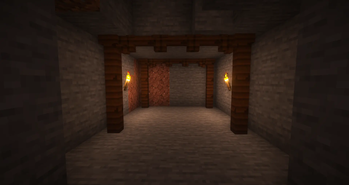

About this Mod
Ages Mining
Turn every mining trip into a real expedition.
Ages Mining brings immersive cave-in mechanics to Minecraft Forge 1.20.1, inspired by TerraFirmaCraft.
Digging deep is no longer routine: unsupported ceilings crack, warn you, and collapse if you ignore the danger.
Why you’ll love it
- High tension, fair gameplay: cave-ins are dangerous, but readable and avoidable.
- Clear warning system: dust, cracking sounds, and action bar alerts before disaster strikes.
- Meaningful engineering loop: build proper mine infrastructure with supports, not just torches.
- Server-ready performance: async checks, queue limits, and caching built in.
Core Features
- Realistic cave-in simulation for underground mining
- Chain collapses for dramatic, natural-looking cave failures
- Configurable damage from falling blocks
- Two support blocks:
Mine Support Pillarfor vertical reinforcementMine Support Beamfor horizontal ceiling support- Admin/debug commands (
/agesmining ...) - Datapack-friendly block tags for compatibility and customization
Built for modpacks
Ages Mining is designed to drop into survival-focused packs and instantly make mining more strategic, immersive, and rewarding.
Fully configurable via:config/agesmining-common.toml
Tune collapse chance, depth thresholds, support ranges, effects, propagation, and performance limits to match your pack’s difficulty and server needs.
Compatibility
- Minecraft:
1.20.1 - Loader:
Forge 47.2.0+ - Optional:
Jadeintegration (client-side)
If you want mining to feel dangerous, atmospheric, and memorable, Ages Mining delivers.
Available Versions
How to Install Ages Mining on Your Server
Order Server
Order a Minecraft Java server with at least 3 GB RAM (4 GB recommended).
Set forge Loader
In the panel under "Egg", select the forge loader and matching Minecraft version (1.20.1).
Install Mod
Open the mod browser in the dashboard and search for "Ages Mining". Click "Install" – done! Alternatively, upload the .jar via SFTP to the /mods folder.
Compatibility
Mod Loaders
Minecraft Versions
1.20.1
Server-side
✓ RequiredRecommended RAM
4 GB(min. 3 GB)Frequently Asked Questions
Ages Mining server crashes on startup – what to do?
Most common cause: wrong forge version or insufficient RAM. Check the server log (latest.log) for "OutOfMemoryError" or "Mixin" errors. With Mado Hosting: ensure at least 3 GB RAM is allocated and the loader matches the mod version (1.20.1). You can switch loaders with one click in the panel.
Is Ages Mining compatible with forge?
Ages Mining officially supports forge for Minecraft 1.20.1. The Mado dashboard automatically detects incompatible loader combinations.
Server lagging with Ages Mining – how to optimize performance?
Recommended RAM: 4 GB (per 8 players). Use /spark profiler to check if Ages Mining consumes the most tick time. Common fixes: reduce server view-distance to 8-10, install "performant" or "starlight" as supplementary mods on Forge. With Mado Hosting, your server runs on NVMe SSDs with dedicated CPU cores for minimal latency.
Similar Mods




Rent Modded Server
Install Ages Mining with just one click on your server.