
Aggregate
A mod that adds and changes many small things. Fully customisable. Game mechanics, biome additions, items, block behaviour and other miscellanea.
Screenshots
About this Mod
Aggregate
A collection of various small additions and changes bundled into one mod. Most can be individually enabled, disabled or configured. All features are disabled by default.
Contents
- Features controlled by via mod config menu:
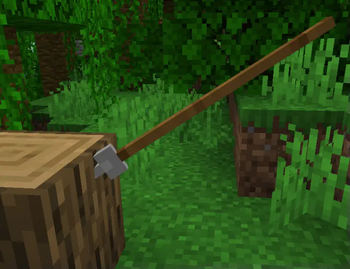
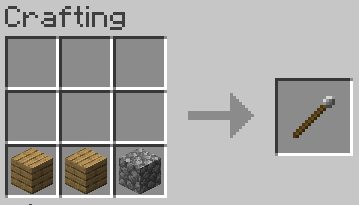
- Added stone javelins. Similar to tridents, but stackable, weaker, and easily craftable.
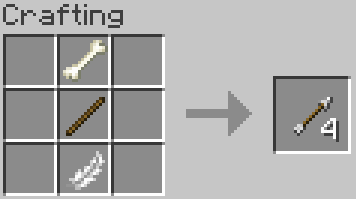
- Large animals drop bones.
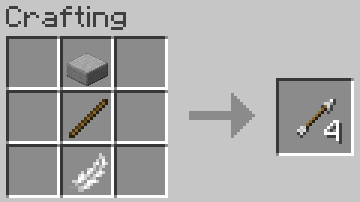
- New crafting recipes for arrows, substituting flint for stone or bones.
- All items are immune to fire, lava and explosions.
- Players and mobs have a couple seconds before they start suffocating inside blocks.
- Fire does not destroy blocks and does not spread.
- Sugar cane can be planted on mud. Planting it on mud doesn't require water.
- Mud blocks slow down movement.
- Creeper explosions don't damage blocks.
- Frogs have random colours.
- Bone meal can be used on mud.
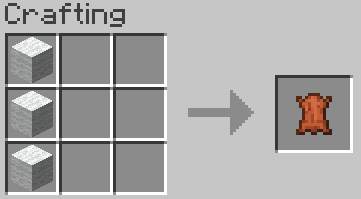
- Leather can be crafted from wool.
- Sub-diamond tools improved.
- Sub-diamond armour improved.
- Disabled escalating level cost penalty for repeated item repairs at anvil.
- Armour weight system - players whose armour weight points cross a threshold are marked as heavy. (chest/legs = 4, boots/helmet = 2, leather = 0).
- Weak blocks (ice, magma, lilypad, mud, moss carpet, sand, gravel) cannot support players wearing heavy armour and will fail in different ways.
- Improved player movement physics. Player air drag and air control greatly reduced. Jumping preserves current speed.
- Players don't sink in water.
- Ice and magma blocks break when a player falls on them from more than 2 blocks height.
- Players can climb 1 to 2 block high walls and cliffs, 3 block high with jump.
- Players and mobs are not knocked away by normal attacks.
- TNT is stronger.
- Player movement speed and sprint speed can be adjusted.
- Disallow replacing water or lava with blocks. Can be toggled for water, lava, source and flowing blocks separately. Option to prevent pouring a fluid bucket into a source block of the same fluid also included.
Some features are available in the form of datapacks (built-in, no additional download needed).
- Features added via the Aggregate biome features datapack:
- Frogs spawn in jungles.
- More grass in swamp, jungle and sparse jungle biomes.
- Mud blocks spawn in swamps and jungles.
- Moss carpets spawn in swamps.
Required mods
- owo-lib : https://modrinth.com/mod/owo-lib
Known Issues and notes
- Built-in datapacks don't get baked into saves, so keep it in mind when updating the mod or transferring saves.
- The diagonal climbing option makes climbing more reliable, but it is slightly exploitable.
- The datapack features may overwrite biome changes made by other mods. Better compatibility is being worked on.
- Changing move/sprint speed might only take effect after dying and respawning (in addition to a restart).
Available Versions
How to Install Aggregate on Your Server
Order Server
Order a Minecraft Java server with at least 4 GB RAM (6 GB recommended).
Set fabric Loader
In the panel under "Egg", select the fabric loader and matching Minecraft version (1.20.1).
Install Mod
Open the mod browser in the dashboard and search for "Aggregate". Click "Install" – done! Alternatively, upload the .jar via SFTP to the /mods folder.
Compatibility
Mod Loaders
Minecraft Versions
1.20.1, 1.20, 1.19.3 (+3 more)
Server-side
✓ RequiredRecommended RAM
6 GB(min. 4 GB)Frequently Asked Questions
Aggregate server crashes on startup – what to do?
Most common cause: wrong fabric version or insufficient RAM. Check the server log (latest.log) for "OutOfMemoryError" or "Mixin" errors. With Mado Hosting: ensure at least 4 GB RAM is allocated and the loader matches the mod version (1.20.1). You can switch loaders with one click in the panel.
Is Aggregate compatible with fabric?
Aggregate officially supports fabric for Minecraft 1.20.1, 1.20, 1.19.3. The Mado dashboard automatically detects incompatible loader combinations.
Server lagging with Aggregate – how to optimize performance?
Recommended RAM: 6 GB (per 5 players). Use /spark profiler to check if Aggregate consumes the most tick time. Common fixes: reduce server view-distance to 8-10, install "performant" or "starlight" as supplementary mods on Forge. With Mado Hosting, your server runs on NVMe SSDs with dedicated CPU cores for minimal latency.
Similar Mods




![[TaCZ] Timeless and Classics Zero](https://cdn.modrinth.com/data/SzzJttH8/fd27766d2bb8390d284696b1dbd358f87e081439_96.webp)

Rent Modded Server
Install Aggregate with just one click on your server.