
AgriTech: Evolved
AgriTech: Evolved is a comprehensive agricultural automation mod for Minecraft that enhances farming with advanced machines, modules, and extensive mod compatibility.
About this Mod
AgriTech: Evolved
AgriTech: Evolved is a comprehensive agricultural automation mod for Minecraft that enhances farming with advanced machines, modules, and extensive mod compatibility.
Core Features
Automated Planters
- Basic Planter: A simple wooden planter that automatically grows crops and saplings. Automatically outputs drops to a container under it. Available in all 11 vanilla wood types.
- Advanced Planter: A high-tech planter with energy consumption, module slots, fertilizer support, and enhanced automation capabilities
Cloche
A glass bell jar that attaches to any planter, boosting both growth speed and harvest yield. Stacks with fertilizer and modules for maximum efficiency. Configurable speed and yield multipliers.
- Right-click a planter with a cloche to attach it
- Shift-right-click with an empty hand to detach and recover it
- Breaking a cloched planter drops both items separately
Machines
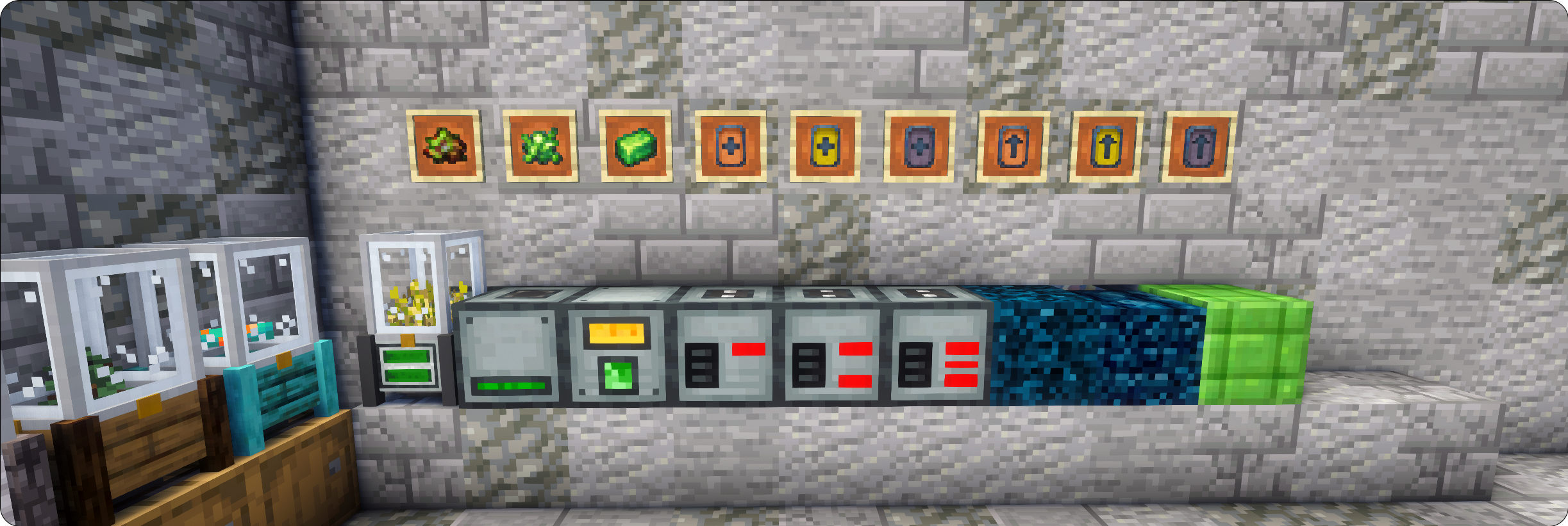
- Composter: Converts organic materials into biomass fuel and fertilizer
- Biomass Burner: Generates RF energy from crude biomass, biomass, and compacted biomass
- Energy Capacitors: Three tiers of energy storage (Tier 1: 500k RF, Tier 2: 1M RF, Tier 3: 4M RF)
Enhancement Modules
- Speed Modules (MK1-MK3): Increase processing speed at the cost of higher power consumption
- Yield Modules (MK1-MK3): Boost harvest yields while reducing processing speed
Specialized Blocks
- Mulch: Natural growth accelerator providing 50% speed boost
- Infused Farmland: Premium soil offering 100% growth speed increase
Fertilizer Support
Fertilizer support via data-maps:
- Vanilla bone meal
- Mystical Agriculture fertilizers
- Immersive Engineering fertilizers
- Forbidden & Arcanus arcane bone meal
Fertilizer can be automated via hopper or pipe into any of the four cardinal sides of the planters.
Data-Driven
The entire system is data-driven. Seeds, saplings, soils, and fertilizers are all defined through data rather than hard-coded, meaning you can fully customize, extend, or override any of them.
This is supported through:
- Datapacks — Add or remove crop/sapling/soil/fertilizer entries using standard datapack JSON files. Drop a datapack into your world or modpack.
- KubeJS — Script additions, removals, and overrides directly in KubeJS server scripts for tighter modpack integration and dynamic control.
This means you can:
- Register entirely new seeds or saplings from any mod not natively supported
- Define custom soils and their growth speed modifiers (or override existing supported soils' modifiers)
- Add new fertilizer types and their effect values (or override existing supported fertilizers' modifiers)
- Override any built-in entry to suit your modpack's needs
Mod Compatibility
Supported Crop Mods
- Mystical Agriculture & Mystical Agradditions
- Farmer's Delight
- Ars Nouveau
- Silent Gear
- Immersive Engineering
- Occultism
- Cobblemon
- Pam's HarvestCraft 2 - Crops
- Actually Additions
- Croptopia
- The Aether II
Supported Tree Mods
- Ars Nouveau & Ars Elemental
- Forbidden & Arcanus
- Integrated Dynamics
- Silent Gear
- Occultism
- Cobblemon
- Pam's HarvestCraft 2 - Trees
- Croptopia
- EvilCraft
- The Aether II
Supported Soil Mods
- Mystical Agriculture farmlands
- Farmer's Delight soils
- Just Dire Things goosoils
- The Aether II
Balance Configuration
Fine-tune module effectiveness, power consumption, and processing times
Live Config Reloading
No server/client restart required. Changes to crops, soils, fertilizers via the overrider toml, or compatibility settings can be applied instantly via in-game commands.
| Command | Effect |
|---|---|
/agritechevolved reload |
Reloads all configs |
Failed reloads report errors directly in chat rather than silently failing.
Interactive Placement
- Right-click with seeds to insert directly into planters
- Right-click with saplings for instant placement
- Right-click with soil blocks for instant placement
- Right-click with hoes to till compatible blocks
- Right-click with mystical essence to convert vanilla farmland to the mystical farmland
Visual Feedback
- Real-time rendering of planted crops and soil types
- Progress bars for all processing operations
- Audio feedback for successful interactions
Energy System
Uses RF power with configurable consumption rates:
- Advanced Planter: 64 RF/t base consumption
- Composter: 64 RF/t base consumption
- Module power scaling based on effectiveness
JEI Integration
- Compatible crop/soil combinations of the planters
Jade Integration
- Displays current crop or sapling name
- Shows growth stage and progress percentage
- Shows active soil type and its growth modifier
- Shows active fertilizer when one is slotted
- Shows cloche status with speed and yield modifiers
Available Versions
How to Install AgriTech: Evolved on Your Server
Order Server
Order a Minecraft Java server with at least 3 GB RAM (4 GB recommended).
Set neoforge Loader
In the panel under "Egg", select the neoforge loader and matching Minecraft version (26.1.2).
Install Mod
Open the mod browser in the dashboard and search for "AgriTech: Evolved". Click "Install" – done! Alternatively, upload the .jar via SFTP to the /mods folder.
Compatibility
Mod Loaders
Minecraft Versions
26.1.2, 1.21.1
Server-side
✓ RequiredRecommended RAM
4 GB(min. 3 GB)Frequently Asked Questions
AgriTech: Evolved server crashes on startup – what to do?
Most common cause: wrong neoforge version or insufficient RAM. Check the server log (latest.log) for "OutOfMemoryError" or "Mixin" errors. With Mado Hosting: ensure at least 3 GB RAM is allocated and the loader matches the mod version (26.1.2). You can switch loaders with one click in the panel.
Is AgriTech: Evolved compatible with neoforge?
AgriTech: Evolved officially supports neoforge for Minecraft 26.1.2, 1.21.1. The Mado dashboard automatically detects incompatible loader combinations.
Server lagging with AgriTech: Evolved – how to optimize performance?
Recommended RAM: 4 GB (per 8 players). Use /spark profiler to check if AgriTech: Evolved consumes the most tick time. Common fixes: reduce server view-distance to 8-10, install "performant" or "starlight" as supplementary mods on Forge. With Mado Hosting, your server runs on NVMe SSDs with dedicated CPU cores for minimal latency.
Similar Mods



Rent Modded Server
Install AgriTech: Evolved with just one click on your server.