
AI Tooltip
An intelligent AI-powered HUD tooltip that uses Gemini 2.5 Flash to instantly describe any block or entity you look at!
Screenshots
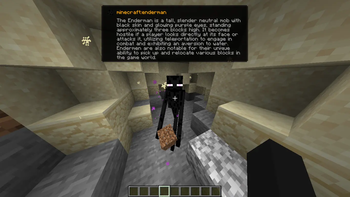
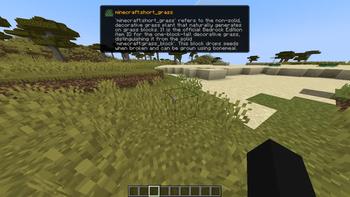
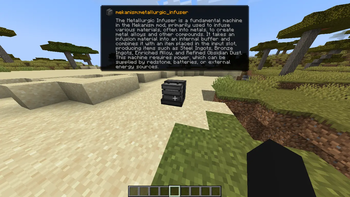
About this Mod
AI Tooltip
AI Tooltip is a simple, polished client-side mod for NeoForge 1.21.1 that integrates Google's Gemini 2.5 Flash AI directly into your Minecraft HUD!
Ever look at a strange modded block or entity and wonder what it does? Now you can just press a keybind!
Features
- Smart Descriptions: Uses Gemini 2.5 Flash to generate a factual, 2-3 sentence description of any Block or Entity you are looking at.
- Google Web Search Grounding: The AI isn't just guessing; if you enable it, the AI browses the live web to find accurate, up-to-date documentation on obscure modded items before it answers you!
- Native Tooltip UI: Renders a gorgeous, native-looking tooltip right below your crosshair. It even pulls the exact Item Icon and Mod ID of the block or entity!
- Hold ALT to Expand: The tooltip defaults to a single, compact summary line so it doesn't clutter your screen. Hold the
ALTkey to instantly expand the box and read the full paragraph. - Optimized & Cached: It only queries the API once per unique block/entity and caches the response in memory, meaning you won't burn through your API quota looking at the same chest twice.
How to Use
- Install the Mod: Drop
aitooltipinto yourmodsfolder. - Launch Minecraft: Launch the game at least once so the mod can generate its configuration file.
- Configure your API Key:
- Go to your Minecraft folder and open
config/aitooltip_config.json. - Get a free API key from Google AI Studio (https://aistudio.google.com/).
- Replace
"PUT_YOUR_GEMINI_KEY_HERE"with your actual key and save the file.
- Go to your Minecraft folder and open
- Toggle the HUD In-Game:
- Join a world or server.
- Press
M(by default, can be changed in Options > Controls) to toggle the AI Tooltip HUD on or off. - Look at something!
Configuration (config/aitooltip_config.json)
{
  "geminiApiKey": "YOUR_KEY_HERE",
  "useWebSearch": true
}
geminiApiKey: Your Google Gemini API key.useWebSearch: Set totrue(default) to allow the AI to browse the internet for better answers on modded content. Set tofalseif you want slightly faster, but potentially less accurate, responses.
Credits
Made by arthurus36.
Available Versions
How to Install AI Tooltip on Your Server
Order Server
Order a Minecraft Java server with at least 3 GB RAM (4 GB recommended).
Set fabric Loader
In the panel under "Egg", select the fabric loader and matching Minecraft version (1.21.11).
Install Mod
Open the mod browser in the dashboard and search for "AI Tooltip". Click "Install" – done! Alternatively, upload the .jar via SFTP to the /mods folder.
Compatibility
Mod Loaders
Minecraft Versions
1.21.11, 1.21.1
Server-side
✗ UnsupportedRecommended RAM
4 GB(min. 3 GB)Frequently Asked Questions
AI Tooltip server crashes on startup – what to do?
Most common cause: wrong fabric version or insufficient RAM. Check the server log (latest.log) for "OutOfMemoryError" or "Mixin" errors. With Mado Hosting: ensure at least 3 GB RAM is allocated and the loader matches the mod version (1.21.11). You can switch loaders with one click in the panel.
Is AI Tooltip compatible with fabric and neoforge?
AI Tooltip officially supports fabric, neoforge for Minecraft 1.21.11, 1.21.1. The Mado dashboard automatically detects incompatible loader combinations.
Server lagging with AI Tooltip – how to optimize performance?
Recommended RAM: 4 GB (per 8 players). Use /spark profiler to check if AI Tooltip consumes the most tick time. Common fixes: reduce server view-distance to 8-10, install "performant" or "starlight" as supplementary mods on Forge. With Mado Hosting, your server runs on NVMe SSDs with dedicated CPU cores for minimal latency.
Rent Modded Server
Install AI Tooltip with just one click on your server.