
Aircraft cursor
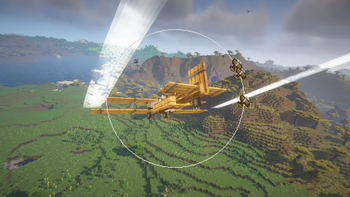
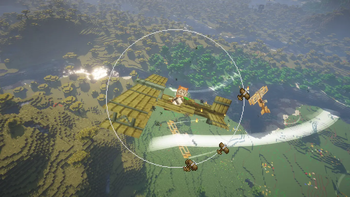
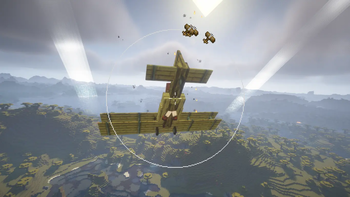
Aircraft Cursor is a client-side addon for the Immersive Aircraft mod that displays visual indicators on the edges of your screen, pointing in the direction of nearby enemy aircraft that are out of your field of view.
Screenshots
About this Mod
Aircraft Cursor (Radar)
Aircraft Cursor is a lightweight, client-side Minecraft mod designed to improve your situational awareness and safety while flying. No more blinding head-on collisions or losing track of your flight formation!
The mod introduces a clean, minimal circular radar GUI directly in the center of your screen (integrated into your crosshair).
🚀 Features
- Dynamic Visibility: The radar is intelligent. It stays completely hidden during regular gameplay to keep your HUD clean, and only activates automatically when you are sitting/riding inside an aircraft.
- Proximity Tracking: Displays real-time positioning and proximity of any nearby aircraft relative to you.
- Minimalist Design: Positioned right at the center of the screen so you can monitor your surroundings without taking your eyes off your flight path.
🛠️ Compatibility & Requirements
- This is a Client-Side mod. You do not need to install it on the server to work, but it is highly recommended for multiplayer servers with heavy aviation action!
- Note: Designed to work seamlessly with aircraft-focused mods (such as Immersive Aircraft).
📄 License & Credits
- License: Distributed under the MIT License.
- Credits: Aircraft icon sprite originally created by Conczin (from the Immersive Aircraft mod).
Available Versions
How to Install Aircraft cursor on Your Server
Order Server
Order a Minecraft Java server with at least 3 GB RAM (4 GB recommended).
Set fabric Loader
In the panel under "Egg", select the fabric loader and matching Minecraft version (1.21.11).
Install Mod
Open the mod browser in the dashboard and search for "Aircraft cursor". Click "Install" – done! Alternatively, upload the .jar via SFTP to the /mods folder.
Compatibility
Mod Loaders
Minecraft Versions
1.21.11, 1.21.10, 1.21.9 (+8 more)
Server-side
✗ UnsupportedRecommended RAM
4 GB(min. 3 GB)Frequently Asked Questions
Aircraft cursor server crashes on startup – what to do?
Most common cause: wrong fabric version or insufficient RAM. Check the server log (latest.log) for "OutOfMemoryError" or "Mixin" errors. With Mado Hosting: ensure at least 3 GB RAM is allocated and the loader matches the mod version (1.21.11). You can switch loaders with one click in the panel.
Is Aircraft cursor compatible with fabric?
Aircraft cursor officially supports fabric for Minecraft 1.21.11, 1.21.10, 1.21.9. The Mado dashboard automatically detects incompatible loader combinations.
Server lagging with Aircraft cursor – how to optimize performance?
Recommended RAM: 4 GB (per 8 players). Use /spark profiler to check if Aircraft cursor consumes the most tick time. Common fixes: reduce server view-distance to 8-10, install "performant" or "starlight" as supplementary mods on Forge. With Mado Hosting, your server runs on NVMe SSDs with dedicated CPU cores for minimal latency.
Rent Modded Server
Install Aircraft cursor with just one click on your server.