
Am I Up To Date?
Provides notifications for mod pack updates on the main menu and in chat. Supports FancyMenu!
Screenshots
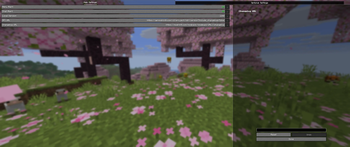
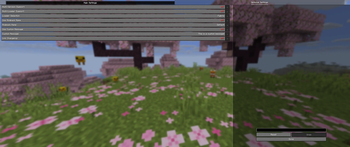
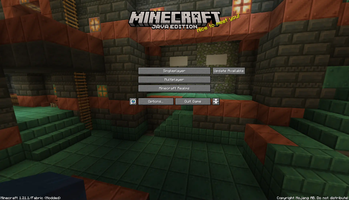
About this Mod


Am I Up To Date is a lightweight mod designed to be included in modpacks to check the local version against the most recent version and notify the user of an update. Supports FancyMenu!
Usage
Text Guide
Setup Am I Up To Date? for your modpack:
- Click the "More Options" button on your modpack page
- Select "Copy ID"
- Paste what you've copied into the URL in the "API URL" section replacing
- Replace the
part of the URL in "Changelog URL" with your pack's URL - Save!
Example (for the "Modern Hypixel Skyblock" modpack):
API URL: https://api.modrinth.com/v2/project/B9GZBYa6/version
Changelog URL: https://modrinth.com/modpack/modern-hypixel-skyblock/changelog
NOTE FOR MOD PACK AUTHORS
aiutd.json5 should be overwritten every update, aiutd-enduser.json5 should be left alone or placed in your YOSBR/ YOSBS folder.
Compatibility
Mods that add elements to the main menu may shift or overlap the position of AIUTD's menu notice, and AIUTD's menu notice may shift or overlap main menu elements of other mods. These situations can be handled on a per-mod basis if requested.
Currently "supported" mods:
FAQ
What modpack providers does this support?
- Just Modrinth.
See Why
This mod only supports Modrinth modpacks for a few reasons.
1: The Modrinth app is the primary sufferer (or at least it was the last time I used it) of the issue this is addressing (that being no obvious visual cue that there is a new version). While some third-party launchers also suffer from this issue, the CurseForge app does an excellent job of showing when there are updates.
2: CurseForge is very strict about using their API; you have to apply to get access, and then if you get it and your connection is being used too much, they may charge you. Additionally, their terms state that only people who are 18 and older can even get an API key, which would limit which pack devs can use it. It is simply not worth the hassle of me getting a key to develop it or any pack devs getting a key to use it.
Available Versions
How to Install Am I Up To Date? on Your Server
Order Server
Order a Minecraft Java server with at least 3 GB RAM (4 GB recommended).
Set fabric Loader
In the panel under "Egg", select the fabric loader and matching Minecraft version (26.1.2).
Install Mod
Open the mod browser in the dashboard and search for "Am I Up To Date?". Click "Install" – done! Alternatively, upload the .jar via SFTP to the /mods folder.
Compatibility
Mod Loaders
Minecraft Versions
26.1.2, 26.1.1, 26.1 (+19 more)
Server-side
✗ UnsupportedRecommended RAM
4 GB(min. 3 GB)Frequently Asked Questions
Am I Up To Date? server crashes on startup – what to do?
Most common cause: wrong fabric version or insufficient RAM. Check the server log (latest.log) for "OutOfMemoryError" or "Mixin" errors. With Mado Hosting: ensure at least 3 GB RAM is allocated and the loader matches the mod version (26.1.2). You can switch loaders with one click in the panel.
Is Am I Up To Date? compatible with fabric and neoforge and quilt?
Am I Up To Date? officially supports fabric, neoforge, quilt for Minecraft 26.1.2, 26.1.1, 26.1. The Mado dashboard automatically detects incompatible loader combinations.
Server lagging with Am I Up To Date? – how to optimize performance?
Recommended RAM: 4 GB (per 8 players). Use /spark profiler to check if Am I Up To Date? consumes the most tick time. Common fixes: reduce server view-distance to 8-10, install "performant" or "starlight" as supplementary mods on Forge. With Mado Hosting, your server runs on NVMe SSDs with dedicated CPU cores for minimal latency.
Rent Modded Server
Install Am I Up To Date? with just one click on your server.