
Ala Industrial
A technology mod featuring an EU energy system, machines, generators, and ore processing for Minecraft.
Screenshots
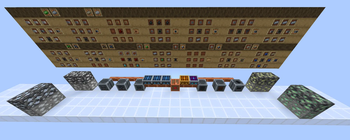
About this Mod
AlaIndustrial is a technology mod for Minecraft that introduces a full electric energy (EU) system. Build your first generator, lay a cable network, start up processing machines — and unlock new materials, alloys, and production chains unavailable in vanilla crafting.
The mod is designed for players who want depth: you need to think about where power comes from, how far it can travel, and how efficiently it is used. Every block is part of a unified engineering system where the balance between production and consumption decides everything.
The current release (v0.1.0) covers the LV tier — the foundation on which higher voltage levels, nuclear power, and advanced technology will be built.
What's included:
- Solar panels in two generations with day and night variants, a fuel generator, and a geothermal generator running on lava
- A cable network with energy loss over distance and a dedicated network diagnostic tool
- Battery Box for storing and smoothing energy between production and consumption
- Macerator, Electric Furnace, Extractor, and Compressor — four LV-tier machines
- Ore doubling via the Macerator: one ore becomes two dust, then two ingots
- Four new ores — Tin, Silver, Nickel, and Uranium — each with a standard and deepslate variant
- New alloys: Bronze, Steel, Invar — integrated into machine production chains
Available Versions
How to Install Ala Industrial on Your Server
Order Server
Order a Minecraft Java server with at least 3 GB RAM (4 GB recommended).
Set fabric Loader
In the panel under "Egg", select the fabric loader and matching Minecraft version (26.2).
Install Mod
Open the mod browser in the dashboard and search for "Ala Industrial". Click "Install" – done! Alternatively, upload the .jar via SFTP to the /mods folder.
Compatibility
Mod Loaders
Minecraft Versions
26.2
Server-side
✓ RequiredRecommended RAM
4 GB(min. 3 GB)Frequently Asked Questions
Ala Industrial server crashes on startup – what to do?
Most common cause: wrong fabric version or insufficient RAM. Check the server log (latest.log) for "OutOfMemoryError" or "Mixin" errors. With Mado Hosting: ensure at least 3 GB RAM is allocated and the loader matches the mod version (26.2). You can switch loaders with one click in the panel.
Is Ala Industrial compatible with fabric?
Ala Industrial officially supports fabric for Minecraft 26.2. The Mado dashboard automatically detects incompatible loader combinations.
Server lagging with Ala Industrial – how to optimize performance?
Recommended RAM: 4 GB (per 8 players). Use /spark profiler to check if Ala Industrial consumes the most tick time. Common fixes: reduce server view-distance to 8-10, install "performant" or "starlight" as supplementary mods on Forge. With Mado Hosting, your server runs on NVMe SSDs with dedicated CPU cores for minimal latency.
Similar Mods





Rent Modded Server
Install Ala Industrial with just one click on your server.