
Alive
Alive brings villagers to life through AI conversations, create unique world and character personas in game using Books and Quills. Powered by baarilliant.ai's Gaming Gateway - no API keys or signup required, with a free tier available.
Screenshots
About this Mod
Alive Mod for Minecraft
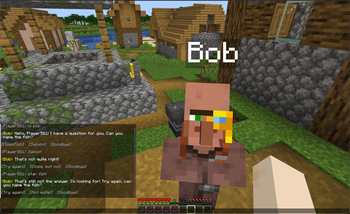
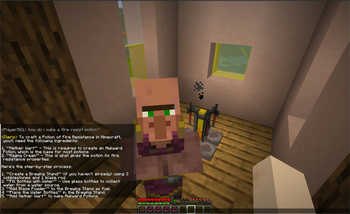
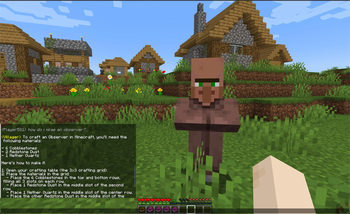
Alive brings villagers to life through AI conversations and enhances both the utility and narrative depth of the game. Whether you need practical advice on crafting and gameplay mechanics or wish to weave intricate lore and RPG-style interactions, Alive Mod brings your world to life.
Initiate conversations with villagers by Shift + left-clicking on them and saying hi. Get answers on crafting, in-game mechanics, and more.
The villager will follow you whilst in conversation. When you're done talking just say goodbye to finish the chat.
Download the mod and if you would like to add default traits download the datapack (add this to your world datapacks folder) alive_datapack.zip
Villager Traits
Every villager has unique traits based on their profession! Farmers, Librarians, Clerics, and others each have distinct:
- Personalities
- Backstories
- Goals
- Fears
- Quirks
- And much more!
All these traits are now fully customizable through data packs, or disabled in the config.
Data Packs
Download the default datapack (add this to your world datapacks folder)
alive_datapack.zip
Our data pack system makes it easy to personalize your World or Mod Pack, you can easily modify:
- Villager traits for each profession
- The pool of villager names
- World instructions for all entities
- Information about various mods
Check out our documentation to learn how to create your own data packs! YOu can also use a Name Tag along with a Book and Quill to create characters in game.
Important Information
Alive Mod free version is only aware of in-game features, lore, and capabilities and is unable to answer or act out real world events or facts. Anyone can use Alive free version so strict guardrails are active, to remove these or for more complex solutions or to integrate AI into your mod without managing API keys, safeguards, and anti-abuse measures, contact us at [email protected].
Note
Your Minecraft UUID is sent to baarilliant.ai used only for safety and to prevent abuse.
AI can make mistakes, always check the facts.
Join the discord! https://discord.gg/7KVqSQ3XXK
Powered by baarilliant.ai Gaming Gateway - no API keys or signup required, with a free tier available.
Alive may not work in some countries or regions, due to restrictions from AI providers Supported Countries.
Available Versions
How to Install Alive on Your Server
Order Server
Order a Minecraft Java server with at least 3 GB RAM (4 GB recommended).
Set fabric Loader
In the panel under "Egg", select the fabric loader and matching Minecraft version (1.21.5).
Install Mod
Open the mod browser in the dashboard and search for "Alive". Click "Install" – done! Alternatively, upload the .jar via SFTP to the /mods folder.
Compatibility
Mod Loaders
Minecraft Versions
1.21.5, 1.21.4
Server-side
✓ RequiredRecommended RAM
4 GB(min. 3 GB)Frequently Asked Questions
Alive server crashes on startup – what to do?
Most common cause: wrong fabric version or insufficient RAM. Check the server log (latest.log) for "OutOfMemoryError" or "Mixin" errors. With Mado Hosting: ensure at least 3 GB RAM is allocated and the loader matches the mod version (1.21.5). You can switch loaders with one click in the panel.
Is Alive compatible with fabric?
Alive officially supports fabric for Minecraft 1.21.5, 1.21.4. The Mado dashboard automatically detects incompatible loader combinations.
Server lagging with Alive – how to optimize performance?
Recommended RAM: 4 GB (per 8 players). Use /spark profiler to check if Alive consumes the most tick time. Common fixes: reduce server view-distance to 8-10, install "performant" or "starlight" as supplementary mods on Forge. With Mado Hosting, your server runs on NVMe SSDs with dedicated CPU cores for minimal latency.
Similar Mods




Rent Modded Server
Install Alive with just one click on your server.