
All-Items
All-Items Mod find all Items in Minecraft also the difficult items(except all Items that need Admin Permissions)
Screenshots

About this Mod
All-Items
Track every item you find in survival Minecraft!
All-Items is a client-side Fabric mod that tracks which items you've discovered in survival mode. It displays a customizable HUD showing your progress, plays sounds on new discoveries, and provides a full GUI to browse your collection.
Features
HUD
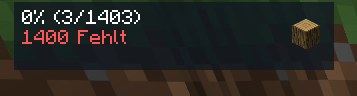
- Progress display — percentage, found/total count, missing items
- Compact mode — all info on a single line
- Last item icon — shows the most recently found item with configurable scale
- Progress bar — solid or multi-stop gradient (horizontal, vertical, diagonal, radial, angled)
- Dimension & biome display — show current dimension and biome on the HUD
- Completion ETA — estimates time to 100% based on your current rate
- Fraction mode — show
found/totalinstead of percentage - HUD scaling & opacity — scale the entire HUD and adjust transparency
- Auto-hide — HUD hides automatically after a configurable idle time
- Fade animation — smooth fade-in effect when a new item is found
- Pulse effect — brief flash on new discoveries
- Separator line — optional line between HUD sections
- Move mode — reposition the HUD with arrow keys (Shift for fine-tuning)
Visual Customization
- Title text — alignment (left/center/right), scale, color, shadow toggle
- Missing text — custom color
- Background — toggle, color, corner radius, padding, blur effect
- Border — toggle, thickness, color, edge snapping in move mode
- Bar — height, gradient mode & colors (multi-stop editor with preview)
- Item — background behind item icon, glint effect on new finds
Notifications
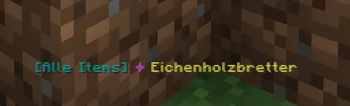
- Chat message — fully customizable template with rich text (§-codes), variables:
%item%,%count%,%total%,%percent%,%prefix% - ActionBar message — same template system
- Title overlay — big screen title on new finds
- Toast notification — Minecraft system toast
- Chat cooldown — prevents message spam
Sound
- 14 note block instruments — harp, bass, bell, chime, bit, banjo, pling, xylophone, iron xylophone, didgeridoo, guitar, snare, hat, cowbell
- Volume & pitch — fully adjustable
- Cooldown — prevents sound spam
- Master toggle — quick disable from settings
- Milestone sound — separate instrument/volume/pitch for milestone events
Tracking
- Automatic detection — scans your inventory for unobtained items
- Per-world saves — separate progress per singleplayer world or server
- Global tracking mode — progress shared across all worlds
- Session counter — tracks items found in the current play session
- Discovery time — records when each item was first found
- Item count — tracks how many times each item has been collected
- Recent finds — last 50 discoveries stored
- Milestones — special notifications at 10%, 25%, 50%, 75%, 90%, and 100%
- Pause tracking — temporarily pause discovery detection
- Blacklist/Whitelist — filter specific items by ID
- Auto-save — configurable interval (in ticks)
- Auto-backup — automatic save file backups
Survival-Only Filter
Items that cannot be obtained in vanilla survival are excluded:
- Creative-only blocks (barrier, bedrock, command blocks, etc.)
- Spawn eggs
- Technical blocks (spawners, portals, structure blocks, etc.)
- Test blocks, infested blocks
- Chorus plant, dirt path, farmland, frogspawn, suspicious blocks, calibrated sculk sensor, budding amethyst, player head
GUI (Chest Inventory)
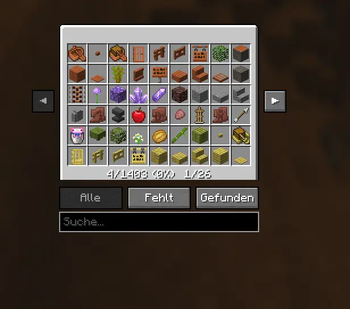
- Grid view — browse all tracked items in a chest-style interface
- Color-coded slots — green for found, red for missing
- Filters — All / Missing / Found
- Search — filter by item name or ID
- Sort modes — A-Z, Found First, Recent, Count
- Tooltip on hover — shows item ID, status, count, discovery time
- Session counter — displayed in the progress bar area
Commands (/ai)
| Command | Description |
|---|---|
/ai |
Show quick progress summary |
/ai overlay |
Toggle HUD on/off |
/ai gui |
Open item inventory |
/ai settings |
Open settings screen |
/ai customize |
Open HUD customization |
/ai move |
Enter HUD move mode |
/ai stats |
Show detailed statistics |
/ai missing |
List all missing items |
/ai recent |
Show recent finds |
/ai export |
Copy JSON export to clipboard |
/ai pause |
Pause/resume tracking |
/ai compact |
Toggle compact mode |
/ai sound |
Toggle sound on/off |
/ai chat |
Toggle chat messages |
/ai actionbar |
Toggle actionbar messages |
Keybinds
| Key | Action |
|---|---|
| R | Toggle HUD overlay |
| N | Toggle sound |
| G | Open items GUI |
| M | Open settings |
| P | Enter move mode |
| (unbound) | Pause tracking |
| (unbound) | Toggle compact mode |
Requirements
- Minecraft: 26.1.2
- Fabric Loader: 0.16+
- Fabric API: Required
Installation
- Install Fabric Loader
- Put Fabric API and All-Items in your
modsfolder - Launch the game — the mod activates automatically
All-Items 3.0 — Created by Monphd
Available Versions
How to Install All-Items on Your Server
Order Server
Order a Minecraft Java server with at least 3 GB RAM (4 GB recommended).
Set fabric Loader
In the panel under "Egg", select the fabric loader and matching Minecraft version (26.1.2).
Install Mod
Open the mod browser in the dashboard and search for "All-Items". Click "Install" – done! Alternatively, upload the .jar via SFTP to the /mods folder.
Compatibility
Mod Loaders
Minecraft Versions
26.1.2
Server-side
✗ UnsupportedRecommended RAM
4 GB(min. 3 GB)Frequently Asked Questions
All-Items server crashes on startup – what to do?
Most common cause: wrong fabric version or insufficient RAM. Check the server log (latest.log) for "OutOfMemoryError" or "Mixin" errors. With Mado Hosting: ensure at least 3 GB RAM is allocated and the loader matches the mod version (26.1.2). You can switch loaders with one click in the panel.
Is All-Items compatible with fabric?
All-Items officially supports fabric for Minecraft 26.1.2. The Mado dashboard automatically detects incompatible loader combinations.
Server lagging with All-Items – how to optimize performance?
Recommended RAM: 4 GB (per 8 players). Use /spark profiler to check if All-Items consumes the most tick time. Common fixes: reduce server view-distance to 8-10, install "performant" or "starlight" as supplementary mods on Forge. With Mado Hosting, your server runs on NVMe SSDs with dedicated CPU cores for minimal latency.
Rent Modded Server
Install All-Items with just one click on your server.