
Alloy
The Alloy mod is an expansion for Minecraft that adds new materials, tools, armor, and unique resource processing mechanics to the game.
Screenshots
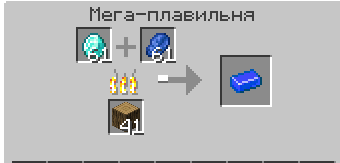
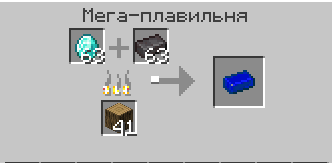
About this Mod
⚒️ Alloy
Alloy is a mod that significantly expands the possibilities of the game by introducing new metals, tools, armor and production units. The mod is aimed at players who want to diversify the process of mining, processing and using resources, as well as gain new experiences from crafting and progression.
✨ What does the mod add?
🔩 New metals and alloys
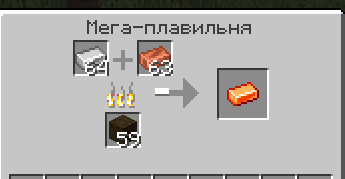
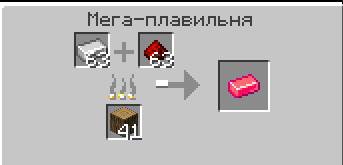
Unique materials such as Azurite, Bronze, Aurum, Aquitaine, Amethyst, Hell Metal and others are added to the game. Each metal has its own properties, appearance and production methods.
🛠️ Tools and weapons
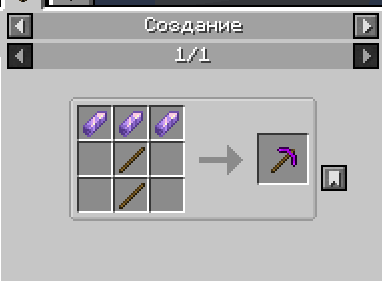
For each new material, a complete set of tools (pickaxe, axe, shovel, hoe, sword) with unique characteristics of strength, speed and damage are implemented.
🛡️ Armor
Each metal allows you to create a complete set of armor, featuring protection and additional effects:
- Amethyst Armor — grants Night Vision effect
- Azurite Armor — grants Speed effect
- Aquitaine Armor — grants Jump Boost effect
- Hell Armor — grants Fire Resistance effect
- Aurum Armor — grants Regeneration effect
🏭 New production units
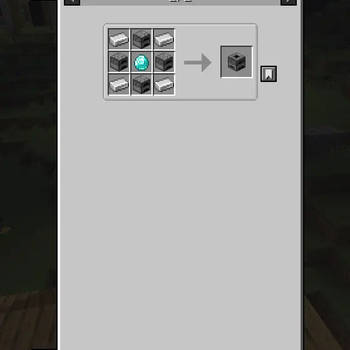
The mod features a unique block — Mega Smelter, which allows you to melt ores and materials more efficiently and quickly, and also has its own interface and animation.
📜 Crafting Recipes
Balanced recipes are implemented for all new items and blocks, integrated into the standard Minecraft crafting system.
🎨 Unique textures and models
All items, blocks and armor have their own high-quality textures and 3D models that harmoniously fit into the style of the game.
🏆 Achievements System
The mod includes a comprehensive achievement system to track your progress:
- 🔥 Embodiment of Fire — Craft a Mega Smelter
- ⚡ Spark of Progress! — Create your first alloy in the Mega Smelter
- 🌙 Master of Night — Craft a full set of amethyst armor
- 💎 First Blood of Earth — Mine any ore from the mod
🎯 Key Features
- ⚔️ Expansion of endgame content through new materials and improved tools
- 🔗 Production chains using new blocks and recipes
- 🎭 Visual and gameplay variety due to unique textures and effects
- ⚖️ Balanced gameplay — all items are carefully balanced and don't overpower vanilla content
- 🌍 Rare ore generation — ores spawn less frequently than diamonds, making them valuable
- 🎮 Seamless integration with vanilla Minecraft mechanics
💡 Why should you download Alloy?
🆕 New impressions: The mod adds a fresh look at the familiar Minecraft mechanics, making the process of mining and processing resources more interesting
⚖️ Balance and integration: All items and blocks are balanced and seamlessly blend into the vanilla gameplay
✨ High-quality implementation: The mod is characterized by high quality of execution, thoughtful textures and stable operation
🔄 Support and development: The project is actively developing, updates with new features are regularly released
🏆 Progression system: Achievements provide additional goals and rewards for your journey
Alloy is the perfect choice for players who want to expand the possibilities of Minecraft, get new challenges and make the gameplay even more exciting!
📋 Requirements
- Minecraft: 1.20.1
- Fabric Loader: ≥0.16.13
- Fabric API: Required
- Java: ≥17
🔧 Installation
- Install Fabric Loader for Minecraft 1.20.1
- Download and install Fabric API
- Place the Alloy mod file in your
modsfolder - Launch Minecraft and enjoy!
Made with ❤️ by ZDev
Available Versions
How to Install Alloy on Your Server
Order Server
Order a Minecraft Java server with at least 3 GB RAM (4 GB recommended).
Set fabric Loader
In the panel under "Egg", select the fabric loader and matching Minecraft version (1.20.6).
Install Mod
Open the mod browser in the dashboard and search for "Alloy". Click "Install" – done! Alternatively, upload the .jar via SFTP to the /mods folder.
Compatibility
Mod Loaders
Minecraft Versions
1.20.6, 1.20.5, 1.20.4 (+3 more)
Server-side
✓ RequiredRecommended RAM
4 GB(min. 3 GB)Frequently Asked Questions
Alloy server crashes on startup – what to do?
Most common cause: wrong fabric version or insufficient RAM. Check the server log (latest.log) for "OutOfMemoryError" or "Mixin" errors. With Mado Hosting: ensure at least 3 GB RAM is allocated and the loader matches the mod version (1.20.6). You can switch loaders with one click in the panel.
Is Alloy compatible with fabric?
Alloy officially supports fabric for Minecraft 1.20.6, 1.20.5, 1.20.4. The Mado dashboard automatically detects incompatible loader combinations.
Server lagging with Alloy – how to optimize performance?
Recommended RAM: 4 GB (per 8 players). Use /spark profiler to check if Alloy consumes the most tick time. Common fixes: reduce server view-distance to 8-10, install "performant" or "starlight" as supplementary mods on Forge. With Mado Hosting, your server runs on NVMe SSDs with dedicated CPU cores for minimal latency.
Similar Mods




Rent Modded Server
Install Alloy with just one click on your server.