
Alpha4J
A Legacy Console Minecraft Mod for Alpha 1.2.6
Screenshots
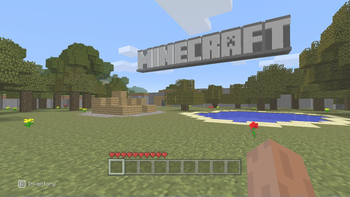
About this Mod
THIS PROJECT WILL NO LONGER RECIEVE UPDATES. ITS SUCCESSOR IS AVAILABLE HERE.

A mod for Minecraft Alpha 1.2.6 that overhauls the game to be more like Legacy Console while still keeping the vibes of Alpha.


Install Instructions
- Download prism or multimc
- Create an instance of Alpha 1.2.6
- Edit instance
- Go to the version section
- Click on "Add to Minecraft.jar"
- Select the zip file you downloaded from releases
- Have fun!
What the mod changes
- Adds
- In game tooltips
- A gamma slider
- An adaptive translucency to the hotbar
- An offset to the hotbar
- An opacity slider for the hotbar translucency
- A slider for the offset amount for the hotbar
- A panorama to every menu background
- A tutorial world
- A toggle for the alpha watermark
- Music to the title screen
- Fixes
- Ore generation bug present before Beta 1.6
- The leaf decay bug present on Alpha 1.2.6
- Changes
- A bit of code to add support for the tutorial world
Copyright Reckobot 2025
Credits
- The Minecraft Architect - TU1 Tutorial World
- The Legacy4J Team for being awesome
NOT AN OFFICIAL MINECRAFT PRODUCT. NOT APPROVED BY OR ASSOCIATED WITH MOJANG OR MICROSOFT.
Available Versions
How to Install Alpha4J on Your Server
Order Server
Order a Minecraft Java server with at least 3 GB RAM (4 GB recommended).
Set modloader Loader
In the panel under "Egg", select the modloader loader and matching Minecraft version (a1.2.6).
Install Mod
Open the mod browser in the dashboard and search for "Alpha4J". Click "Install" – done! Alternatively, upload the .jar via SFTP to the /mods folder.
Compatibility
Mod Loaders
Minecraft Versions
a1.2.6
Server-side
✓ RequiredRecommended RAM
4 GB(min. 3 GB)Frequently Asked Questions
Alpha4J server crashes on startup – what to do?
Most common cause: wrong modloader version or insufficient RAM. Check the server log (latest.log) for "OutOfMemoryError" or "Mixin" errors. With Mado Hosting: ensure at least 3 GB RAM is allocated and the loader matches the mod version (a1.2.6). You can switch loaders with one click in the panel.
Is Alpha4J compatible with modloader?
Alpha4J officially supports modloader for Minecraft a1.2.6. The Mado dashboard automatically detects incompatible loader combinations.
Server lagging with Alpha4J – how to optimize performance?
Recommended RAM: 4 GB (per 8 players). Use /spark profiler to check if Alpha4J consumes the most tick time. Common fixes: reduce server view-distance to 8-10, install "performant" or "starlight" as supplementary mods on Forge. With Mado Hosting, your server runs on NVMe SSDs with dedicated CPU cores for minimal latency.
Similar Mods





Rent Modded Server
Install Alpha4J with just one click on your server.