
Alternating Flux NeoForge
Alternating Flux adds a long-distance, low-loss "super high voltage" power tier to Immersive Engineering, built for hauling power across large distances.
Screenshots
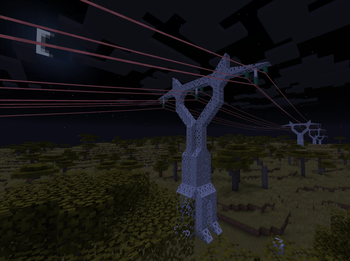
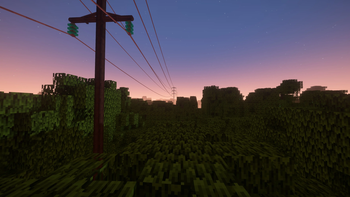
About this Mod
Alternating Flux adds a long-distance, low-loss "super high voltage" power tier to Immersive Engineering, built for hauling power across large distances.
Immersive Engineering's HV wires top out at short distances — you end up placing relays every 32 blocks. Alternating Flux (AF) fixes that:
- Long range — AF wires reach up to 96 blocks per span (configurable)
- Low loss — far less power lost over distance than standard wires
- High throughput — 131,072 IF/t (4x modern HV)
- Transmission only — AF can't power machines directly; you step down to HV through an AF Transformer, just like a real substation
Think of it as the transmission backbone of your grid: bulk power across distance on AF lines, stepped down to HV/MV/LV to actually use.
HOW TO USE
- Craft Constantan Wire, then an AF Wire Coil.
- Place AF Wire Relays as your towers and string AF coil between them.
- Build an AF Transformer — HV on the low side, AF on the high side. Converts 1:1.
- At the far end, another AF Transformer steps it back down to HV for your machines.
REQUIRES Immersive Engineering. Minecraft 1.21.1, NeoForge.
CurseForge and Modrinth only host the latest stable release of Alternating Flux. Older versions, as well as beta and alpha builds, are no longer available on either platform. If you need an older version or want to try a beta/alpha, head over to the GitHub releases page.
This is a BETA — tested on a live server but still shaking out edge cases. Please report any bugs!
Alternating Flux was originally created by AntiBlueQuirk for Minecraft 1.12.2. The concept, design, and original artwork are theirs — this is an update of their work to 1.21.1, shared publicly with their permission. Full credit to AntiBlueQuirk for the original mod.
Available Versions
How to Install Alternating Flux NeoForge on Your Server
Order Server
Order a Minecraft Java server with at least 3 GB RAM (4 GB recommended).
Set forge Loader
In the panel under "Egg", select the forge loader and matching Minecraft version (1.21.1).
Install Mod
Open the mod browser in the dashboard and search for "Alternating Flux NeoForge". Click "Install" – done! Alternatively, upload the .jar via SFTP to the /mods folder.
Compatibility
Mod Loaders
Minecraft Versions
1.21.1, 1.20.1
Server-side
✓ RequiredRecommended RAM
4 GB(min. 3 GB)Frequently Asked Questions
Alternating Flux NeoForge server crashes on startup – what to do?
Most common cause: wrong forge version or insufficient RAM. Check the server log (latest.log) for "OutOfMemoryError" or "Mixin" errors. With Mado Hosting: ensure at least 3 GB RAM is allocated and the loader matches the mod version (1.21.1). You can switch loaders with one click in the panel.
Is Alternating Flux NeoForge compatible with forge and neoforge?
Alternating Flux NeoForge officially supports forge, neoforge for Minecraft 1.21.1, 1.20.1. The Mado dashboard automatically detects incompatible loader combinations.
Server lagging with Alternating Flux NeoForge – how to optimize performance?
Recommended RAM: 4 GB (per 8 players). Use /spark profiler to check if Alternating Flux NeoForge consumes the most tick time. Common fixes: reduce server view-distance to 8-10, install "performant" or "starlight" as supplementary mods on Forge. With Mado Hosting, your server runs on NVMe SSDs with dedicated CPU cores for minimal latency.
Similar Mods





Rent Modded Server
Install Alternating Flux NeoForge with just one click on your server.