
Always More Items
An inventory editor mod for b1.7.3, with a few neat systems like a rarity system.
Screenshots
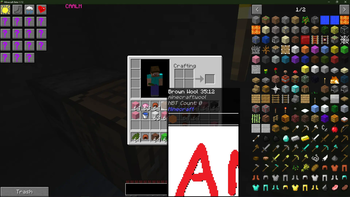
About this Mod
A partial backport of JustEnoughItems to b1.7.3.
Features over HMI-fabric (for users):
- A much less laggy UI.
- Proper support for StationAPI tooltips.
- Proper support for hiding items that you don't want to see. (WIP)
- Syncing recipes from server to client, meaning servers running custom recipes can nicely do so without additional client mods. (Requires AMI on server)
- Overhauled tooltip rendering.
- Tooltips are the last thing rendered, meaning you can queue a tooltip at any point, and it should render, regardless of the current GUI (if any at all).
- Tooltips are screen edge aware, unlike vanilla tooltips.
- They can render modern formatting codes (italics, bold, etc).
- They can render itemstacks, dividers, and even images.
- Customisation and extension API coming soon:tm:.
- A rarities system.
- This does nothing without a mod that adds them to items.
- Can have fancy formatting, header colours, and icons.
Drawbacks compared to HMI-fabric:
- You need StationAPI regardless of if you want it or not. (Will be worked on, but you will lose everything aside from recipe-related features)
Features over every other inventory editor:
- Multiplayer NBT and metadata giving. (Requires AMI on server)
- Multiplayer healing. (Requires AMI on server)
- Multiplayer day/night.
- Recipe viewing.
Features over HMI-fabric (for devs):
- A sane API that allows you to almost entirely reuse your existing container and rendering code, removing the need for specialized containers and UIs.
- An entirely redone tooltip rendering system which supports modern colour and formatting codes, and also supports rarities (WIP on latter.)
- A ton of render helpers that make creating and editing GUIS far less painful.
- An item blacklist API, which can be updated during runtime for progression-locked items, if wanted.
Available Versions
How to Install Always More Items on Your Server
Order Server
Order a Minecraft Java server with at least 3 GB RAM (4 GB recommended).
Set babric Loader
In the panel under "Egg", select the babric loader and matching Minecraft version (b1.7.3).
Install Mod
Open the mod browser in the dashboard and search for "Always More Items". Click "Install" – done! Alternatively, upload the .jar via SFTP to the /mods folder.
Compatibility
Mod Loaders
Minecraft Versions
b1.7.3
Server-side
~ OptionalRecommended RAM
4 GB(min. 3 GB)Frequently Asked Questions
Always More Items server crashes on startup – what to do?
Most common cause: wrong babric version or insufficient RAM. Check the server log (latest.log) for "OutOfMemoryError" or "Mixin" errors. With Mado Hosting: ensure at least 3 GB RAM is allocated and the loader matches the mod version (b1.7.3). You can switch loaders with one click in the panel.
Is Always More Items compatible with babric and fabric?
Always More Items officially supports babric, fabric for Minecraft b1.7.3. The Mado dashboard automatically detects incompatible loader combinations.
Server lagging with Always More Items – how to optimize performance?
Recommended RAM: 4 GB (per 8 players). Use /spark profiler to check if Always More Items consumes the most tick time. Common fixes: reduce server view-distance to 8-10, install "performant" or "starlight" as supplementary mods on Forge. With Mado Hosting, your server runs on NVMe SSDs with dedicated CPU cores for minimal latency.
Similar Mods



Rent Modded Server
Install Always More Items with just one click on your server.