
Amethyst Tools & Armor
This mod adds strong and stylish amethyst tools and armor for players to craft and use. They're tougher and look cooler than regular gear.
Screenshots
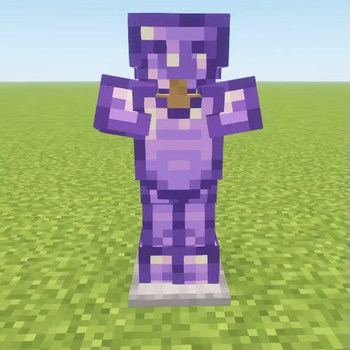
About this Mod
Introducing the Amethyst Tools and Armor Mod!
Hey, fellow Minecrafters! Get hyped for the Amethyst Tools and Armor Mod – the ultimate addition to your crafting arsenal! Picture this: you're deep in the mines, surrounded by blocks waiting to be excavated, when suddenly, you stumble upon the most epic gemstone of them all – amethyst!
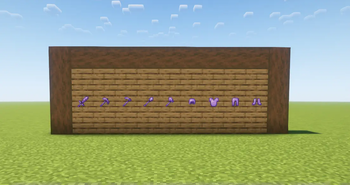
First off, we've got the Amethyst Pickaxe. This bad boy isn't just for show – it's your ticket to mining nirvana! It'll tear through everything like a hot knife through butter! Plus, it's got that signature amethyst sparkle that'll make you the envy of every miner in town.
Next up, we've got the Amethyst Sword. It's not your average blade – oh no! This thing is a straight-up beast on the battlefield! It'll slice through mobs like they're nothing, leaving behind a mesmerizing purple trail that's as stylish as it is deadly.
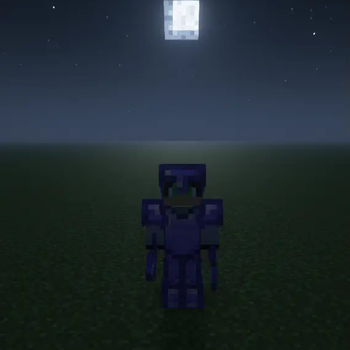
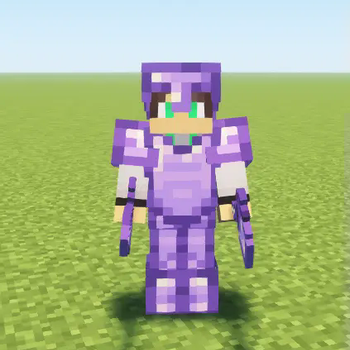
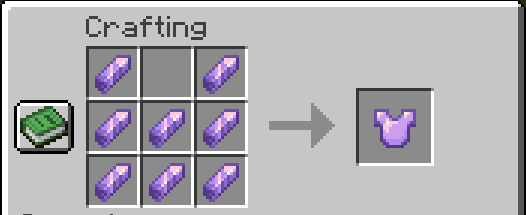
And let's not forget about the Amethyst Armor. This isn't your grandma's armor – it's sleek, it's stylish, and it's packing some serious protection! It'll keep you safe from whatever the Minecraft world throws at you, all while making you look like the coolest adventurer around.
But hold on to your pickaxes, because there's more! You can even trade emeralds and amethyst with villagers for armour and tools!
So, what are you waiting for? Grab your gear, gather your friends, and let's dive into a Minecraft adventure like never before! With the Amethyst Tools and Armor Mod, the possibilities are endless, and the fun is just getting started!
Available Versions
How to Install Amethyst Tools & Armor on Your Server
Order Server
Order a Minecraft Java server with at least 3 GB RAM (4 GB recommended).
Set forge Loader
In the panel under "Egg", select the forge loader and matching Minecraft version (1.21.8).
Install Mod
Open the mod browser in the dashboard and search for "Amethyst Tools & Armor". Click "Install" – done! Alternatively, upload the .jar via SFTP to the /mods folder.
Compatibility
Mod Loaders
Minecraft Versions
1.21.8, 1.21.4, 1.21.1 (+4 more)
Server-side
✓ RequiredRecommended RAM
4 GB(min. 3 GB)Frequently Asked Questions
Amethyst Tools & Armor server crashes on startup – what to do?
Most common cause: wrong forge version or insufficient RAM. Check the server log (latest.log) for "OutOfMemoryError" or "Mixin" errors. With Mado Hosting: ensure at least 3 GB RAM is allocated and the loader matches the mod version (1.21.8). You can switch loaders with one click in the panel.
Is Amethyst Tools & Armor compatible with forge and neoforge?
Amethyst Tools & Armor officially supports forge, neoforge for Minecraft 1.21.8, 1.21.4, 1.21.1. The Mado dashboard automatically detects incompatible loader combinations.
Server lagging with Amethyst Tools & Armor – how to optimize performance?
Recommended RAM: 4 GB (per 8 players). Use /spark profiler to check if Amethyst Tools & Armor consumes the most tick time. Common fixes: reduce server view-distance to 8-10, install "performant" or "starlight" as supplementary mods on Forge. With Mado Hosting, your server runs on NVMe SSDs with dedicated CPU cores for minimal latency.
Similar Mods




Rent Modded Server
Install Amethyst Tools & Armor with just one click on your server.