
ANC Indicators
A simple mod that adds various alphabetic, numeric, and color-based indicators. Also featuring a custom-made Automatic Universal ReColoring System, aka the AURCS.
Screenshots


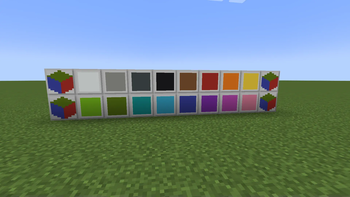

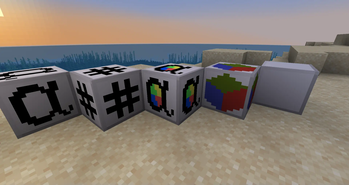
About this Mod
ANC Indicators, short for Alphabetic + Numeric + Color Indicators, is a mod which aims to help with organization and channel management for mods that have such, by adding various indicators for colors of blocks, alphabetic sorting, or numeric values.
What originally started in concept as a simple mod for adding blocks and items visually representing all numbers and letters, originally called AlphaNumeric Indicators, it gradually ballooned in scope.
Now it features indicators for:
• Every letter of the (english) Alphabet
• Numeric values 0 through 16, as well as for: 32, 64, 1000, Infinity, Even, Odd, and basic math
• Every Block Color, as in what colors blocks can be dyed
• Every Text Color, with their respective dark backgrounds to differentiate them from Block Colors
• Redstone Levels, each of which output their respective signal strength corresponding to their numeric value
• Light Levels, similar to the Redstone Levels, but output light
It took a lot of work as i challenged myself to not reference any existing mods, but I also implemented a fancy Automatic Universal ReColoring System, aka the AURCS! The vials of paint you can craft have been coded to automatically get their own color and the color of the targeted block and change the color of the block! Nothing manually inputted into the code, all detected and used, so should be nearly universal in usage no matter what mods' blocks are being recolored!
And I was having so much fun making this mod, that i went ahead and added decorative blocks of the basic blank indicator and the darkened version, because i ended up liking how they looked just as a texture. (slabs, stairs, doors, trapdoors, and pressure plates, to be specific)
Available Versions
How to Install ANC Indicators on Your Server
Order Server
Order a Minecraft Java server with at least 3 GB RAM (4 GB recommended).
Set neoforge Loader
In the panel under "Egg", select the neoforge loader and matching Minecraft version (1.21.2).
Install Mod
Open the mod browser in the dashboard and search for "ANC Indicators". Click "Install" – done! Alternatively, upload the .jar via SFTP to the /mods folder.
Compatibility
Mod Loaders
Minecraft Versions
1.21.2, 1.21.1, 1.21
Server-side
✓ RequiredRecommended RAM
4 GB(min. 3 GB)Frequently Asked Questions
ANC Indicators server crashes on startup – what to do?
Most common cause: wrong neoforge version or insufficient RAM. Check the server log (latest.log) for "OutOfMemoryError" or "Mixin" errors. With Mado Hosting: ensure at least 3 GB RAM is allocated and the loader matches the mod version (1.21.2). You can switch loaders with one click in the panel.
Is ANC Indicators compatible with neoforge?
ANC Indicators officially supports neoforge for Minecraft 1.21.2, 1.21.1, 1.21. The Mado dashboard automatically detects incompatible loader combinations.
Server lagging with ANC Indicators – how to optimize performance?
Recommended RAM: 4 GB (per 8 players). Use /spark profiler to check if ANC Indicators consumes the most tick time. Common fixes: reduce server view-distance to 8-10, install "performant" or "starlight" as supplementary mods on Forge. With Mado Hosting, your server runs on NVMe SSDs with dedicated CPU cores for minimal latency.
Similar Mods






Rent Modded Server
Install ANC Indicators with just one click on your server.