
PhoenixBorne
This is an Addon for the minecraft origins mod that adds the Phoenixborne origin, an origin that has custom tools, a custom crafting station, and a fully functional temperature system that integrates with the ladder two seamlessly to top it all off.
Screenshots
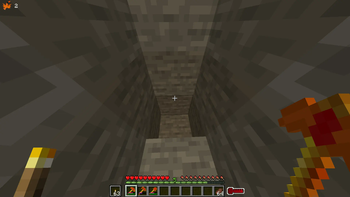
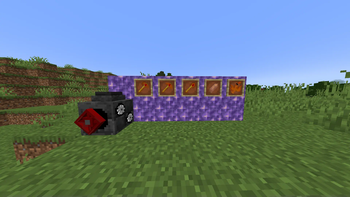
About this Mod
Synopsis
WARNING: for the time being this project has been put on hold. I may finish it in the future, who knows. In this addon for minecraft origins, you get to play as the reworked version of my old PhoenixBorne origin! Now with custom tools, and an entire new crafting station with custom animations!  Don't worry, the temperature bar does return... With a new look!

The Tools
The tools that this mod adds are all reliant on heat, and in order to use them you have to charge them with the hotkey that is set. The default is \, but you can change that in options.

The axe
The first tool that is currently made, is the Phoenix Axe, made with 2 blaze rods and 3 Charged Amythest. It can be thrown to light enemies on fire, right before returning to you! And to top it all off, it has a nice spinning animation!


Not to mention, if you mine a tree while crouching, it'll mine the entire tree in one action! How convenient! It's a little weaker than a netherite axe, since Charged Amythest is so expensive, but with its extra abilities, it's more than worth it!
The Pickaxe
The Second tool is the pickaxe, which can smelt ores in an instant as long as you crouch while mining the ore. Add that with its ability to locate any ore by right clicking, and it's more than worth it the recipe!

The Shovel
The third tool that has been made is the shovel, which while its passive ability is simply a small change to get a random nugget while mining gravel, its primary ability is being thrown down on any block that's mineable via a shovel and acting as a portable beacon! Note that, however, these effects only work for yourself and other phoenixborns.


The Turnblast
The Turnblast is this mods custom crafting station. It can be used by holding down secondary, and using your flamethrower while the appropriate crafting recipe is placed in the back. Items can be placed by right clicking the back of the panel.


The rebirths, and other mechanics
By making a Rebirth Charm and right clicking it, you essentially gain a 1-up. The number of rebirths you have can be seen in the top left corner, as seen in the earlier screenshots. When you get brought back, you will be given an effect that restores you to full heat, while also healing you and enhancing your stats.

The main resource of this mod, the charged Amythest, is quite expensive. In future updates, it's planned to make the tools upgradeable, thus making charged Amythest less expensive. But for now, you'll have to pay quite the metaphorical pretty penny to acquire these tools. If you're in a pinch, these can also be used to gain heat.

Lastly, your heat. Values have been changed, but here is where I'll REALLY need feedback. Everything I could think of changes your temperature, I may add the ability to make datapacks for modded compatibility in the future, but for now, you'll have to deal with everything that works in vanilla. There is a temperature changing action and command, however, so you can try and use that if you really want to try and add modded compatibility. Once you're at half heat, the more it goes down the more your stats will go down, until you start to freeze.
Available Versions
How to Install PhoenixBorne on Your Server
Order Server
Order a Minecraft Java server with at least 3 GB RAM (4 GB recommended).
Set fabric Loader
In the panel under "Egg", select the fabric loader and matching Minecraft version (1.19.4).
Install Mod
Open the mod browser in the dashboard and search for "PhoenixBorne". Click "Install" – done! Alternatively, upload the .jar via SFTP to the /mods folder.
Compatibility
Mod Loaders
Minecraft Versions
1.19.4, 1.19.3
Server-side
✓ RequiredRecommended RAM
4 GB(min. 3 GB)Frequently Asked Questions
PhoenixBorne server crashes on startup – what to do?
Most common cause: wrong fabric version or insufficient RAM. Check the server log (latest.log) for "OutOfMemoryError" or "Mixin" errors. With Mado Hosting: ensure at least 3 GB RAM is allocated and the loader matches the mod version (1.19.4). You can switch loaders with one click in the panel.
Is PhoenixBorne compatible with fabric?
PhoenixBorne officially supports fabric for Minecraft 1.19.4, 1.19.3. The Mado dashboard automatically detects incompatible loader combinations.
Server lagging with PhoenixBorne – how to optimize performance?
Recommended RAM: 4 GB (per 8 players). Use /spark profiler to check if PhoenixBorne consumes the most tick time. Common fixes: reduce server view-distance to 8-10, install "performant" or "starlight" as supplementary mods on Forge. With Mado Hosting, your server runs on NVMe SSDs with dedicated CPU cores for minimal latency.
Similar Mods




Rent Modded Server
Install PhoenixBorne with just one click on your server.