
Antique Atlas
Antique Atlas is a craftable item that enables a special map screen.
Screenshots
About this Mod

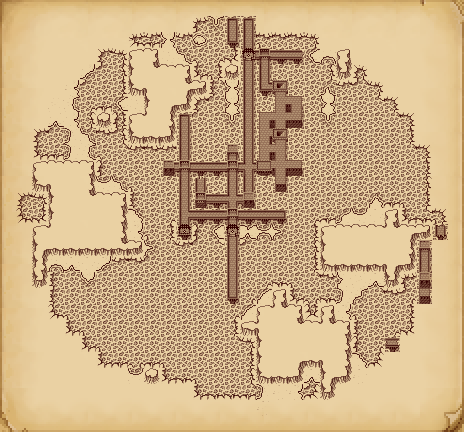
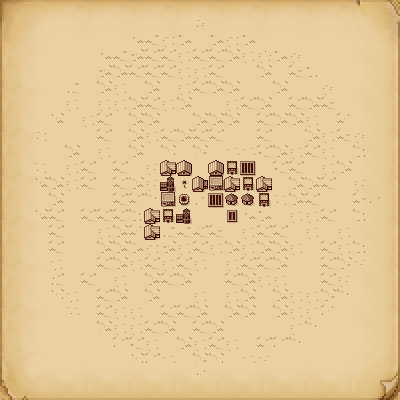
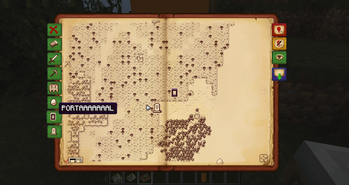
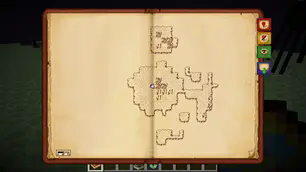
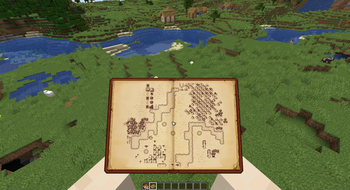
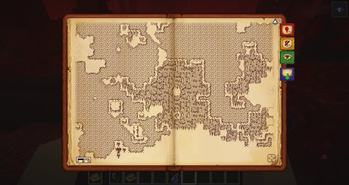
Antique Atlas is a craftable item that enables a special map screen. You can navigate the map via click & drag, zoom via the scroll wheel. Additionally, on-screen buttons let you add/remove/hide markers, export the map to an image file.
Both server and client need to have the mod installed.
You're free to include this mod in mod packs, as long as you're not making money off of it.
Known bugs: https://github.com/AntiqueAtlasTeam/AntiqueAtlas/labels/type:%20bug
Join our Discord: https://discord.gg/N2H3r9y
The map is generated around the player by selecting a single biome to represent each chunk of 16x16 blocks. Custom biomes added by other mods will be automatically assigned to a default texture set based on their types as registered in Forge BiomeDictionary, but you can add your own texture packs with custom textures: see Editing Textures
As of this writing (2018-06-02), when you export the image file, it will be in PNG format, and contain a map of the dimension the player is currently in.
This mod initially started as a spin-off from a (discontinued) mod project Quest, it was inspired and improved by ideas from the team. For more Quest-related stuff check out Zelda Sword Skills by coolAlias! His mod also uses Atlas API to mark Boss Dungeon locations. Make sure to use the appropriate download of Antique Atlas that says it is compatible with ZSS!
Modders can make use of the Atlas API!
Read the manual here: https://github.com/AntiqueAtlasTeam/AntiqueAtlas/wiki/API
In order to develop with the API, grab a deobfuscated build here: https://github.com/AntiqueAtlasTeam/AntiqueAtlas/releases/latest
Crafting Recipe: +
+  =
= 
Like with Minecraft maps, right-click on empty Atlas to create a usable instance: 
Cloning: + * N = * (N + 1)
Crafting an Atlas with empty Atlases creates clones of the original Atlas. The map content is shared between the clones, so you can always leave a copy at home and go on adventures without ever worrying about losing your Atlas.
Combining:#1 + #2 = #3
2 different Atlases can be crafted together and have the contents of both merged into a new one.
Right-click while holding the Atlas to open it.
Credits:
A huge thanks for everyone's contributions to the mod!
especially to Kenkron for updating and maintaing the mod for several years,
also especially to tyra314 for updating to 1.14.4 and maintaining the Fabric version of the mod,
to voythas and others from the Quest team for inspiring the original idea
to coolAlias for integrating with ZSS, rewriting network code and providing lots of along the way
to crafteverywhere, CapoFantasma97, Mazdallier, Ruukas for translating texts
to Golrith for his work on a custom texture pack, and to temdur and barrowisp for contributing
to everyone who made suggestions in the Minecraft Forums thread. They have been really insightful, and some of the suggested features have been implemented.
Golrith's colored texture pack! Supports Biomes O'Plenty and Thaumcraft!
A gigantic thanks to Golrith for making this one!
Download v1.2 (compatible with Antique Atlas v4.5.0+ and MC v1.7.10+):
https://drive.google.com/file/d/1ta8B_-rzQ9opKIq2olDPX5HWJ5Ct-FHJ/view?usp=sharing
Apologies if this is an old version, you can ask Golrith for updates.
Offers a revamped and colored style for the Atlas (except mesa/icy biomes) as well as custom textures for the biomes from Biomes O'Plenty and Thaumcraft.
How to install:
1. Copy the file "AntiqueAtlasExtra.zip" from the archive to the folder ".minecraft/resourcepacks"
2. Launch Minecraft, go to Settings > Resource Packs and enable the resource pack "Golriths Anqitue Atlas".
How to enable Biomes O'Plenty / Thaumcraft:
1. Replace the file "texture_sets.json" in the folder ".minecraft/config/antiqueatlas" with the one in the archive.
2. Similarly replace the file "biome_textures.json" or manually edit it using a text editor to copy the lines which correspond to the custom biomes from the file "biome_textures.json" in the archive file.
3. Make sure that biome IDs in this config match the actual biome IDs in use in your BoP/Thaumcraft installations. You can use NEI to do a biome ID dump. Change the biome IDs in your "biome_textures.json" accordingly so that they match their intended textures.

Available Versions
How to Install Antique Atlas on Your Server
Order Server
Order a Minecraft Java server with at least 3 GB RAM (4 GB recommended).
Set fabric Loader
In the panel under "Egg", select the fabric loader and matching Minecraft version (1.18.2).
Install Mod
Open the mod browser in the dashboard and search for "Antique Atlas". Click "Install" – done! Alternatively, upload the .jar via SFTP to the /mods folder.
Compatibility
Mod Loaders
Minecraft Versions
1.18.2, 1.17.1, 1.16.5 (+3 more)
Server-side
✓ RequiredRecommended RAM
4 GB(min. 3 GB)Frequently Asked Questions
Antique Atlas server crashes on startup – what to do?
Most common cause: wrong fabric version or insufficient RAM. Check the server log (latest.log) for "OutOfMemoryError" or "Mixin" errors. With Mado Hosting: ensure at least 3 GB RAM is allocated and the loader matches the mod version (1.18.2). You can switch loaders with one click in the panel.
Is Antique Atlas compatible with fabric and forge?
Antique Atlas officially supports fabric, forge for Minecraft 1.18.2, 1.17.1, 1.16.5. Note: Forge and Fabric mods are NOT cross-compatible – pick one loader and stick with it. The Mado dashboard automatically detects incompatible loader combinations.
Server lagging with Antique Atlas – how to optimize performance?
Recommended RAM: 4 GB (per 8 players). Use /spark profiler to check if Antique Atlas consumes the most tick time. Common fixes: reduce server view-distance to 8-10, install "performant" or "starlight" as supplementary mods on Forge. With Mado Hosting, your server runs on NVMe SSDs with dedicated CPU cores for minimal latency.
Similar Mods




Rent Modded Server
Install Antique Atlas with just one click on your server.