
APEL
Apel stands for Animative Particle Engine Library and is used for complex particle animations, all without the need to major in linear algebra. It provides a straightforward interface and rich in documentation for developers.
Screenshots

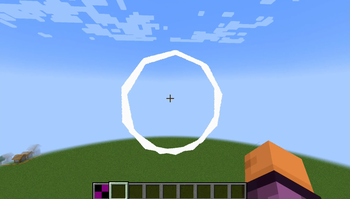
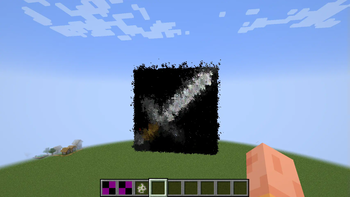
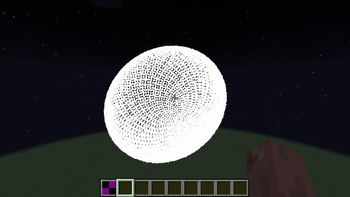
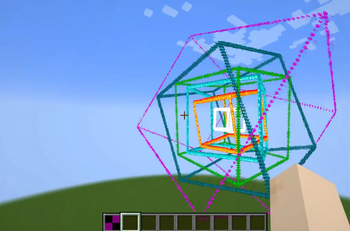
About this Mod

Apel stands for Animative Particle Engine Library. Its goal is to give the developer a huge productivity boost by incorporating a powerful animation engine that allows for the management of complex particle animations. Thus the library aims to provide:

To put it simply. APEL allows you to fully make these animations with very few lines of code:
The key strengths of APEL are specifically:
- Ease Of Use: The library cuts down the components into its simplest roots. This provides a straightforward and easy to use developer interface, so any developer can use.
- Flexiblity: Another goal is to make the library as flexible as it can be without ruining the other goal factors. The library allows for composing complex scenes without additional syntactic sugar involved.
- Rich Documentation: Our team aims for detailed documentation that clearly explains how each feature works. We actively work on improving it, and documentation can be read from java docs or from the markdown documents in github.
- High Performance: Since the library is meant to be used for creating intricate particle scenes, the library is very optimised and performance friendly.

Developers
This section is for developers using APEL as a library.
- In your
gradle.propertiesfile, add this line:apel_version=0.1.5+1.21.8 - In
build.gradle, find the top-levelrepositoriesblock, and add these lines if you haven't installed any other dependency mods from modrinth:repositories { // ... maven { url = "https://api.modrinth.com/maven" } } - Also in
build.gradle, add the dependency under the dependencies block:dependencies { // ... modImplementation "maven.modrinth:apel:${project.apel_version}" // ... } - Refresh gradle (in IntelliJ IDEA, press the gradle icon with a rotate sub-icon)
- Try to either type
Apeland let your IDE autocomplete it, or importnet.mcbrincie.apel.Apel. If all steps are done, everything should work as expected.
Players
Download the mod via your usual means and place it in your mods folder.

For a regular particle polygon that moves in a line from one point to another, rotates around the Y axis, and loops by animating between 3 sides to 30 sides, the code looks like this (not a straightforward first example, but showcases the possibilities):
AtomicBoolean reverse = new AtomicBoolean(false);

ParticlePolygon polygon = ParticlePolygon.builder()
  .particleEffect(ParticleTypes.END_ROD)
  .sides(3)
  .scale(3.0f)
  .amount(100)
  .beforeDraw((data, obj) -> {
    if (data.getCurrentStep() <= 15) {
      return;
    }
    boolean isStepZero = data.getCurrentStep() % 15 == 0;
    int sides = ApelUtils.getValueFromEasingCurve(obj.getSides());
    if (isStepZero && !reverse.get()) {
      obj.setSides(sides + 1);
      if (sides >= 30) {
        reverse.set(true);
      }
    } else if (isStepZero && reverse.get()) {
        obj.setSides(sides - 1);
        if (sides == 4) {
          reverse.set(false);
        }
    }
    Vector3f newRot = ApelUtils.getValueFromEasingCurve(obj.getRotation()).add(0, 0.002f, 0);
    obj.setRotation(newRot);
})
  .build();

LinearAnimator linearAnimator = LinearAnimator.builder()
  .endpoint(new Vector3f())
  .endpoint(new Vector3f(10, 0, 0))
  .particleObject(polygon)
  .delay(1)
  .stepsForAllSegments(1000)
  .build();

ApelServerRenderer renderer = ApelServerRenderer.client((ServerWorld) world);
linearAnimator.beginAnimation(renderer);
We define the particle object (ParticlePolygon) with the particle effect to use, the sides of the polygon, the size of the polygon, and the number of particles to use on the polygon.
After that we use the library's ability to modify the object before each frame is rendered. This is via a lambda function that receives some context and the object to be rendered. This example modifies the number of sides on the polygon by checking what step the animation is on, and using that to determine the number of sides the polygon should have. It also shows how to increment the rotation (expressed in Euler angles per axis), in this case a slight rotation around the y-axis on each tick.
Note: We extract the value using ApelUtils.getValueFromEasingCurve for rotation and the number of sides, in our case we know this is not a null value so it works perfectly fine
We then create a linear path animator and supply it with the delay in ticks between frames, the starting position of the line, the ending position of the line, the particle object to use, and the number of rendering steps for the animation.
Finally, we play the linear path animator and supply it with a renderer instance for server-side rendering.
Note
The mod may be required to be installed client-side depending on if the developer chooses to use Apel's client-side renderer, which optimises the particles way more than the server-side renderer although it requires that people need the client mod to be installed. If they don't choose client-side renderer then no need for the client mod

Available Versions
How to Install APEL on Your Server
Order Server
Order a Minecraft Java server with at least 3 GB RAM (4 GB recommended).
Set fabric Loader
In the panel under "Egg", select the fabric loader and matching Minecraft version (1.21.8).
Install Mod
Open the mod browser in the dashboard and search for "APEL". Click "Install" – done! Alternatively, upload the .jar via SFTP to the /mods folder.
Compatibility
Mod Loaders
Minecraft Versions
1.21.8, 1.21, 1.20.6
Server-side
✓ RequiredRecommended RAM
4 GB(min. 3 GB)Frequently Asked Questions
APEL server crashes on startup – what to do?
Most common cause: wrong fabric version or insufficient RAM. Check the server log (latest.log) for "OutOfMemoryError" or "Mixin" errors. With Mado Hosting: ensure at least 3 GB RAM is allocated and the loader matches the mod version (1.21.8). You can switch loaders with one click in the panel.
Is APEL compatible with fabric?
APEL officially supports fabric for Minecraft 1.21.8, 1.21, 1.20.6. The Mado dashboard automatically detects incompatible loader combinations.
Server lagging with APEL – how to optimize performance?
Recommended RAM: 4 GB (per 8 players). Use /spark profiler to check if APEL consumes the most tick time. Common fixes: reduce server view-distance to 8-10, install "performant" or "starlight" as supplementary mods on Forge. With Mado Hosting, your server runs on NVMe SSDs with dedicated CPU cores for minimal latency.
Similar Mods



Rent Modded Server
Install APEL with just one click on your server.