
Live Whitelist
A mod that allows you to connect your server to an api or discord bot to allow or disallow connections based on uuid
Screenshots
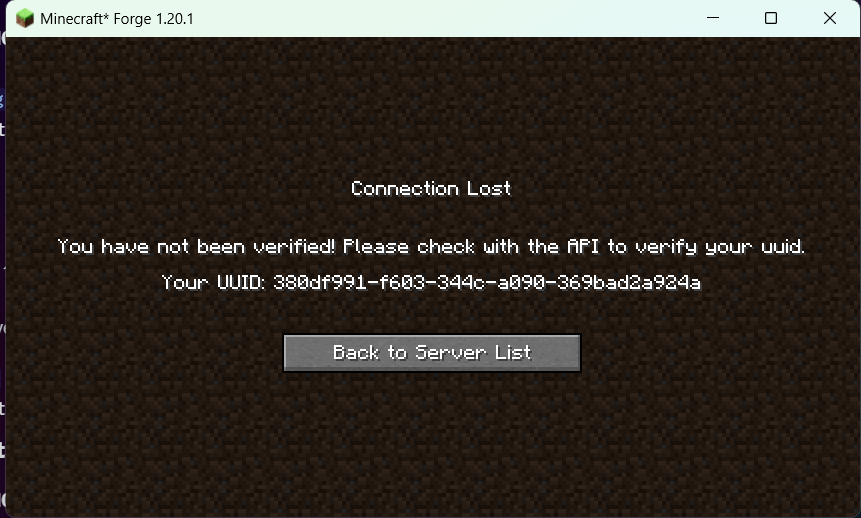
About this Mod
A mod by cyber.98
This very simple mod allows you to connect to an api running somewhere on the internet (or on your machine) to validate or invalidate minecraft UUIDS. This was originally intended to be used with a discord bot running an api, but is completely valid outside of that use case. If you'd like to use the discord bot to make sure specific people have a role before joining, please skip to that section.
Configuration settings
The mod has two configuration settings:
api:[a url by default]
message:[a string by default]
- The api url is what defines the base of where all requests should go. This can be a site, or an ip, but the server must allow for http connections.
- The message string is what is shown to the player if the api is online, and responds with a false verification for that uuid.
Setting up an API
API setup is super simple. It should meet the following guidelines:
- Have at least one endpoint, being at '/verify'
- Respond within about 2 seconds to ensure no progress can be made by players before being kicked
- follow this json guide for urls and responses:
URLS:
[base url defined in config]/[minecraft uuid sent from the server] // make sure you have something to parse the url bar, as the server sends get requests, not post requests.

Responses:

{
  "verified":boolean
}
It's that easy (at least for this version)
Discord bot setup
This mod comes feature complete with a discord bot!
Follow these steps to allow users to authenticate using the discord bot instead of having to make your own api!
Prerequisites
- Script running is enabled on your system (see microsoft's page on this)
- You have nodeJS and npm installed (I'm a js developer idk what you want me to do)
Usage:
/link uuid:[uuid] -> will link your discord account to your mojang account. if you don't know your uuid, try joining the server first, the server will tell it to you (assumming the api is running already).
/unlink -> pretty self-explanatory, will remove your entry from the database, allowing you to relink it
/ping -> gets the status of the api and some response times
setup guide
Head to The github page for the bot
and download the source code as a zip. extract it, and open the root folder and run
npm install
and wait a few moments for it to get the required packages.
afterwards, create a config.json file with the following information (fill in the fields)
{
    "token":"discord bot token",
    "botname":"a name you wanna see in the terminal for the bot",
    "author":"your name",
    "clientId":"the bots client id",
    "adminids":["your user id"],
    "authorid":"your user id",
    "roleID":"the id of the role you want to look for"
}
your discord bot will need:
Guild install only.
Public bot off (unless you are not discord server admin)
Server members intent.
These permissions: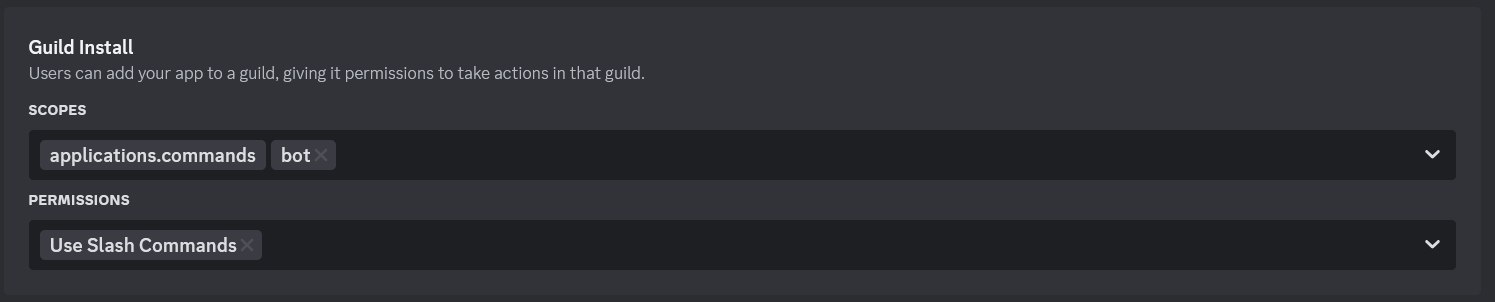
Add in your token, and you're ready to hit the ground running!
To run the script, open the folder and run
npm start
Available Versions
How to Install Live Whitelist on Your Server
Order Server
Order a Minecraft Java server with at least 3 GB RAM (4 GB recommended).
Set forge Loader
In the panel under "Egg", select the forge loader and matching Minecraft version (1.20.6).
Install Mod
Open the mod browser in the dashboard and search for "Live Whitelist". Click "Install" – done! Alternatively, upload the .jar via SFTP to the /mods folder.
Compatibility
Mod Loaders
Minecraft Versions
1.20.6, 1.20.5, 1.20.4 (+3 more)
Server-side
✓ RequiredRecommended RAM
4 GB(min. 3 GB)Frequently Asked Questions
Live Whitelist server crashes on startup – what to do?
Most common cause: wrong forge version or insufficient RAM. Check the server log (latest.log) for "OutOfMemoryError" or "Mixin" errors. With Mado Hosting: ensure at least 3 GB RAM is allocated and the loader matches the mod version (1.20.6). You can switch loaders with one click in the panel.
Is Live Whitelist compatible with forge?
Live Whitelist officially supports forge for Minecraft 1.20.6, 1.20.5, 1.20.4. The Mado dashboard automatically detects incompatible loader combinations.
Server lagging with Live Whitelist – how to optimize performance?
Recommended RAM: 4 GB (per 8 players). Use /spark profiler to check if Live Whitelist consumes the most tick time. Common fixes: reduce server view-distance to 8-10, install "performant" or "starlight" as supplementary mods on Forge. With Mado Hosting, your server runs on NVMe SSDs with dedicated CPU cores for minimal latency.
Similar Mods






Rent Modded Server
Install Live Whitelist with just one click on your server.