
Apple Expansion
more special apples with unique effects
Screenshots
About this Mod
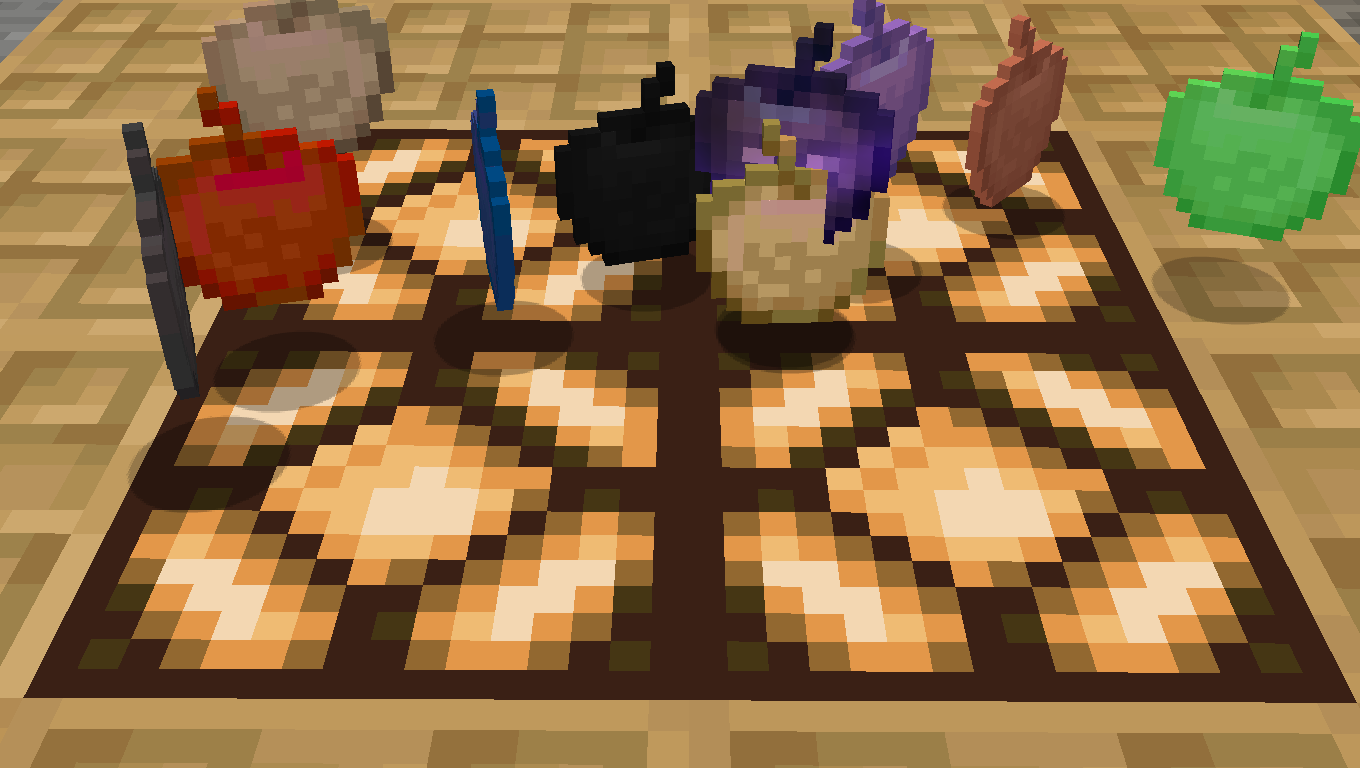
This mod completely reimagines Minecraft’s apple system by introducing a wide collection of powerful apples with unique abilities that go far beyond restoring hunger. Every apple offers its own special effect, creating new possibilities for exploration, survival, combat, and progression.
Alongside the classic Golden Apple and Enchanted Golden Apple, this mod adds entirely new apple variants inspired by Minecraft ores. These apples can grant powerful status effects, enhance attributes, weaken nearby creatures, or trigger special abilities that make every encounter more interesting and dynamic.
Coal Apples grant Night Vision and burn nearby monsters.
Copper Apples call down lightning strikes on enemies.
Diamond Apples weaken hostile mobs while giving the player regeneration.
Emerald Apples provide Hero of the Village effects and can even summon villagers.
Glowstone Apples reveal enemies by making them glow through walls.
Iron Apples increase resistance and weaken nearby monsters.
Lapis Apples improve underwater survival and reward experience.
Netherite Apples turn the player into a near-unstoppable tank with fire resistance, healing, and enemy debuffs.
Redstone Apples boost speed and mining efficiency while slowing enemies.
Amethyst Apples increase luck and generate valuable crystal resources.
Quartz Apples dramatically increase attack power.
Withering Apples spread devastating wither damage to nearby mobs.
Stone Apples transform nearby stone blocks into random ores, creating powerful mining opportunities.
Some apples are designed to strengthen the player with useful buffs and enhanced survivability, while others can affect nearby mobs by reducing their maximum health or applying negative effects. Each apple has a distinct purpose, encouraging experimentation and different playstyles throughout your world.
The mod currently adds a total of 24 unique apples:
11 Normal Apples
11 Enchanted Apples
2 Special Apple
The current apples are based on Minecraft ores, but more varieties and mechanics are planned for future updates as the mod continues to grow.
Feedback, suggestions, and new apple ideas are always welcome and greatly appreciated.
Special thanks to MCreator for making the creation of this mod possible.
Available Versions
How to Install Apple Expansion on Your Server
Order Server
Order a Minecraft Java server with at least 3 GB RAM (4 GB recommended).
Set forge Loader
In the panel under "Egg", select the forge loader and matching Minecraft version (1.20.1).
Install Mod
Open the mod browser in the dashboard and search for "Apple Expansion". Click "Install" – done! Alternatively, upload the .jar via SFTP to the /mods folder.
Compatibility
Mod Loaders
Minecraft Versions
1.20.1
Server-side
✓ RequiredRecommended RAM
4 GB(min. 3 GB)Frequently Asked Questions
Apple Expansion server crashes on startup – what to do?
Most common cause: wrong forge version or insufficient RAM. Check the server log (latest.log) for "OutOfMemoryError" or "Mixin" errors. With Mado Hosting: ensure at least 3 GB RAM is allocated and the loader matches the mod version (1.20.1). You can switch loaders with one click in the panel.
Is Apple Expansion compatible with forge?
Apple Expansion officially supports forge for Minecraft 1.20.1. The Mado dashboard automatically detects incompatible loader combinations.
Server lagging with Apple Expansion – how to optimize performance?
Recommended RAM: 4 GB (per 8 players). Use /spark profiler to check if Apple Expansion consumes the most tick time. Common fixes: reduce server view-distance to 8-10, install "performant" or "starlight" as supplementary mods on Forge. With Mado Hosting, your server runs on NVMe SSDs with dedicated CPU cores for minimal latency.
Similar Mods



Rent Modded Server
Install Apple Expansion with just one click on your server.