Aquamarine
A Modern Industrialization-like multiblock library.
About this Mod
Aquamarine
Multiblock library to allow creation of multiblocks in mods easier.
This mod help create "Modern Industrialization-like" multiblocks, i.e. multiblocks which have a controller, some innert blocks, and hatch blocks for IO.
Note: This project is very unfinished but works. This is intended as a base library for my other mods using multiblock but can be used by others.
Docs exist but not for everything, still WIP.
Features
Multiblocks
Multiblocks are made of lists both simple members and hatch flags. The simple member defines what block goes at that position. The hatch flags define what hatch types can replace that position. Empty flags can be provided.
Multiblocks can easily access their attached hatches to transfer items/fluids/energy between multiblock and hatch.
Multiblock Rendering
Rendering multiblock previews layer by layer.
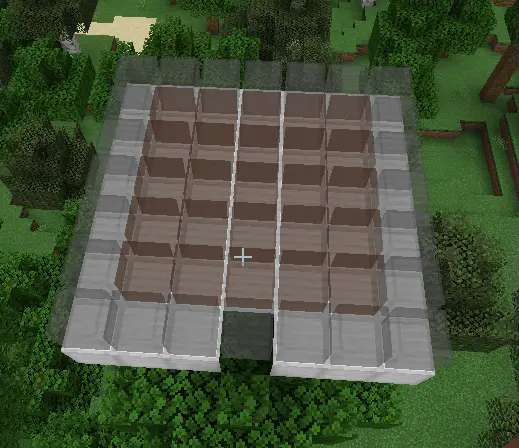
Indicating which blocks can be replaced by hatches.
If a block in the multiblock can be replaced by a hatch that the player is holding, the block will have a green outline around it.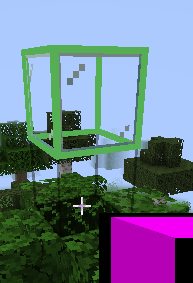
Rendering entire multiblock at one.
Not recommended as it renders weirdly and layer by layer is easier to build.
How to use
Adding dependancy
Add version to gradle.properties
aquamarine_version = 0.0.1-1.21.3 # replace with version id from download page
Add repository to build.gradle
repositories {
  maven { url 'https://jitpack.io' }
}
Add dependency to build.gradle
dependencies {
    modApi "com.github.KrazyMiner001:Aquamarine:${project.aquamarine_version}"
}
Using
Create a class which extends MultiblockBlockEntity and implements methods.
Create a class which extends HatchBlockEntity and implements methods.
Create blocks for both block entities.
Multiblock.
(better explanation todo)
Available Versions
How to Install Aquamarine on Your Server
Order Server
Order a Minecraft Java server with at least 3 GB RAM (4 GB recommended).
Set fabric Loader
In the panel under "Egg", select the fabric loader and matching Minecraft version (1.21.3).
Install Mod
Open the mod browser in the dashboard and search for "Aquamarine". Click "Install" – done! Alternatively, upload the .jar via SFTP to the /mods folder.
Compatibility
Mod Loaders
Minecraft Versions
1.21.3
Server-side
✓ RequiredRecommended RAM
4 GB(min. 3 GB)Frequently Asked Questions
Aquamarine server crashes on startup – what to do?
Most common cause: wrong fabric version or insufficient RAM. Check the server log (latest.log) for "OutOfMemoryError" or "Mixin" errors. With Mado Hosting: ensure at least 3 GB RAM is allocated and the loader matches the mod version (1.21.3). You can switch loaders with one click in the panel.
Is Aquamarine compatible with fabric?
Aquamarine officially supports fabric for Minecraft 1.21.3. The Mado dashboard automatically detects incompatible loader combinations.
Server lagging with Aquamarine – how to optimize performance?
Recommended RAM: 4 GB (per 8 players). Use /spark profiler to check if Aquamarine consumes the most tick time. Common fixes: reduce server view-distance to 8-10, install "performant" or "starlight" as supplementary mods on Forge. With Mado Hosting, your server runs on NVMe SSDs with dedicated CPU cores for minimal latency.
Rent Modded Server
Install Aquamarine with just one click on your server.