
AR1 Backup
A mod that allows you to manually or automatically back up your worlds!
Screenshots

About this Mod
AR1 Backup
AR1 Backup is a simple and reliable Fabric mod for manual or automatic backup of your worlds.
Forget about sudden crashes, corrupted chunks, or failed experiments — the mod will take care of your data integrity.
🌍 Localization
- Multilingual: Support for 14 languages! The mod is fully translated into:
- 🇷🇺 Russian (Русский)
- 🇺🇸 English (English)
- 🇩🇪 German (Deutsch)
- 🇪🇸 Spanish (Español)
- 🇵🇱 Polish (Polski)
- 🇺🇦 Ukrainian (Українська)
- 🇧🇾 Belarusian (Беларуская)
- 🇫🇷 French (Français)
- 🇧🇬 Bulgarian (Български)
- 🇨🇿 Czech (Čeština)
- 🇯🇵 Japanese (日本語)
- 🇰🇿 Kazakh (Қазақша)
- 🇮🇳 Hindi (हिन्दी)
- 🇨🇳 Chinese Simplified (简体中文)
✨ Features
- ⏲️ Automatic Backups: Set the interval (1–120 minutes), and the mod will regularly archive your world on schedule.
- 📦 Smart Storage: Automatically delete old copies using a backup limit (5–30) and an optional retention time (1–30 days). Backups that exceed the age limit are removed first; then, if the total still exceeds the count limit, the oldest remaining copies are deleted. This keeps your backup folder clean without manual work.
- 🗂️ World Folder Wrapping: A new
wrapInWorldFolderoption (enabled by default) packs the world files inside a folder with the original world name inside the ZIP archive. This way, you can simply extract the archive intosavesand get a ready‑to‑use world folder — no extra steps required. - 🔄 Backup Restore: Fully-featured
/backup restorecommand lets you restore a world from any existing backup. The mod automatically detects the archive structure (with or without wrapping). The restored world gets a localized suffix (_RESTOREDby default). After restoring, simply exit the world and re‑enter – all player data (inventory, spawn point) will be intact. - 🚀 Asynchronous & Parallel Processing: Archiving runs in a separate thread with configurable compression level (0–9) and multi‑threaded compression (1–8 threads). You control the balance between backup speed and CPU load.
- 💬 Detailed Notifications: The mod announces backup start and completion in chat. The success message now includes file size (MB), creation time, and average CPU load during packing. Message fallbacks ensure non‑modded clients also see readable information.
- 🛠️ Convenient Management: Full command support and a graphical configuration screen accessible via ModMenu.
💻 Commands
All commands use the /backup prefix:
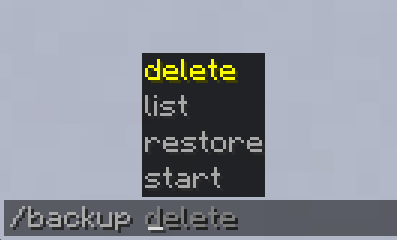
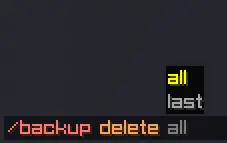
/backup start— create a backup immediately (saves the world before archiving to guarantee data integrity)./backup restore <filename>— restore a world from the specified backup archive (filename autocomplete, optional target world name). After a successful restore, you'll be prompted to exit and re‑enter the world./backup delete last— delete the most recent backup (the filename is shown in chat)./backup delete all— clear the entire backup folder (requires operator privileges)./backup list— list all backups with their size in MB (available to all players).
⚙️ Configuration
Fully integrated with ModMenu and Cloth Config. In the settings menu you can adjust:
- Enable/disable auto‑backup.
- Backup interval in minutes (1–120).
- Backup limit (maximum number of files before old ones are deleted, 5–30).
- Retention days (0–30, 0 = disabled; backups older than this are removed automatically).
- Chat message display.
- ZIP compression level (0 – no compression, 9 – maximum).
- Backup thread priority (1 – low, 10 – high; affects CPU resource distribution).
- Number of compression threads (1 – single‑threaded, up to 8 – parallel file packing for faster backups).
- Wrap in world folder (true/false).
📥 Installation
- Install Fabric Loader.
- Place the required dependencies into the
modsfolder:- Fabric API
- Cloth Config API
- ModMenu (for convenient in‑game configuration)
- Copy the AR1 Backup file into the
modsfolder.
📝 Additional Information
Backups are saved to the .minecraft/backups folder. File names include date and time for easy sorting.
Developed by ar1emq — a member of THEMIDNIGHTCORE.
Available Versions
How to Install AR1 Backup on Your Server
Order Server
Order a Minecraft Java server with at least 3 GB RAM (4 GB recommended).
Set fabric Loader
In the panel under "Egg", select the fabric loader and matching Minecraft version (1.21.11).
Install Mod
Open the mod browser in the dashboard and search for "AR1 Backup". Click "Install" – done! Alternatively, upload the .jar via SFTP to the /mods folder.
Compatibility
Mod Loaders
Minecraft Versions
1.21.11
Server-side
✓ RequiredRecommended RAM
4 GB(min. 3 GB)Frequently Asked Questions
AR1 Backup server crashes on startup – what to do?
Most common cause: wrong fabric version or insufficient RAM. Check the server log (latest.log) for "OutOfMemoryError" or "Mixin" errors. With Mado Hosting: ensure at least 3 GB RAM is allocated and the loader matches the mod version (1.21.11). You can switch loaders with one click in the panel.
Is AR1 Backup compatible with fabric?
AR1 Backup officially supports fabric for Minecraft 1.21.11. The Mado dashboard automatically detects incompatible loader combinations.
Server lagging with AR1 Backup – how to optimize performance?
Recommended RAM: 4 GB (per 8 players). Use /spark profiler to check if AR1 Backup consumes the most tick time. Common fixes: reduce server view-distance to 8-10, install "performant" or "starlight" as supplementary mods on Forge. With Mado Hosting, your server runs on NVMe SSDs with dedicated CPU cores for minimal latency.
Similar Mods


Rent Modded Server
Install AR1 Backup with just one click on your server.