
Arbitrary Alloy
Make any alloy you can imagine.
Screenshots
About this Mod
Introduction
Arbitrary Alloy is a realistic metallurgy mod for Minecraft 1.12.2 Forge. It removes vanilla iron/gold tools, ingots, nuggets, and blocks, replacing them with a composition-based alloy system: mine real-world metal ores, control carbon content through smelting, blend different compositions on a crafting table, and craft tools whose stats are dynamically determined by their metal composition — all while watching them slowly corrode over time.
Core Gameplay
Mine → Smelt (carbon ingot) → Re-smelt (decarburize) → Blend (average) → Craft tool → Corrode
| Stage | Description |
|---|---|
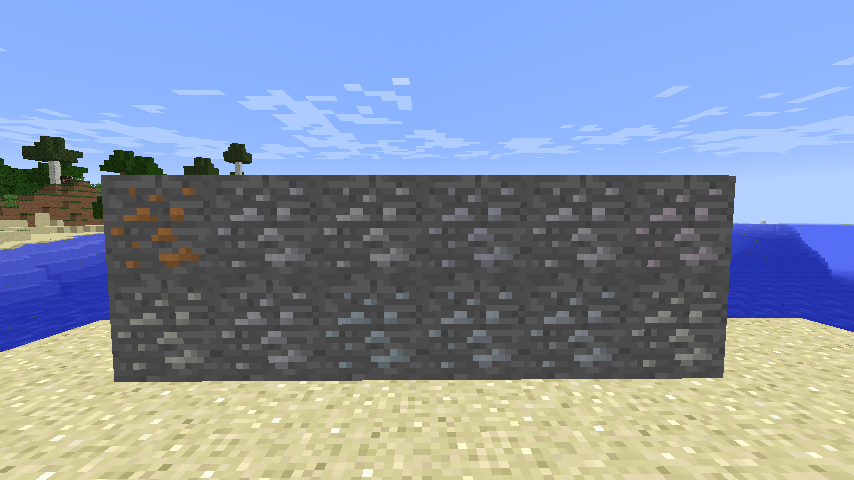
| Mining | 12 real-world metal ores (Cu, Sn, Zn, Pb, Ni, Ag, Al, Mn, Cr, Ti, W, Pt) + vanilla iron/gold ores |
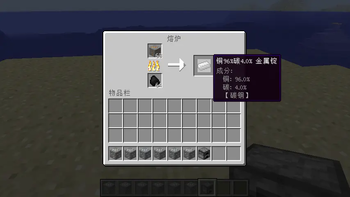
| Smelting | Smelt any metal ore → metal ingot with ~93-97% metal + 3-7% random carbon |
| Decarb | Put a carbon-containing ingot back in the furnace → reduced carbon by 20%-50% (hacks furnace input slot NBT.Therefore, unknown alloy ingots may appear when only one metal ingot is fired.) |
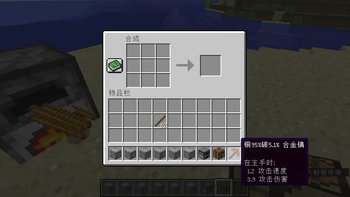
| Blending | 2-4 ingots of any composition in shapeless crafting → same count, averaged composition |
| Tools | 2-3 same-composition ingots + sticks → Sword/Pickaxe/Axe/Shovel/Hoe with dynamic stats |
| Corrosion | Tools lose durability over time; accelerated in water (×2), rain (×1.5), humid biomes (×1.3) |
Removed Vanilla Content
All iron/gold tools, ingots, nuggets, blocks, armor, horse armor, iron doors, and their crafting/furnace recipes.
Configuration
Config file: .minecraft/config/arbitraryalloy.cfg
| Category | Key | Default | Description |
|---|---|---|---|
| Carbon | carbonInitialMin |
0.03 | Minimum carbon from ore smelting |
| Carbon | carbonInitialMax |
0.07 | Maximum carbon from ore smelting |
| Carbon | carbonReductionMin |
0.20 | Minimum carbon reduction per re-smelt |
| Carbon | carbonReductionMax |
0.50 | Maximum carbon reduction per re-smelt |
| Corrosion | corrosionInterval |
1200 | Ticks between corrosion checks (60s) |
| Corrosion | corrosionChance |
0.05 | Base chance of durability loss per check |
| OreGen | oreCountCopper ~ oreCountPlatinum |
varies | Veins per chunk for each ore |
| OreGen | oreVeinSize |
8 | Maximum vein size |
| Tools | baseDurabilityIron |
250 | Base durability |
| Tools | baseSpeedIron |
6.0 | Base mining speed |
| Tools | baseDamageIron |
2.0 | Base attack damage |
| Tools | baseEnchantabilityIron |
14 | Base enchantability |
Available Versions
How to Install Arbitrary Alloy on Your Server
Order Server
Order a Minecraft Java server with at least 3 GB RAM (4 GB recommended).
Set forge Loader
In the panel under "Egg", select the forge loader and matching Minecraft version (1.12.2).
Install Mod
Open the mod browser in the dashboard and search for "Arbitrary Alloy". Click "Install" – done! Alternatively, upload the .jar via SFTP to the /mods folder.
Compatibility
Mod Loaders
Minecraft Versions
1.12.2
Server-side
✓ RequiredRecommended RAM
4 GB(min. 3 GB)Frequently Asked Questions
Arbitrary Alloy server crashes on startup – what to do?
Most common cause: wrong forge version or insufficient RAM. Check the server log (latest.log) for "OutOfMemoryError" or "Mixin" errors. With Mado Hosting: ensure at least 3 GB RAM is allocated and the loader matches the mod version (1.12.2). You can switch loaders with one click in the panel.
Is Arbitrary Alloy compatible with forge?
Arbitrary Alloy officially supports forge for Minecraft 1.12.2. The Mado dashboard automatically detects incompatible loader combinations.
Server lagging with Arbitrary Alloy – how to optimize performance?
Recommended RAM: 4 GB (per 8 players). Use /spark profiler to check if Arbitrary Alloy consumes the most tick time. Common fixes: reduce server view-distance to 8-10, install "performant" or "starlight" as supplementary mods on Forge. With Mado Hosting, your server runs on NVMe SSDs with dedicated CPU cores for minimal latency.
Similar Mods



![[TaCZ] Timeless and Classics Zero](https://cdn.modrinth.com/data/SzzJttH8/fd27766d2bb8390d284696b1dbd358f87e081439_96.webp)


Rent Modded Server
Install Arbitrary Alloy with just one click on your server.